 PluginStats
Wolf has 1,022,516 recorded installs on VS Code Marketplace.
It ranks #532 of 2,501 tracked VS Code Marketplace listings by installs.
It is rated 5.0 out of 5 from 11 ratings.
PluginStats has 4 daily observations since Oct 16, 2026; the latest is from Oct 19, 2026.
Rating: 5.00 / 5 from 11 ratings
About Wolf
Wolf - Live Python editing for VS-Code
Wolf is a VsCode extension that enables visual inspection of live Python code from the editor. It was inspired by Quokka.js: The Rapid Prototyping Playground for JavaScript and TypeScript and my love of programming.
Wolf is Good for:
• Teachers • Students • Kids Who love to Code • API testers • Code Streamers • Planet Earth
Wolf Feature Overview
Other features
Check out variables inline
Works inside functions
And nested objects
Works with loops
and recursion
Highlights errors
Works with http requests
NOTE: Please see FAQ section "Will APIs Hate Me?" before making requests with Wolf.
Comment Macros
Relative imports and paths all just work!
What people are saying about Wolf
• Very impressive work! ~ Quokka.js • What the hell does it do? ~ My Wife
Requirements
• Visual Studio Code • Python 3.5 - 3.8 (tested on 3.5, 3.6, and 3.8)
Extension Settings
This extension contributes the following settings:
• wolf.barkAtCurrentFile: Starts Wolf on the current file. • wolf.stopBarking: Stops all running Wolf sessions. • wolf.pawPrintsInGutter: Use paw prints for gutter icons. • wolf.maxLineLength: The maximum length of line decorations. Lines longer than this are truncated (ex: 97, 98, 99, ... ) • wolf.printLoggingEnabled: Enable Wolf console output (ie: the vscode terminal "output" section) • wolf.updateFrequency: Adjust the minimum timeframe before the file is saved during Hot Mode
FAQ
Can I have the text annotations in cornflower blue?
Abso-fucking-lutely.
I don't see any annotations
Make sure to save the file you're working on, and that Wolf is activated. You can try stopping and starting Wolf again on the file to see if this helps.
The annotations are everywhere
Sorry, it's a feature for now. Try stopping and starting Wolf from the command menu to clear the pesky buggers.
Can my script have relative imports?
Yes. Sorry, I mean, HELL YES!
Will APIs Hate Me?
That depends. If you code reponsibly and use something like diskcache or redis to cache your calls, then you'll do just fine out there. But if you decide to just bang away at some API without some other sort of caching in place, then it's on you my friend. Having said that, Wolf will only actually run your code _on document save_. So you do get a small amount of throttling by default.
Here's an example using diskcache:
Wolf is stupid.. PDB is better
\*Cue Jingle
Honestly, if you need a real debugger, the one builtin to VSCode is about as good as it gets. So really, please use that (or pdb, ipdb) if you're in need of stuff like breakpoints (or if lives depend on it, ie please don't use this to debug something like a drug pump ffs, ty).
I see Wolf as more of an exploration tool, for teachers or students in a learning environment, and definitely for streamers. You can't get any better than _live feedback next to the code you're editing_!
Known Bugs/Issues
The 1 + 334 #? 335 example from above doesn't work in Python 3.8
It's possible the tracer just passes over non-binding expressions but it could also be a bug.. I'm not really sure ATM but there's a unit test so I'll know if it regresses.
It doesn't work inside UnitTests
I know :( Not really sure how to fix this one yet but I'll get to it someday.
Changelog
v0.4.3 ~ Patch
Flashing Bug Fixed
Wolf annotations no longer stutter/flash when editing files. Makes for a much smoother coding experience.
See #46 comment about "flashing on updates"
Other Changes:
• Reduced extension size ala webpack bundling. • Code cleanup and removal of unused APIs.
v0.4.2 ~ hotfix
Fixes a regression of issue #54 on some systems.
v0.4.1 ~ Patch
Fixed issues 52 and 53 on GitHub and added test cases for each (Fixes contributed by @Almenon)
v0.4.0 ~ Minor Release
Run extension on unsaved files
This was a limitation of the previous versions of Wolf and is a really nice QOL feature when coding on the fly.
More Extensive Tests
Using github-actions Wolf is now tested against windows, macos, and windows, for Python versions 3.5, 3.6, and 3.8. This caught more than a few bugs that should make it easier for new users to get running with Wolf faster.
Updated Dependencies
Now using the latest vscode extension APIs and Python 3rd party deps.
Bug Fixes
Fixed issues 28, 29, 30, and 34 on GitHub. Fixed some cross compatibility issues with Python v3.6, and v3.8.
v0.3.10 ~ Patch
Fixed hunter installation and added setting for python path (Fixes contributed by @Almenon). This should fix any remaining 'Hunter not found' errors. The Python Path setting makes it easy to point your Wolf session at another Python installation if you don't want to have to install Hunter into your working env.
v0.3.0 ~ Minor Release
No Config Setup
Wolf works in what was once called "Hot Mode" by default now. This means your live editing experience will be tuned for performance out of the box, with updating annotations on the fly.
NOTE: With these changes the following config options have been removed or changed:
Removed Options:
• wolf.hot: For enabling live re-loading. (Always on now)
Changed Options:
• wolf.hotFrequency -> wolf.updateFrequency
v0.2.0 ~ Minor Release
Hot Reloading
Turn on Hot Mode to enable live reloading of code as you work. You can set the minimum frequency from the user settings if you want more control over when your file is saved/run.
_Turn on Live Reloading:_
"wolf.hot": true
Adjust minimum time between saves (throttle control) in milliseconds:
"wolf.hotFrequency": 270
Note: Frequency setting is clamped between 100 and 1000 millisecends
Macros are Back!!!
A comment macro is any single line comment character (pound/hash symbol) followed by a question mark. See the examples above to get a better idea of how they work, and check out the macro syntax rules below.
Syntax:
some.expression() #? <----Comment Macro a = [i for i in some_list] # ? <----Space allowed…
Description from the VS Code Marketplace listing.
- python
Where Wolf sits in the listing
Each band is one page of 20. Installs on a log scale. Placement is projected from installs, so it can differ from the marketplace's own sort order. Hover a dot to see the listing.


Charts
Images: 30d · 1y · all time · 1600×900 dark


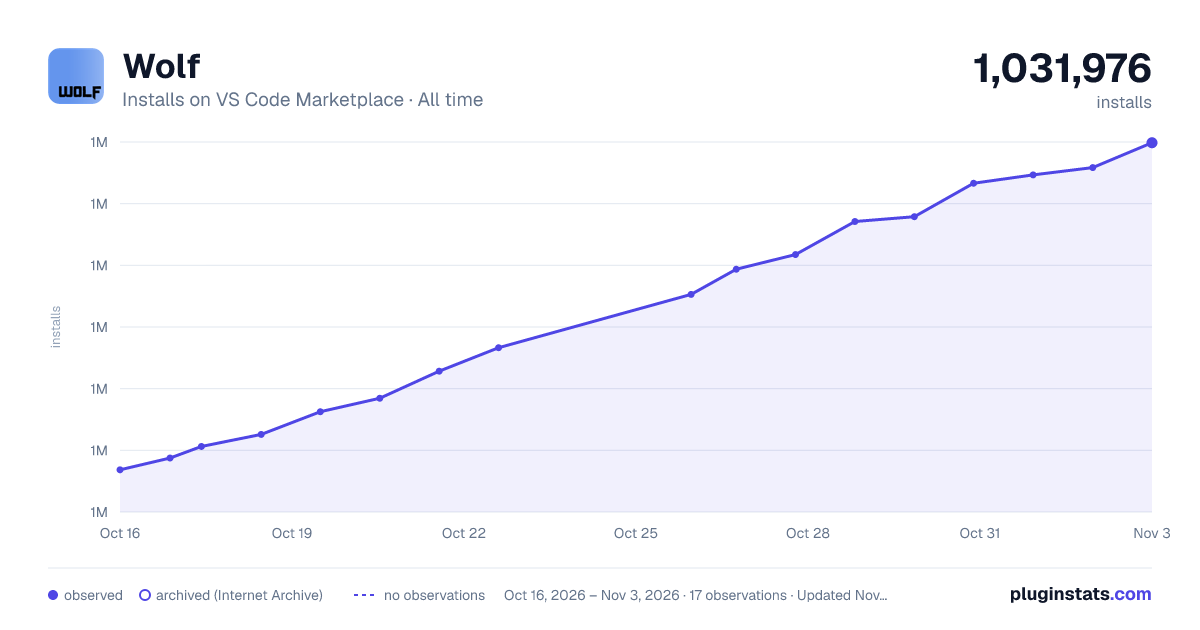

Adoption over time


7/30/90-day growth


Filled points are observed values; hollow points come from Internet Archive snapshots of the listing page. Dashed segments span periods with no observations — values between points are not interpolated.
Recent observations
Full history (4)Similar VS Code Marketplace Debuggers plugins
Data source
Install counts, average rating, and rating counts come from the public Visual Studio Marketplace gallery API. Installs are cumulative and exclude updates.
Listing: https://marketplace.visualstudio.com/items?itemName=traBpUkciP.wolf. First seen Oct 16, 2026; last successful collection Oct 19, 2026. See the methodology.