 PluginStats
Project Dashboard installs statistics
By Kruemelkatze · VS Code Marketplace · Other
Organize your workspaces in a speed-dial manner.
Project Dashboard has 98,656 recorded installs on VS Code Marketplace, ranking #2384 of 2,501 tracked listings.
Rating: 4.73 / 5 from 37 ratings
About Project Dashboard
VSCode Project Dashboard
VSCode Project Dashboard is a Visual Studio Code extension that lets you organize your projects in a speed-dial like manner. Pin your frequently visited folders, files, and SSH remotes onto a dashboard to access them quickly.

<img width="200" alt="Screenshot 2" src="https://github.com/Kruemelkatze/vscode-dashboard/raw/HEAD/screenshot2.png"> <img width="200" alt="Screenshot 3" src="https://github.com/Kruemelkatze/vscode-dashboard/raw/HEAD/screenshot3.png"> <img width="200" alt="Screenshot 4" src="https://github.com/Kruemelkatze/vscode-dashboard/raw/HEAD/screenshot4.png">
Usage
The dashboard is a dedicated UI that can be opened using a command or ctrl + F1 and configured to open automatically. Clicking a project opens it in the current window, while ctrl + click (cmd + click on Mac) opens it in a new window.
Projects are separated into groups and can be assigned a color to find them quickly. Managing the groups and projects is done directly on the dashboard.
Good to know
- You can edit and reorder projects and groups directly on the dashboard.
- Emojis may (or may not, depending on your preference) be good icons for projects. You can add them by pressing WIN + . (under Windows) while naming the project.
- You can use gradients as project color, via CSS Gradient functions like linear-gradient and radial-gradient.
- Only colors defined by the theme were used. So the dashboard should always blend nicely into your VSCode design. If not, you can customize them in the settings.
- The extension automatically detects if a project is a Git repository. If so, this is indicated by an icon.
- The filter option can be toggled by ctrl + f or disabled via settings.
Configuration
The dashboard can be configured and customized using the VSCode configuration:
- Projects are stored in the globalState by default (saved on the machine) but can be set to be saved in the settings (to be synced via Settings Sync) instead. Note that by doing so, you remove the possibility of having different dashboards on your synced devices.
- Startup behavior (open always, on empty editor, or never)
- Placement of '+' buttons
- Visibility of project path
- Project tile size
- Filter option's default visibility
- Colors (see below)
By default, the dashboard uses only colors defined by the theme, which was tested against all default themes. If you use a custom theme and see the dashboard's colors unfit, you can change them in the settings (Settings > Dashboard). Following settings can be changed to any CSS color (name, hex, rgba, hsl, var) or left empty (for default):
- Project Card Background
- Project Name Color
- Project Path Color
Changelog
Acknowledgements
- Special thanks to Font Awesome (License) for the icons used in the dashboard.
- The color names are generated using the Name that Color library.
Description from the VS Code Marketplace listing.
- keybindings
README badge
Show your rank in a README or on your website. The badge updates automatically.
Charts
Images: 30d · 1y · all time · 1600×900 dark


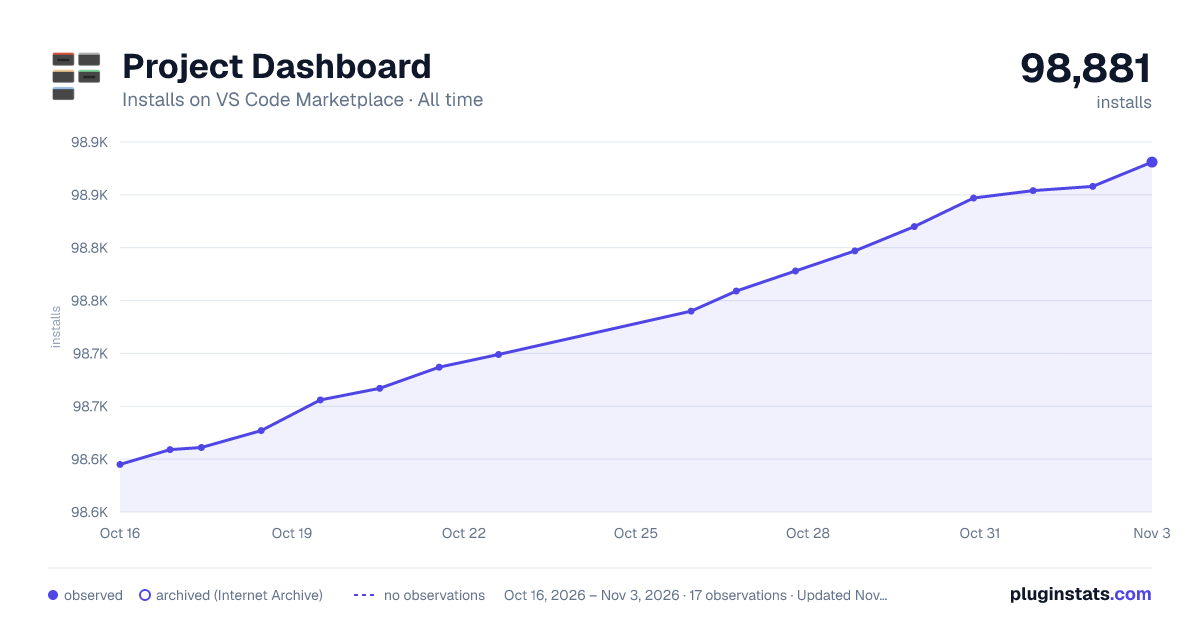

Adoption over time
7/30/90-day growth
Ranking history
Ratings over time
Listing placement
Listing placement
Filled points are observed values; hollow points come from Internet Archive snapshots of the listing page. Dashed segments span periods with no observations — values between points are not interpolated.
Each band is one page of 20. Installs on a linear scale. Placement is projected from installs, so it can differ from the marketplace's own sort order. Hover a dot to see the listing.
Recent observations
Full history (5)Similar VS Code Marketplace Other plugins
All 20 Project Dashboard alternativesData source
Install counts, average rating, and rating counts come from the public Visual Studio Marketplace gallery API. Installs are cumulative and exclude updates.
Listing: https://marketplace.visualstudio.com/items?itemName=kruemelkatze.vscode-dashboard. First seen Oct 16, 2026; last successful collection Oct 20, 2026. See the methodology.