 PluginStats
Perforce for VS Code installs statistics
By mjcrouch · VS Code Marketplace · SCM Providers
(2020 Fork) Perforce integration with VS Code's SCM features
Perforce for VS Code has 164,279 recorded installs on VS Code Marketplace, ranking #1757 of 2,501 tracked listings.
Rating: 5.00 / 5 from 14 ratings
About Perforce for VS Code
vscode-perforce
Perforce integration for Visual Studio Code - Now with more features and fixes!
This is a fork of the slevesque.perforce extension, published in 2020, as the original creator now appears to be inactive on GitHub.
If you install this extension, please uninstall or disable slevesque.perforce to prevent issues with duplicate icons and failed commands.
If you are installing for the first time, Proceed to the setup section for setup instructions.
If you have a working setup from the old extension, it will almost certainly continue to work - There are some unlikely (but possible) breaking changes. If for any reason your setup stops working after switching over, please check the migration guide for more help.
What's included?
All the features you've come to expect
Built on the foundation of the most installed perforce extension on the market, it has all the core features you already know
Login & go
If your perforce server requires a password, you can log in from within VS Code
 Theme: Night Owl - Font: JetBrains Mono
Integration with VS Code's SCM View
- Create and manage your open changelists from the built in SCM View
- Submit and revert changelists
- Shelve and unshelve files
- Move files between changelists
- Click on an open file to see the diff

Run common perforce operations on the open file
Click on the 'p4' in the status bar to perform an operation
add- Open a new file to add it to the depotedit- Open an existing file for editrevert- Discard changes from an opened filediff- Display diff of client file with depot filediff revision- Display diff of client file with depot file at a specific revisionlogin,logout- Login operations- ... and more!

Automatically open files for add and edit as you work
- Enable the settings
perforce.editOnFileSave,perforce.addOnFileCreateandperforce.deleteOnFileDeleteto automatically perform depot operations without that pesky warning dialog
Diff files in the editor
- Diff the open file against the workspace file
- Diff against any revision of a file
- See diffs as you work with gutter decorations

What's new in the fork?
The fork has a variety of new features to help you manage your changes and understand your code history, reducing the time spent switching back and forth to p4v or the command line.
We've borrowed ideas from popular extensions like GitLens and... okay, mainly just GitLens, adapting them for the perforce workflow.
And there's still lots of features yet to be implemented, to improve your development experience without getting in the way.
Improved annotation view
See more context about each line, including the author and the changelist description.

The format of the annotations is customisable in the extension configuration if this is too much information.
New revision & changelist quick pick
Looking at a diff or annotation? Dive in to the depot with a single click to see some context:
- Browse through revisions and file history
- See integrations into and from the file
- See other files in the same changelist
- Using swarm for reviews? click through to the swarm review
- ... more :)
To open this view, ensure you have a depot revision open (if you are diffing against a local file, click the left hand editor to select the depot revision), then click on the 'commit' icon on the editor title bar:

Or, from an annotated file, hover over an annotation and click the three dots (...) or the changelist number in the message that pops up
Ideas for improvement? Post feedback here
Changelist Search
Search for changelists from the SCM view, using the standard set of perforce filters:

Enter the set of filters and click "Search Now" to see or update results. Use auto search to automatically update results when you change the filters
All views can now be dragged to other locations in VS Code - so this can be placed anywhere you like
Ideas for improvement? Post feedback here
Improved diff behaviour
- Diffs against the have revision, not the latest revision
- This includes the gutter decorations - so you'll have an accurate view of what you've actually changed
- But you can still manually select a newer revision for a diff if needed
- Click through revisions using the left and right arrows
- Diff a shelved file against its depot revision, or the current workspace file
- Automatically diffs a moved file against the original file
Much more!
Internally, almost every feature has been refactored, rewritten or touched in some way
This fork fixes many issues from the original extension and adds a variety of other new features. A few more examples:…
Description from the VS Code Marketplace listing.
- keybindings
- multi-root ready
- perforce
- scm
- vscode
README badge
Show your rank in a README or on your website. The badge updates automatically.
Charts
Images: 30d · 1y · all time · 1600×900 dark


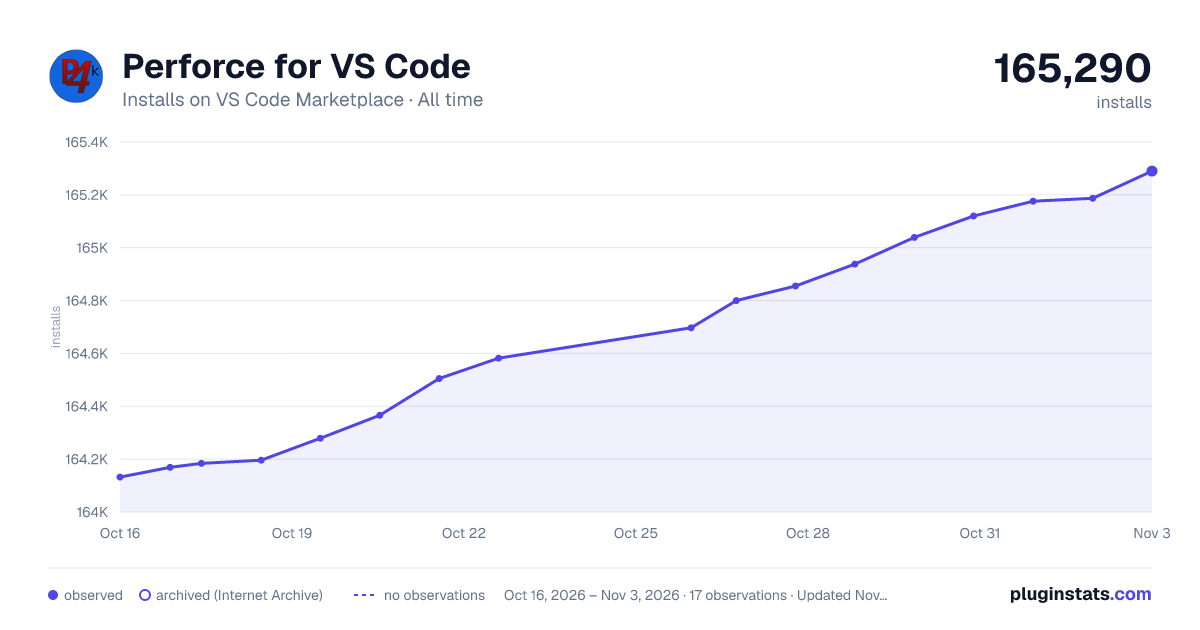

Adoption over time
7/30/90-day growth
Ranking history
Ratings over time
Listing placement
Listing placement
Filled points are observed values; hollow points come from Internet Archive snapshots of the listing page. Dashed segments span periods with no observations — values between points are not interpolated.
Each band is one page of 20. Installs on a linear scale. Placement is projected from installs, so it can differ from the marketplace's own sort order. Hover a dot to see the listing.
Recent observations
Full history (5)Similar VS Code Marketplace SCM Providers plugins
All 20 Perforce for VS Code alternativesData source
Install counts, average rating, and rating counts come from the public Visual Studio Marketplace gallery API. Installs are cumulative and exclude updates.
Listing: https://marketplace.visualstudio.com/items?itemName=mjcrouch.perforce. First seen Oct 16, 2026; last successful collection Oct 20, 2026. See the methodology.