 PluginStats
ExtendScript Debugger installs statistics
By Adobe (18 listings) · VS Code Marketplace · Debuggers
Enables debugging ExtendScript-based extensions in Adobe’s applications that support ExtendScript extensions.
ExtendScript Debugger has 150,183 recorded installs on VS Code Marketplace.
It ranks #1855 of 2,501 tracked VS Code Marketplace listings by installs.
It is rated 3.3 out of 5 from 53 ratings.
PluginStats has 4 daily observations since Oct 16, 2026; the latest is from Oct 19, 2026.
Rating: 3.25 / 5 from 53 ratings
About ExtendScript Debugger
ExtendScript Debugger Extension for VS Code
A VS Code Extension that enables debugging ExtendScript scripts and extensions in Adobe’s ExtendScript-enabled applications.
Supported features
• Breakpoints • Conditional Breakpoints • Expression Condition • Hit Count • Exception Breakpoints • Caught Exceptions ¹ • Logpoints • Variables View • Local and Global Scope • Modify variables • Watch View • Call Stack View • Debug Actions • Continue / Pause • Step Over • Step Into • Step Out • Restart • Disconnect / Stop • Debug Console • Expression Evaluation • Expression Evaluation of Code on Hover ² • Script Evaluation and Halting • Export ExtendScript to JSXBin
¹ _Changes to the Caught Exceptions setting while a script is running or stopped at a breakpoint will only apply to scopes created after the setting is changed._ ² _Requires active debug session._
Unsupported Features
• Profiling Support • Object Model Viewer (OMV) ¹ • Auto-Completion • Scripts Panel
¹ _The extension supports retrieving raw OMV Dictionary data via the Get OMV Dictionary... command._
Getting Started
Installation
Install the extension through the usual means.
The extension requires VS Code v1.62 or newer.
Migration from V1 Versions
The ExtendScript Debugger V2 is a complete rewrite of the V1 version. The internals received a complete overhaul that substantially increased stability, performance, flexibility, and improved compatibility with native VS Code features. As a result of this overhaul, the launch configuration properties have changed. The following is a table of properties that have been renamed:
| V1 | V2 |
| targetSpecifier | hostAppSpecifier | | program | script | | excludes | hiddenTypes |
The engineName and debugLevel properties remain unchanged. All other V1 properties have been removed and will be ignored. Please see the Advanced Configuration section for a full listing of configuration properties available in V2.
Additionally, the manner in which the extension operates has changed _dramatically_. It is highly recommended that you read the following section as it provides an overview of how to use this extension with three common use cases.
Using the Debugger
This extension was designed to support a wide variety of use cases. Three common use cases are outlined below to provide guidance on how certain features may be used.
Running a Script
The extension supports running (evaluating) a script in a host application without an active debug session. This functionality may be triggered via the Evaluate Script in Host... command or by clicking the _Eval in Adobe..._ button.
Debugging a Script
The most direct way to debug a script in the extension is to start a debug session configured with a launch request type. Such a debug session will connect to the specified host engine, inform it that the debugger is active, and then trigger the script evaluation. Any breakpoints or uncaught exceptions will cause VS Code to show the debug state and enable interacting with the host application. Once the script evaluation is complete, the debug session will clean itself up and shut down.
Debugging Event Callbacks
Debugging ExtendScript triggered via a callback (e.g. with ScriptUI or CEP) requires that the debugger be connected when that script is run. A launch debug session is only active when the originating script is processed by the host application and will therefore miss debug messages from the host application in these circumstances.
To debug ExtendScript triggered by callbacks, start a debug session configured with an attach request type. Such a debug session will connect to the specified host engine, inform it that the debugger is active, and then wait for debug messages from the connected engine. Any breakpoints or uncaught exceptions encountered by the host engine while your attach debug session is active will cause VS Code to show the debug state and enable interacting with the host application. This debug session will remain active until explicitly disconnected or stopped.
Additional notes:
• Scripts may also be evaluated while an attach debug session is active. • CEP environments in particular may benefit from a compound launch configuration to debug both scripting environments simultaneously. • If your scripts are loaded into an application through a symbolic link (most commonly seen in CEP workflows), the aliasPath configuration property may be required to enable debugging features.
Debugger Configuration
The ExtendScript Debugger is capable of debugging with and without a standard launch configuration.
Zero Configuration
If you have not yet defined a launch.json file in your project, the Run and Debug view will show the "Run and Debug" button. If you click this button while a file recognized as "JavaScript" (.js) or "JavaScript React" (.jsx) is the active file in VS Code, you will be given the option to select "ExtendScript" in the list of debugger options in the dropdown.
When you select "ExtendScript", you will be asked to select a Debugging Mode. Once you have made your choice, simply select your target host application and, if applicable, the target engine and the debug session will start.
Launch Configuration
Setting up a launch configuration allows you to simplify and customize the process of starting a debug session. To start, please follow the standard steps to initialize a launch configuration.
When you add a new ExtendScript configuration to your launch.json, it will contain only the minimum settings required to start debugging. Shown below is the default attach request configuration:…
Description from the VS Code Marketplace listing.
- creative cloud
- debugger
- debuggers
- esdebug
- estk
- extendscript
- javascript
- javascriptreact
- keybindings
Charts
Images: 30d · 1y · all time · 1600×900 dark


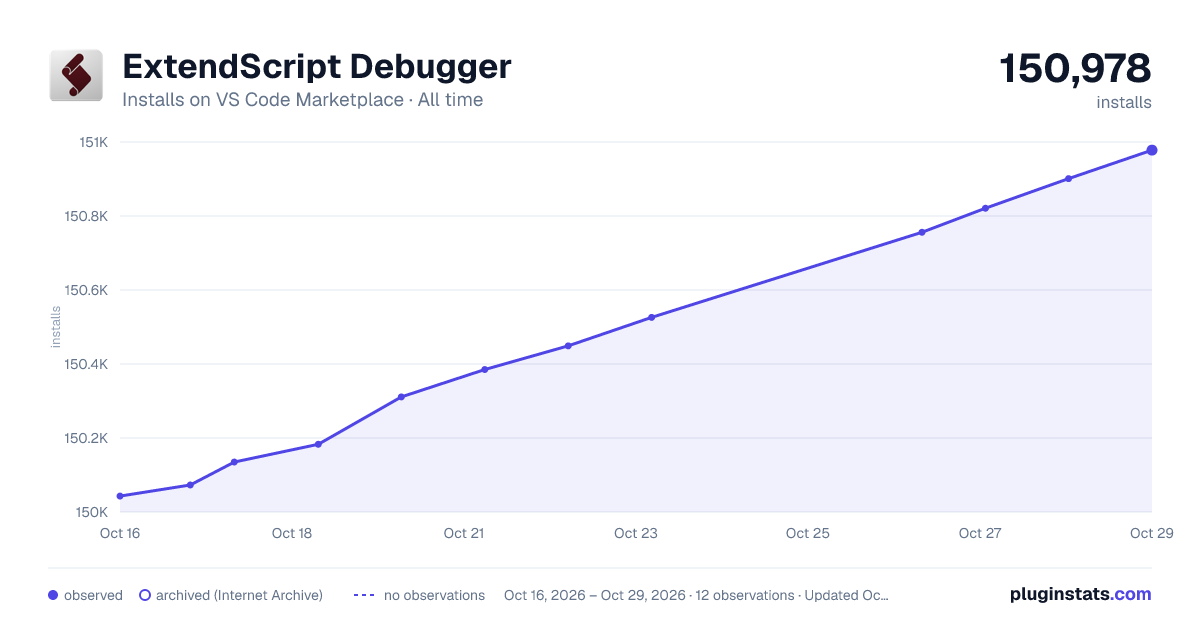

Adoption over time


7/30/90-day growth


Ranking history


Ratings over time


Listing placement


Filled points are observed values; hollow points come from Internet Archive snapshots of the listing page. Dashed segments span periods with no observations — values between points are not interpolated.
Each band is one page of 20. Installs on a log scale. Placement is projected from installs, so it can differ from the marketplace's own sort order. Hover a dot to see the listing.
Recent observations
Full history (4)Similar VS Code Marketplace Debuggers plugins
All 20 ExtendScript Debugger alternativesData source
Install counts, average rating, and rating counts come from the public Visual Studio Marketplace gallery API. Installs are cumulative and exclude updates.
Listing: https://marketplace.visualstudio.com/items?itemName=Adobe.extendscript-debug. First seen Oct 16, 2026; last successful collection Oct 19, 2026. See the methodology.