 PluginStats
ChatGPT Copilot installs statistics
By Pengfei Ni · VS Code Marketplace · Programming Languages
An VS Code ChatGPT Copilot Extension
ChatGPT Copilot has 339,859 recorded installs on VS Code Marketplace, ranking #1071 of 2,501 tracked listings.
Rating: 3.40 / 5 from 5 ratings
About ChatGPT Copilot
An VS Code ChatGPT Copilot Extension
The Most Loved Open-Source ChatGPT Extension for VS Code
ChatGPT Copilot is a powerful and telemetry-free extension for Visual Studio Code, bringing the capabilities of ChatGPT directly into your coding environment.
Features
• 🤖 Supports GPT-5, o1/o3, Claude, Gemini, Ollama, Claude Code, Github Copilot and other OpenAI-compatible local models with your API key from OpenAI, Azure OpenAI Service, Google, Anthropic or other providers. • 💥 Model Context Protocol (MCP) to bring your own tools for best AI responses. • 📂 Chat with your Files: Add multiple files and images to your chat using @ for seamless collaboration. • 📃 Streaming Answers: Receive real-time responses to your prompts in the sidebar conversation window. • 📖 Prompt Manager: Chat with your own prompts (use # to search). • 🔥 Tool calls via prompt parsing for models that don't support native tool calling. • 📝 Code Assistance: Create files or fix your code with one click or keyboard shortcuts. • ➡️ Export Conversations: Export all your conversation history at once in Markdown format. • 📰 Custom Prompt Prefixes: Customize what you are asking ChatGPT with ad-hoc prompt prefixes. • 💻 Seamless Code Integration: Copy, insert, or create new files directly from ChatGPT's code suggestions. • ➕ Editable Prompts: Edit and resend previous prompts. • 🛡️ Telemetry Free: No usage data is collected.
Recent Release Highlights
• v4.10: Add Claude Code provider. • v4.9: Add prompt based tool calls for models that don't support native tool calling. • v4.8: New LOGO and new models. • v4.7: Added Model Context Protocol (MCP) integration. • v4.6: Added prompt manager, Github Copilot provider and chat with files.
Installation
• Install the extension from the Visual Studio Marketplace or search ChatGPT Copilot in VScode Extensions and click install. • Reload Visual Studio Code after installation.
Supported Models & Providers
AI Providers
The extension supports major AI providers with hundreds of models:
| Provider | Models | Special Features |
| OpenAI | GPT-5, GPT-4o, GPT-4, o1, o3, o4-mini | Reasoning models, function calling | | Anthropic | Claude Sonnet 4, Claude 3.5 Sonnet, Claude Opus 4 | Advanced reasoning, large context | | Google | Gemini 2.5 Pro, Gemini 2.0 Flash, Gemini Pro | Search grounding, multimodal | | GitHub Copilot | GPT-4o, Claude Sonnet 4, o3-mini, Gemini 2.5 Pro | Built-in VS Code authentication | | Claude Code | CLaude Sonnet/Opus 4 | Vibe coding in SOLO mode | | DeepSeek | DeepSeek R1, DeepSeek Reasoner | Advanced reasoning capabilities | | Azure OpenAI | GPT-4o, GPT-4, o1 | Enterprise-grade security | | Azure AI | Various non-OpenAI models | Microsoft's AI model hub | | Ollama | Llama, Qwen, CodeLlama, Mistral | Local model execution | | Groq | Llama, Mixtral, Gemma | Ultra-fast inference | | Perplexity | Llama, Mistral models | Web-enhanced responses | | xAI | Grok models | Real-time information | | Mistral | Mistral Large, Codestral | Code-specialized models | | Together | Various open-source models | Community models | | OpenRouter | 200+ models | Access to multiple providers |
AI Services
Configure the extension by setting your API keys and preferences in the settings.
| Configuration | Description |
| API Key | Required, get from OpenAI, Azure OpenAI, Anthropic or other AI services | | API Base URL | Optional, default to "" | | Model | Optional, default to "gpt-4o" |
Refer to the following sections for more details on configuring various AI services.
OpenAI
Special notes for ChatGPT users: OpenAI API is billed separately from ChatGPT App. You need to add credits to your OpenAI for API usage here. Once you add credits to your API, create a new api key and it should work.
| Configuration | Example |
| API Key | your-api-key | | Model | gpt-4o | | API Base URL | (Optional) |
Ollama
Pull your image first from Ollama library and then setup the base URL and custom model.
| Configuration | Example |
| Provider | Ollama | | API Key | ollama (Optional) | | Model | custom | | Custom Model | qwen2.5 | | API Base URL | |
Note that should be used if you're using OpenAI provider or Auto provider (default is using OpenAI-compatible API).
DeepSeek
Ollama provider:
| Configuration | Example |
| Provider | Ollama | | API Key | ollama (Optional) | | Model | custom | | Custom Model | deepseek-r1 | | API Base URL | |
Note that should be used if you're using OpenAI provider or Auto provider (default is using OpenAI-compatible API).
DeepSeek provider:
| Configuration | Example |
| API Key | your-deepseek-key | | Model | deepseek-reasoner | | API Base URL | |
SiliconFlow (SiliconCloud) provider:
| Configuration | Example |
| API Key | your-siliconflow-key | | Model | custom | | Custom Model | deepseek-ai/DeepSeek-R1 | | API Base URL | |
Azure AI Foundry provider:
| Configuration | Example |
| API Key | your-azure-ai-key | | Model | DeepSeek-R1 | | API Base URL | https://[endpoint-name].[region].models.ai.azure.com |
Claude Code
| Configuration | Example |
| Provider | ClaudeCode. | | Claude Code Path | /opt/homebrew/bin/claude | | Model | claude-sonnet-4-20250514 |
OAuth Providers (Subscription-Based)
In addition to API key providers, the extension supports OAuth authentication for subscription-based access:
Gemini (Google OAuth)
Use your Google account with a Gemini subscription. No API key required.
| Configuration | Example |
| Provider | Gemini | | Model | gemini-2.5-pro, gemini-2.5-flash |
Setup:
- Run command: ChatGPT: Login with Gemini OAuth 2. Complete Google authentication in browser 3. Select Gemini as provider
Claude (Anthropic OAuth)
Use your Anthropic account with a Claude Pro/Max subscription. No API key required.
| Configuration | Example |
| Provider | Claude | | Model | claude-sonnet-4, claude-opus-4 |
Setup:…
Description from the VS Code Marketplace listing.
- agent
- ai
- chatgpt
- Claude
- copilot
- find bugs
- Gemini
- gpt
- gpt4
- keybindings
- Llama
- llm
- Ollama
- openai
- testing
README badge
Show your rank in a README or on your website. The badge updates automatically.
Charts
Images: 30d · 1y · all time · 1600×900 dark


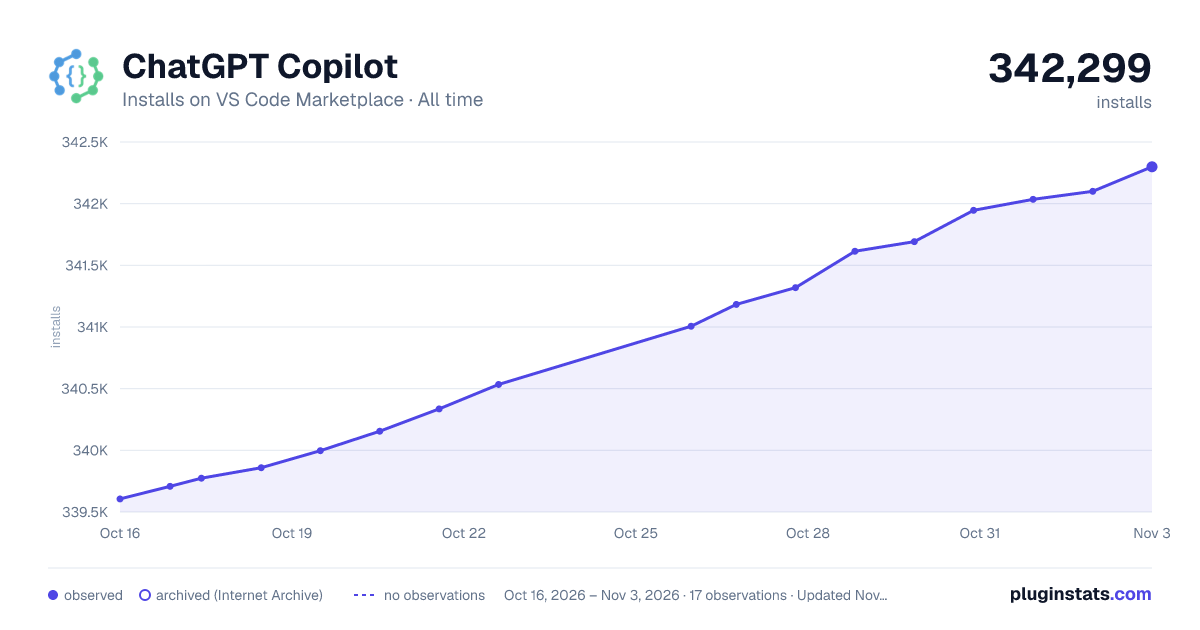

Adoption over time
7/30/90-day growth
Ranking history
Ratings over time
Listing placement
Listing placement
Listing placement
Listing placement
Filled points are observed values; hollow points come from Internet Archive snapshots of the listing page. Dashed segments span periods with no observations — values between points are not interpolated.
Each band is one page of 20. Installs on a linear scale. Placement is projected from installs, so it can differ from the marketplace's own sort order. Hover a dot to see the listing.
Recent observations
Full history (4)Similar VS Code Marketplace Programming Languages plugins
All 20 ChatGPT Copilot alternativesData source
Install counts, average rating, and rating counts come from the public Visual Studio Marketplace gallery API. Installs are cumulative and exclude updates.
Listing: https://marketplace.visualstudio.com/items?itemName=feiskyer.chatgpt-copilot. First seen Oct 16, 2026; last successful collection Oct 19, 2026. See the methodology.