 PluginStats
.NET Auto Attach installs statistics
By Dennis Jung · VS Code Marketplace · Programming Languages
Automatically attach the debugger to a dotnet process started with dotnet-watch.
.NET Auto Attach has 116,364 recorded installs on VS Code Marketplace, ranking #2172 of 2,501 tracked listings.
Rating: 3.67 / 5 from 3 ratings
About .NET Auto Attach
The ".NET Auto Attach" extension is created to enable a seamless debugging experience when working with dotnet-watch. While dotnet-watch will rebuild and launch your application every time you change and store a file, you have to manually restart the debugger each time.
This is where ".NET Auto Attach" comes in and shines. After dotnet-watch restarts your application, it will attach the debugger to enable a seamless debugging experience while changing files on the fly.
Features
Attach debugger if dotnet-watch reloads
<p align="center"> <img src="https://gitlab.com/dennismaxjung/vscode-dotnet-auto-attach/raw/master/images/watch-reload.gif" alt="Reload and Attach" width="550"><br/> </p>Solutions and Workspaces with multiple projects
The extension supports solutions and workspaces with multi projects by letting you chose which project the auto-attacher should target.
<p align="center"> <img src="https://gitlab.com/dennismaxjung/vscode-dotnet-auto-attach/raw/master/images/multi-project.png" alt="Multiproject Support" width="550"><br/> </p>Disconnection detection
The extension notices when a project is no longer debugged and offers to re-attache if desired.
<p align="center"> <img src="https://gitlab.com/dennismaxjung/vscode-dotnet-auto-attach/raw/master/images/disconnect.png" alt="Disconnect detected" width="550"><br/> </p>Requirements
- C# - C# for Visual Studio Code (powered by OmniSharp).
Getting Started
- Install the extension
- Restart VS Code and open the folder containing the project you want to work on.
Using the debugger
When your ".NET: Auto Attach Debug (dotnet-watch)" launch config is set up, you can debug your project. Pick the launch config from the dropdown on the Debug pane in Code. Press the play button or F5 to start.
Configuration
The extension currently operates in only one mode - it can launch your project you want to debug with dotnet-watch.
Just like when using the normal C# debugger, you configure the mode with a .vscode/launch.json file in the root directory of your project. You can create this file manually, or Code will create one for you if you try to run your project and it doesn't exist yet.
Sample launch config
    {
      "type": "DotNetAutoAttach",
      "request": "launch",
      "name": ".NET Core Watch",
      "args": [

      ],
      "env": {
        "ASPNETCORE_ENVIRONMENT": "Development"
      }
    },
Sample launch config for a specific project
The extension will normaly ask you which project should get launched when your workspace contains multiple projects. However, you can pre-set which project should get launched.
    {
      "type": "DotNetAutoAttach",
      "request": "launch",
      "name": ".NET Core Watch: dotnet-test.console",
      "project": "dotnet-test.console.csproj",
      "args": [

      ],
      "env": {
        "ASPNETCORE_ENVIRONMENT": "Development"
      }
    },
Release Notes & Known Issues
See the CHANGELOG.md for the details of changes for each version and known issues.
Built With
- typescript-collections - It is a complete, fully tested data structure library written in TypeScript.
Contributing
Please read CONTRIBUTING.md for details on our code of conduct, and the process for submitting pull requests to us.
Versioning
We use SemVer for versioning. For the versions available, see the tags on this repository.
Authors
- Dennis Jung - Initial work - dennismaxjung dennismaxjung
- Konrad Müller - Initial work - krdmllr
See also the list of contributors who participated in this project. Or the list of members.
License
This project is licensed under the MIT License - see the LICENSE.md file for details.
Description from the VS Code Marketplace listing.
- C#
- csharp
- debuggers
- dotnet watch
- multi-root ready
README badge
Show your rank in a README or on your website. The badge updates automatically.
Charts
Images: 30d · 1y · all time · 1600×900 dark


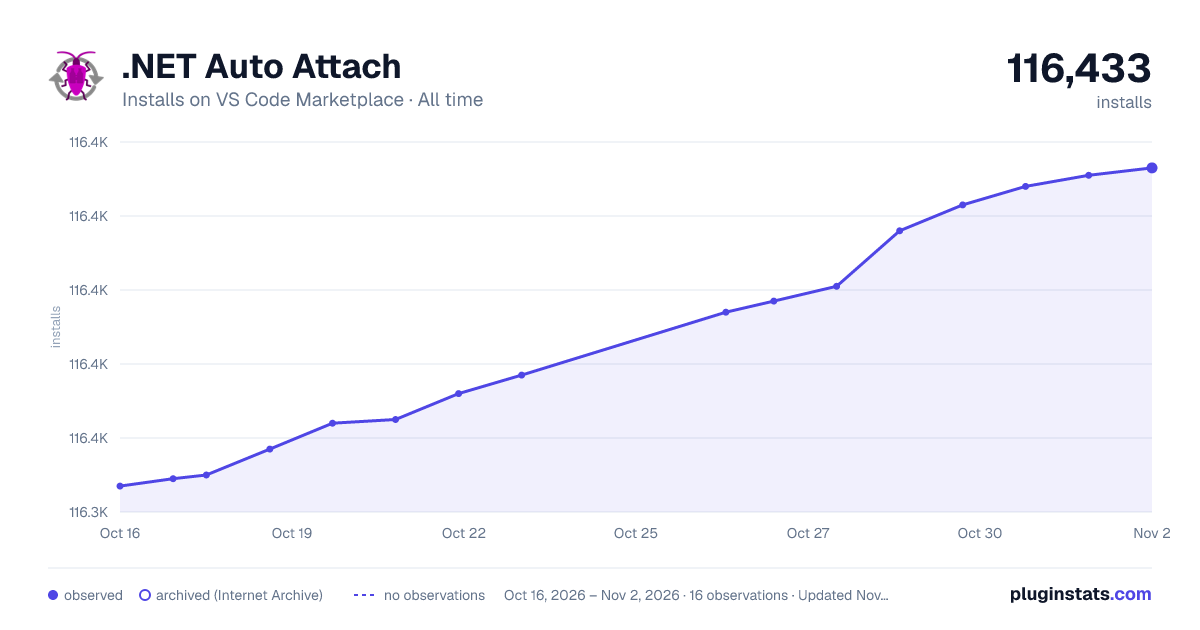

Adoption over time
7/30/90-day growth
Ranking history
Ratings over time
Listing placement
Listing placement
Listing placement
Filled points are observed values; hollow points come from Internet Archive snapshots of the listing page. Dashed segments span periods with no observations — values between points are not interpolated.
Each band is one page of 20. Installs on a linear scale. Placement is projected from installs, so it can differ from the marketplace's own sort order. Hover a dot to see the listing.
Recent observations
Full history (5)Similar VS Code Marketplace Programming Languages plugins
All 20 .NET Auto Attach alternativesData source
Install counts, average rating, and rating counts come from the public Visual Studio Marketplace gallery API. Installs are cumulative and exclude updates.
Listing: https://marketplace.visualstudio.com/items?itemName=DennisMaxJung.vscode-dotnet-auto-attach. First seen Oct 16, 2026; last successful collection Oct 20, 2026. See the methodology.