 PluginStats
Gitlab MR installs statistics
By Jason Nutter (3 listings) · VS Code Marketplace · Other
Manage MRs in Gitlab from VS Code
Gitlab MR has 138,511 recorded installs on VS Code Marketplace, ranking #1947 of 2,501 tracked listings.
Rating: 3.80 / 5 from 5 ratings
About Gitlab MR
VS Code - Gitlab MR


VS Code extension for working with Gitlab Merge Requests, supporting both Gitlab.com and Gitlab EE/CE servers.
Features
- Supports both Gitlab.com and Gitlab CE/EE servers.
- Configurable default remote (e.g.
origin) and branch (e.g.master).
Create MR
Create an MR from VS Code by providing a branch name and commit message.
Workflow
- Open the command palette and select Gitlab MR: Create MR.
- First, input the name of the branch you want created for this MR. If you are not on your default branch, the current branch name will be autofilled (providing a different branch name will result in a new branch).
- Next, provide the commit message for the changes. If nothing is being committed, the last commit message will be autofilled (providing a different commit message will only impact the MR).
- If the new branch is different from your current branch, the new branch will be created and checked out.
- If the current branch has uncommitted changes, you will be asked if you want to commit the uncommited changes.
- The branch will be pushed to the remote specified as
gitlab-mr.targetRemote(defaults toorigin). - An MR will be created to the branch specified as
gitlab-mr.targetBranch(defaults tomaster) from the new branch. - A message will be shown in VS Code with a link to the MR.
Checkout MR
Checkout out an existing MR from the current repo.
Workflow
- Open the command palette and select Gitlab MR: Checkout MR.
- Select an MR from the list.
- If the branch for the selected MR does not exist on your computer, it will be created and switched to.
- If the branch for the selected MR does exist on your computer, it will be switched to.
View MR
View an existing MR in your browser.
Workflow
- Open the command palette and select Gitlab MR: View MR.
- Select an MR from the list.
- The MR will be opened in your browser.
Extension Settings
gitlab-mr.accessToken: Access token to use to connect to the Gitlab.com API. Create one by going to Profile Settings -> Access Tokens.gitlab-mr.accessTokens: Access token to use to connect to Gitlab CE/EE APIs. Create one by going to Profile Settings -> Access Tokens.gitlab-mr.apiVersion: Gitlab API version. Note,v4is the only supported API version, but this setting can be used as an escape hatch in case your Gitlab instance is still onv3.gitlab-mr.targetBranch: Default target branch for MRs (defaults tomaster).gitlab-mr.targetRemote: Default target remote for MRs (defaults toorigin).gitlab-mr.useDefaultBranch: When creating MRs, usedefault_branchset in repository as target branch.;gitlab-mr.autoOpenMr: Open newly created MRs in your browser.gitlab-mr.openToEdit: Open and edit newly created MRs in your browser.gitlab-mr.removeSourceBranch: When creating MRs, enable the option to remove the source branch after merging.
Access Tokens Example
"gitlab-mr.accessToken": "ACCESS_TOKEN_FOR_GITLAB.COM",
"gitlab-mr.accessTokens": {
    "https://gitlab.domain.com": "ACCESS_TOKEN_FOR_GITLAB.DOMAIN.COM"
}
Links
- Visual Studio Marketplace: https://marketplace.visualstudio.com/items?itemName=jasonn-porch.gitlab-mr
- Repo: https://gitlab.com/jasonnutter/vscode-gitlab-mr
- Known Issues: https://gitlab.com/jasonnutter/vscode-gitlab-mr/issues?scope=all&state=opened&utf8=%E2%9C%93&label_name%5B%5D=Bug
- Change Log: https://gitlab.com/jasonnutter/vscode-gitlab-mr/blob/master/CHANGELOG.md
- Github Plugin: https://github.com/jasonnutter/vscode-github-pr
Description from the VS Code Marketplace listing.
- keybindings
README badge
Show your rank in a README or on your website. The badge updates automatically.
Charts
Images: 30d · 1y · all time · 1600×900 dark


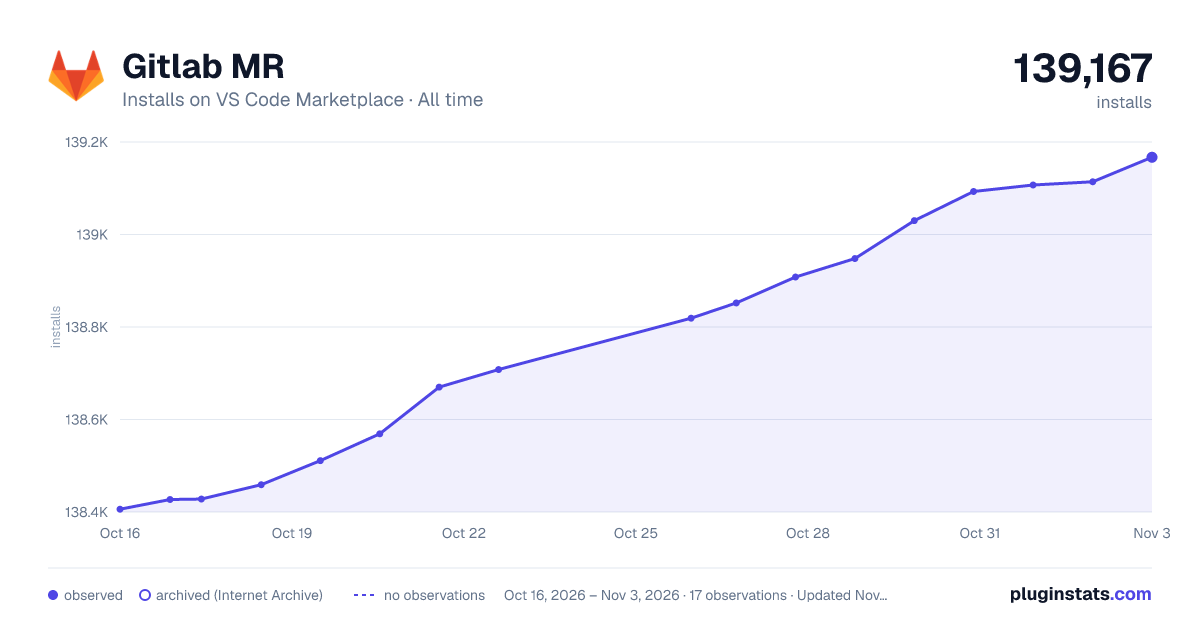

Adoption over time
7/30/90-day growth
Ranking history
Ratings over time
Listing placement
Listing placement
Filled points are observed values; hollow points come from Internet Archive snapshots of the listing page. Dashed segments span periods with no observations — values between points are not interpolated.
Each band is one page of 20. Installs on a linear scale. Placement is projected from installs, so it can differ from the marketplace's own sort order. Hover a dot to see the listing.
Recent observations
Full history (5)Similar VS Code Marketplace Other plugins
All 20 Gitlab MR alternativesData source
Install counts, average rating, and rating counts come from the public Visual Studio Marketplace gallery API. Installs are cumulative and exclude updates.
Listing: https://marketplace.visualstudio.com/items?itemName=jasonn-porch.gitlab-mr. First seen Oct 16, 2026; last successful collection Oct 20, 2026. See the methodology.