 PluginStats
Copilot for VS Code installs statistics
By Metatype · VS Code Marketplace · Programming Languages
JavaScript/TypeScript development tooling
Copilot for VS Code has 95,187 recorded installs on VS Code Marketplace.
It ranks #2448 of 2,501 tracked VS Code Marketplace listings by installs.
It is rated 3.3 out of 5 from 16 ratings.
PluginStats has 4 daily observations since Oct 16, 2026; the latest is from Oct 19, 2026.
Rating: 3.25 / 5 from 16 ratings
About Copilot for VS Code
Copilot for Visual Studio Code
This extension contributes JavaScript/TypeScript development tooling. It is the successor of the AngularDoc extension, but we have made significant improvements to the static analyzer's performance, and best of all, we now support React, Vue, NestJS, and Stencil in addition to Angular!
Features
• "Application Explorer" view that lets you browse the application's modules and components, and the top level constructs in the TypeScript file. • "State Management Explorer" view that lets you browse the NgRx/Redux/Vuex constructs such as stores, states, reducers, selectors, and effects, etc. • State management diagrams for NgRx, Redux, and Vuex. • (Angular) Invoking schematics commands from the explorer's inline menu. The list of supported schematics is customizable (see the Usage section below). • "RxJS Operator Decision Tree" command (see https://rxjs-dev.firebaseapp.com/operator-decision-tree).
Screenshots
Installation
Launch Visual Studio Code. In the command palette (cmd-shift-p) select Install Extension and enter Copilot.
Usage
To verify the installation, you can optionally clone the repositories from https://github.com/AngularDoc-Showcases and see if the Copilot features work as expected.
To use Copilot view, click the "Copilot" icon in the Activity bar on the far left-hand side. It may take a few seconds for the project to be analyzed and the items to show up in the Application Explorer and State Management Explorer. Click on an element in the tree view and the corresponding file will be previewed in the editor.
The "State Management Explorer" view and diagrams are advanced features that are enabled for projects using AngularDoc Team Services on https://angulardoc.io, and open source projects that have set up the free service on https://angulardoc.org.
To run the schematics commands, move the cursor over a module in Application Explorer, and select the inline icon "Schematics". You will then be asked to pick the schematics type and enter the entity type/name in the input box. Press "Enter" to confirm. The following schematics are supported by default (and you can add your own schematics to the list in the User Settings): • @schematics/angular • @ngrx/schematics • @angular/pwa • @ng-bootstrap/schematics • @angular/material • @clr/angular • @angular/elements
_Note_: Only the schematics that have been installed in the project will be available to pick.
To run the "RxJS Operator Decision Tree" command, select it in the command palette (cmd-shift-p).
About
For more information on our product suite, please visit our web site. Follow us on Twitter @angulardocio to receive updates. Last but not the least, please leave a review if you like this extension!
Description from the VS Code Marketplace listing.
- Angular
- JavaScript
- Nest
- React
- TypeScript
- Vue
Where Copilot for VS Code sits in the listing
Each band is one page of 20. Installs on a log scale. Placement is projected from installs, so it can differ from the marketplace's own sort order. Hover a dot to see the listing.


Charts
Images: 30d · 1y · all time · 1600×900 dark


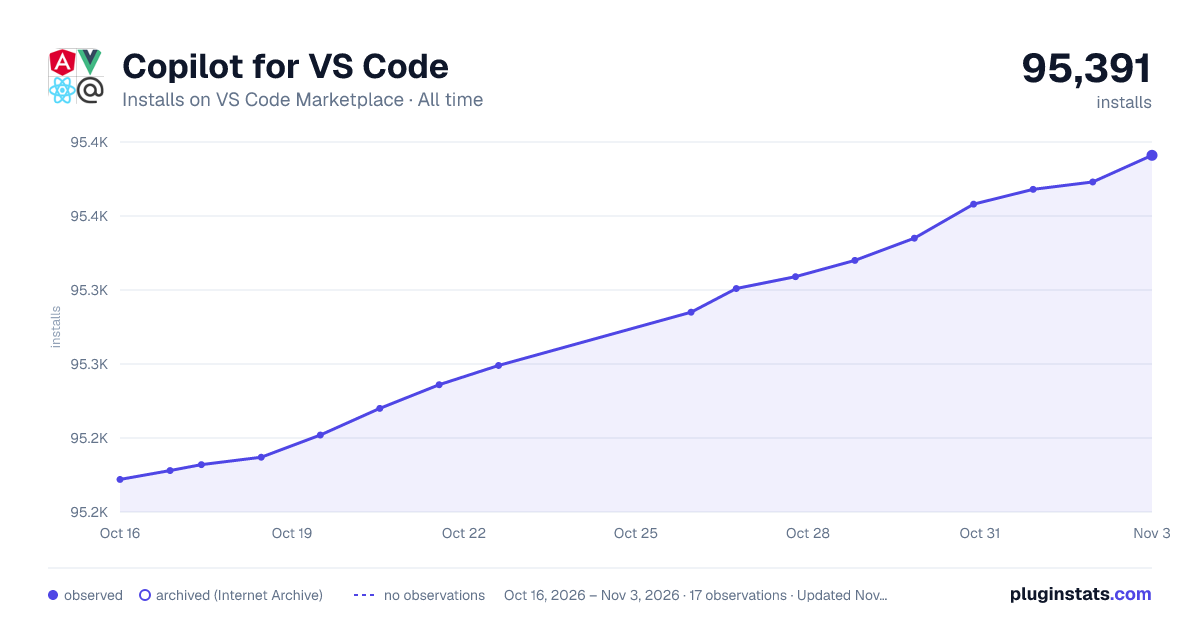

Adoption over time


7/30/90-day growth


Ranking history


Filled points are observed values; hollow points come from Internet Archive snapshots of the listing page. Dashed segments span periods with no observations — values between points are not interpolated.
Recent observations
Full history (4)Similar VS Code Marketplace Programming Languages plugins
Data source
Install counts, average rating, and rating counts come from the public Visual Studio Marketplace gallery API. Installs are cumulative and exclude updates.
Listing: https://marketplace.visualstudio.com/items?itemName=Metatype.copilot-vscode. First seen Oct 16, 2026; last successful collection Oct 19, 2026. See the methodology.