 PluginStats
SQL Formatter VSCode installs statistics
By Rene Saarsoo · VS Code Marketplace · Formatters
Official VSCode Extension of SQL Formatter library
SQL Formatter VSCode has 104,085 recorded installs on VS Code Marketplace, ranking #2307 of 2,501 tracked listings.
Rating: 4.00 / 5 from 8 ratings
About SQL Formatter VSCode
SQL Formatter VSCode 
Official VSCode Extension of the SQL Formatter library.
Note: This extension is a direct successor of Prettier SQL VSCode extension, which is no more maintained.
Setup
By default the formatter relies on VSCode to provide it information about the SQL dialect you're using, but this depends heavily on your VSCode environment and other extensions you have installed.
When it fails do detect any specific dialect it will default to "generic" SQL. This will work for the most basic and common SQL statements.
To get better results when formatting, please configure the dialect
you're using by setting the dialect option in extension settings
to target one of the following:
- BigQuery
- DB2 for LUW (Linux, Unix, Windows)
- DB2 for IBM iSystem
- DuckDB
- Hive
- MariaDB
- MySQL
- N1QL
- PL/SQL
- PostgresQL
- Amazon Redshift
- SingleStoreDB
- Snowflake
- Spark
- SQLite
- Trino (Presto)
- TransactSQL
Configuration
-
dialect: The SQL dialect to use when parsing the SQL files for formatting. -
ignoreTabSettings: Whether to ignore VSCode user/workspace settings fortabSizeandinsertSpaces -
tabSizeOverride: OverridestabSizeifignoreTabSettingsis enabled -
insertSpacesOverride: OverridesinsertSpacesifignoreTabSettingsis enabled -
keywordCase: Whether to print keywords in ALL CAPS or lowercase -
dataTypeCase: Whether to print data types in ALL CAPS or lowercase -
functionCase: Whether to print function names in ALL CAPS or lowercase -
identifierCase: Whether to print identifiers in ALL CAPS or lowercase (experimental) -
indentStyle: Switched between standard keyword positioning vs maintaining a central space column -
logicalOperatorNewline: Whether to break before or after AND and OR -
expressionWidth: Number of characters allowed in each line before breaking -
linesBetweenQueries: How many newlines to place between each query / statement -
denseOperators: Whether to strip whitespace around operators such as + or >= -
newlineBeforeSemicolon: Whether to place semicolon on its own line or on previous line -
paramTypes: Specifies parameter placeholders types to support
Having a problem?
Please report issues to SQL Formatter library Github page.
This extension and the sql-formatter library share the same issue tracker, as the authors of both are the same and the bugs reported about the VSCode extension are really mostly bugs in the underlying formatter library.
Don't worry about this difference though when reporting problems. But do read the FAQ before filing your report.
Description from the VS Code Marketplace listing.
- bigquery
- db2
- db2i
- formatter
- hive
- mariadb
- mssql
- mysql
- n1ql
- node
- pl/sql
- plsql
- postgres
- postgresql
- presto
- prettier
- redshift
- singlestoredb
- snowflake
- spark
README badge
Show your rank in a README or on your website. The badge updates automatically.
Charts
Images: 30d · 1y · all time · 1600×900 dark


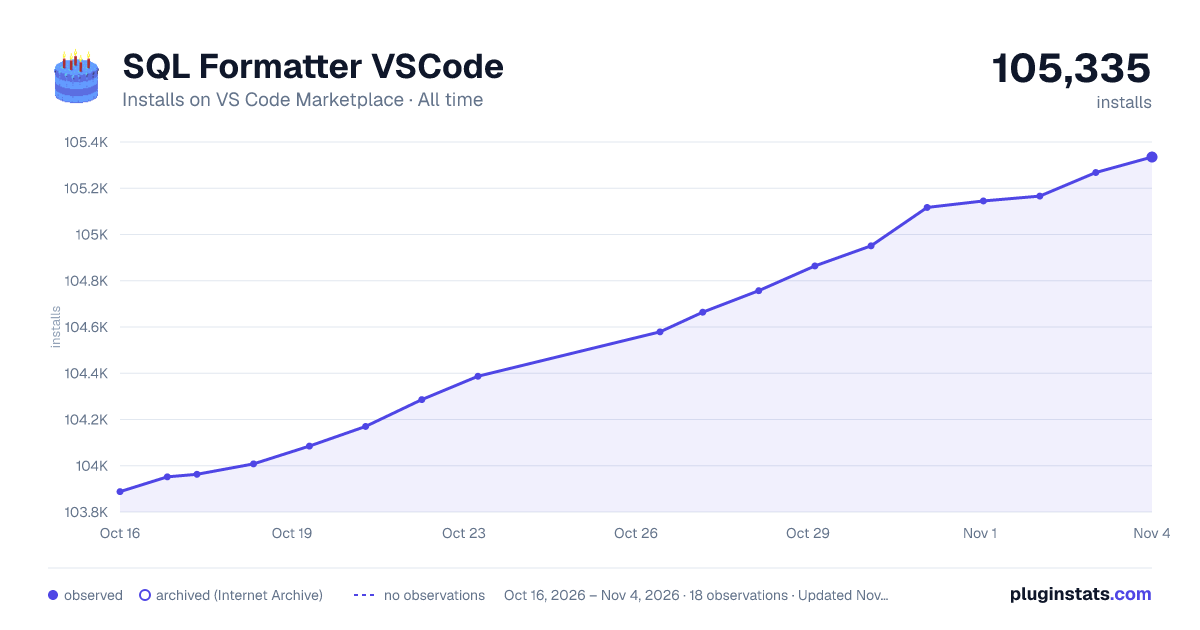

Adoption over time
7/30/90-day growth
Ranking history
Ratings over time
Listing placement
Listing placement
Filled points are observed values; hollow points come from Internet Archive snapshots of the listing page. Dashed segments span periods with no observations — values between points are not interpolated.
Each band is one page of 20. Installs on a linear scale. Placement is projected from installs, so it can differ from the marketplace's own sort order. Hover a dot to see the listing.
Recent observations
Full history (5)Similar VS Code Marketplace Formatters plugins
All 20 SQL Formatter VSCode alternativesData source
Install counts, average rating, and rating counts come from the public Visual Studio Marketplace gallery API. Installs are cumulative and exclude updates.
Listing: https://marketplace.visualstudio.com/items?itemName=ReneSaarsoo.sql-formatter-vsc. First seen Oct 16, 2026; last successful collection Oct 20, 2026. See the methodology.