 PluginStats
ERB Linter installs statistics
By manuelpuyol · VS Code Marketplace · Linters
execute erb-lint for ERB code.
ERB Linter has 253,228 recorded installs on VS Code Marketplace, ranking #1298 of 2,501 tracked listings.
Rating: 4.60 / 5 from 5 ratings
About ERB Linter
ERB Linter for Visual Studio Code
This project is based on ruby-rubocop
This extensions provides interfaces to erb-lint for vscode. It requires version >= 0.1.0 to work.

Features
- Lint ERB files using
ERB Linter: lint with erb-lintin the command palette. - Lint on save.
- Autocorrect using
ERB Linter: autocorrect current file with erb-lintin the command palette. - Format on save
Installation
You can configure rules and behaviors like explained in the erb-lint docs. To install the gem, there are two methods.
Preferred
Add erb_lint to your project's Gemfile and install it with Bundler.
Global install
Install in globally using gem install erb_lint. If you want to use it globally, you must set the executePath.
Enabling format on save
To enable Format on Save for ERB files, you have to update your VSCode configs with:
"[erb]": {
  "editor.defaultFormatter": "manuelpuyol.erb-linter",
  "editor.formatOnSave": true
},
Note: If you are using the Rails extension, you may need to set the same configuration for html.erb
Options
erb.erb-lint.executePath
Declare an specific path to run erb-lint. This is untested and may have some issues loading your configuration file (see configFilePath to fix this).
If no path is provided, the extension will default to running erb-lint with bundle.
The extension expected the executable path, so instead of
$ gem which erb_lint
~/.rvm/gems/ruby-3.1.0/gems/erb_lint-0.4.0/lib/erb_lint.rb
use
~/.rvm/gems/ruby-3.1.0/gems/erb_lint-0.4.0/exe
In case of a globally installed erblint, use
$ which erblint
/opt/rubies/ruby-2.7.8/bin/erblint
erb.erb-lint.cmd
Command to use when running erb-lint. The default is erb_lint, but older versions of the gem may need to use erblint.
erb.erb-lint.cache
Enables erb-lint --cache argument. Defaults to false.
erb.erb-lint.configFilePath
Path to the erb-lint configuration file. The extension will try to use your root .erb-lint.yml file.
erb.erb-lint.onSave
Whether or not to run erb-lint in the current file on save. This defaults to true.
erb.erb-lint.suppressERBLintWarnings
Suppress warnings from erb-lint and attempt to run regardless. Useful if you have random warnings in the erb-lint execution. This defaults to true.
erb.erb-lint.pathToBundler
Uses bundle by default, but can be modified in case you use a custom path.
TODOs
- Add tests
- Improve usability with global
erb-lint
Description from the VS Code Marketplace listing.
- erb
- html.erb
- js.erb
- linters
README badge
Show your rank in a README or on your website. The badge updates automatically.
Charts
Images: 30d · 1y · all time · 1600×900 dark


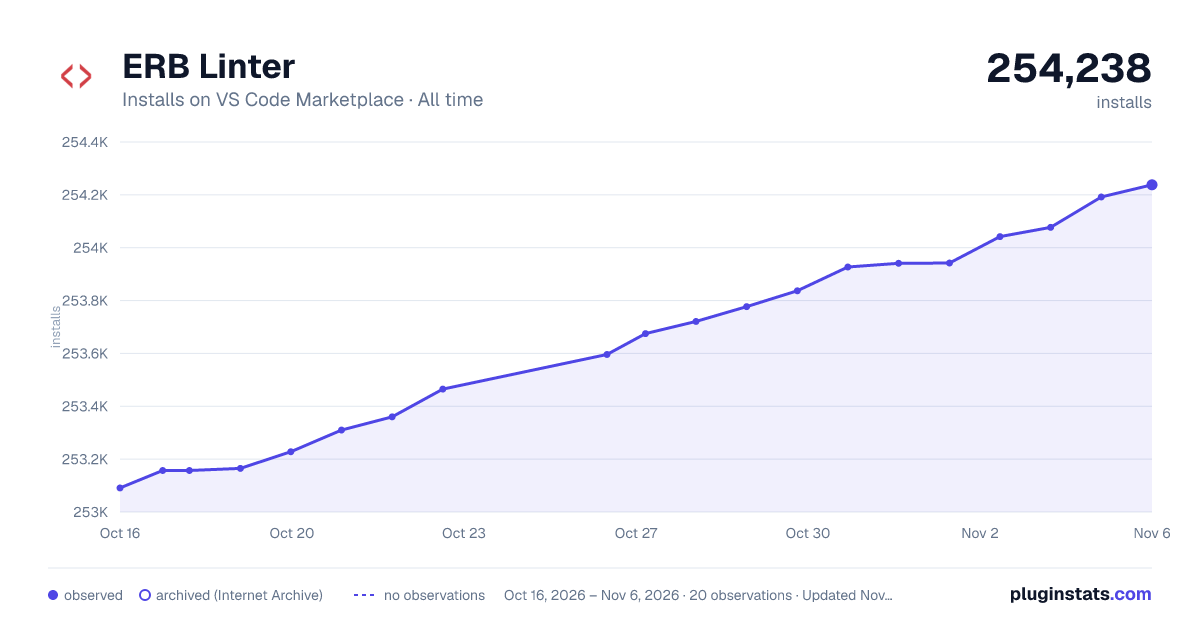

Adoption over time
7/30/90-day growth
Ranking history
Ratings over time
Listing placement
Listing placement
Filled points are observed values; hollow points come from Internet Archive snapshots of the listing page. Dashed segments span periods with no observations — values between points are not interpolated.
Each band is one page of 20. Installs on a linear scale. Placement is projected from installs, so it can differ from the marketplace's own sort order. Hover a dot to see the listing.
Recent observations
Full history (5)Similar VS Code Marketplace Linters plugins
All 20 ERB Linter alternativesData source
Install counts, average rating, and rating counts come from the public Visual Studio Marketplace gallery API. Installs are cumulative and exclude updates.
Listing: https://marketplace.visualstudio.com/items?itemName=manuelpuyol.erb-linter. First seen Oct 16, 2026; last successful collection Oct 20, 2026. See the methodology.