 PluginStats
godot-tools installs statistics
By Geequlim · VS Code Marketplace · Programming Languages
Tools for game development with Godot Engine and GDScript
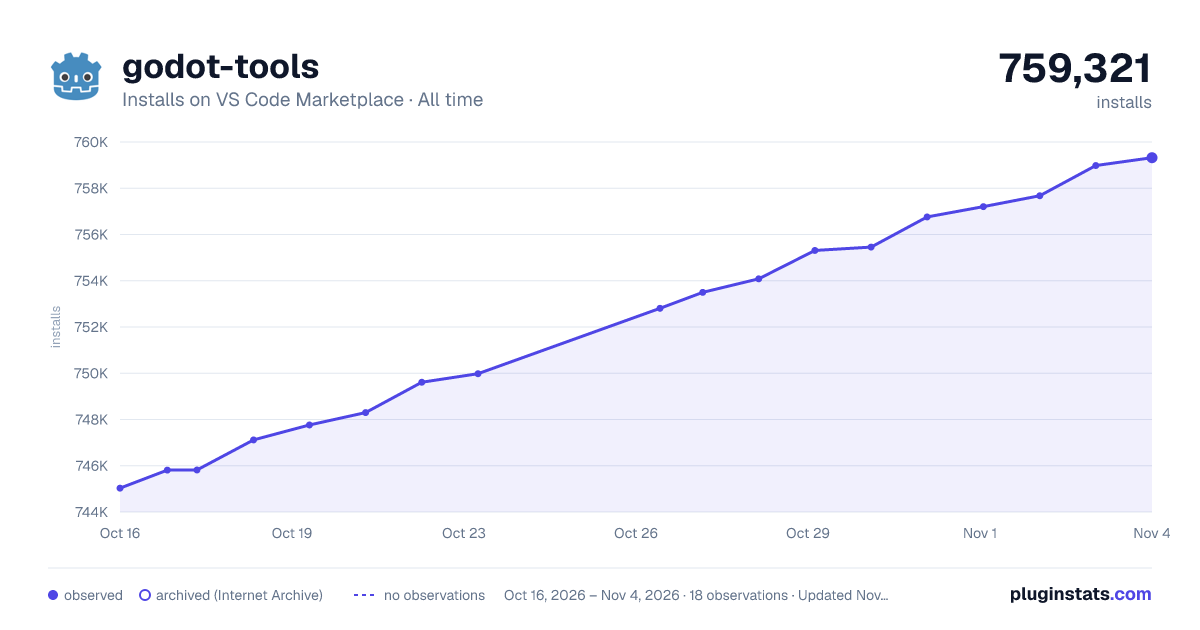
godot-tools has 747,117 recorded installs on VS Code Marketplace, ranking #656 of 2,501 tracked listings.
Rating: 4.96 / 5 from 56 ratings
About godot-tools
Godot Tools
Game development tools for working with Godot Engine in Visual Studio Code.
IMPORTANT NOTE: Versions 1.0.0 and later of this extension only support Godot 3.2 or later.
• Godot Tools • Features • Download • Commands • Configuration - Godot Editor - VS Code • GDScript Debugger - Configurations • Issues and contributions • Contributing • FAQ • Why does it fail to connect to the language server? • Why isn't IntelliSense displaying script members? • I'm using Linux and the drag + shift drop isn't working. Why?
Features
(bold items are new in Godot Tools v2.0.0)
• ALL FEATURES FULLY SUPPORT GODOT 4 • GDScript (.gd) language features: • syntax highlighting • ctrl+click on any symbol to jump to its definition or open its documentation • ctrl+click on res://resource/path links • hover previews on res://resource/path links • builtin code formatter • autocompletions • full typed GDScript support • optional "Smart Mode" to improve productivity with dynamically typed scripts • Hover previews show function/variable definitions including doc-comments • switch from a .gd file to the related .tscn file (default keybind is alt+o) • display script warnings and errors • GDScript Debugger features: • completely rewritten, greatly improved reliability • new, simple configuration (seriously, just hit F5!) • convenient launch targets: current project/current file/pinned file, • breakpoints • exceptions • step-in/out/over • variable watch • call stack • active scene tree • inspector • GDResource (.tscn and .tres) language features: • syntax highlighting • ctrl+click on res://resource/path links • ctrl+click on symbols to jump to its definition or open its documentation • hover previews show definitions of External and Sub Resources • hover previews on res://resource/path links • inlay hints to help visualize External and Sub Resources • in-editor Scene Preview • GDShader (.gdshader) language features: • syntax highlighting
Download
• Visual Studio Marketplace (recommended) • Stable release, with support for automatic updates. • GitHub Releases • Stable release, but no automatic updates. Can be useful if you need to install an older version of the extension. • Development build (follows the master branch) • Development build. Contains new features and fixes not available in stable releases, but may be unstable. • Extract the ZIP archive before installing (it contains the .vsix file inside).
To install from GitHub Releases or a development build, see Install from a VSIX in the Visual Studio Code documentation.
Commands
The extension adds a few entries to the VS Code Command Palette under "Godot Tools":
• Open workspace with Godot editor • List Godot's native classes (and open thier documentation) • Debug the current .tscn/.gd file • Debug the pinned .tscn/.gd file • Pin/Unpin the current .tscn/.gd file for debugging • Open the pinned file
Configuration
Godot Editor
You can set VS Code as your default script editor for Godot by following these steps:
- Open the Editor Settings 2. Select Text Editor > External 3. Check Use External Editor 4. Fill Exec Path with the path to your VS Code executable • On macOS, this executable is typically located at: /Applications/Visual Studio Code.app/Contents/MacOS/Electron 5. Fill Exec Flags with {project} --goto {file}:{line}:{col}
You can make Godot seamlessly reload VSCode-edited scripts by changing some additional settings. More details about each are available when hovering over the description in the Settings window:
• Editor Settings > Text Editor > Behavior > Files > Auto Reload Scripts on External Change • Editor Settings > Interface > Editor > Save on Focus Loss • Editor Settings > Interface > Editor > Import Resources When Unfocused
VS Code
You can use the following settings to configure Godot Tools:
• godotTools.editorPath.godot3 • godotTools.editorPath.godot4
The path to the Godot editor executable. Under Mac OS, this is the executable inside of Godot.app.
• godotTools.lsp.headless
When using Godot >3.6 or >4.2, Headless LSP mode is available. In Headless mode, the extension will attempt to launch a windowless instance of the Godot editor to use as its Language Server.
GDScript Debugger
The debugger is for GDScript projects. To debug C# projects, use C# Tools for Godot.
To configure the GDScript debugger:
-
Open the command palette (by pressing F1): 2. >View: Show Run and Debug 3. Click on "create a launch.json file"
-
Select the Debug Godot configuration. 5. Change any relevant settings. 6. Press F5 to launch.
Configurations
Minimal:
Everything:
Godot's command flags are documented here: https://docs.godotengine.org/en/stable/tutorials/editor/command_line_tutorial.html
Usage
• Stacktrace and variable dumps are the same as any regular debugger • The active scene tree can be refreshed with the Refresh icon in the top right. • Nodes can be brought to the fore in the Inspector by clicking the Eye icon next to nodes in the active scene tree, or Objects in the inspector. • You can edit integers, floats, strings, and booleans within the inspector by clicking the pencil icon next to each.
Issues and contributions
The Godot Tools extension is an open source project from the Godot organization. Feel free to open issues and create pull requests anytime.
See the full changelog for the latest changes.
Contributing
see CONTRIBUTING.md
FAQ
Why does it fail to connect to the language server?
• Godot 3.2 or later is required. • Make sure the Godot editor is running • Make sure to open the project in the Godot editor first. If you opened the editor after opening VS Code, you can click the Retry button in the bottom-right corner in VS Code. • Reset the LSP Server port to the default values in both Godot's Editor Settings and in VSCode.
Why isn't IntelliSense displaying script members?…
Description from the VS Code Marketplace listing.
- debuggers
- gdresource
- gdscene
- gdscript
- gdshader
- keybindings
- snippet
README badge
Show your rank in a README or on your website. The badge updates automatically.
Charts
Images: 30d · 1y · all time · 1600×900 dark



Adoption over time
7/30/90-day growth
Ranking history
Ratings over time
Listing placement
Listing placement
Listing placement
Listing placement
Filled points are observed values; hollow points come from Internet Archive snapshots of the listing page. Dashed segments span periods with no observations — values between points are not interpolated.
Each band is one page of 20. Installs on a linear scale. Placement is projected from installs, so it can differ from the marketplace's own sort order. Hover a dot to see the listing.
Recent observations
Full history (4)Similar VS Code Marketplace Programming Languages plugins
All 20 godot-tools alternativesData source
Install counts, average rating, and rating counts come from the public Visual Studio Marketplace gallery API. Installs are cumulative and exclude updates.
Listing: https://marketplace.visualstudio.com/items?itemName=geequlim.godot-tools. First seen Oct 16, 2026; last successful collection Oct 19, 2026. See the methodology.