 PluginStats
Formatting Toggle installs statistics
By tombonnike · VS Code Marketplace · Formatters
A VS Code extension that allows you to toggle formatting settings ON and OFF with a simple click.
Formatting Toggle has 1,696,896 recorded installs on VS Code Marketplace, ranking #385 of 2,502 tracked listings.
Rating: 4.50 / 5 from 18 ratings
About Formatting Toggle
Formatting Toggle
A VS Code extension that allows you to toggle your formatting settings ON and OFF with a simple click.
Installation
In the command palette (CMD + SHIFT + P) select “Install Extension” and choose “Formatting Toggle”.
Usage
The extension should show up on the right side of the status bar. Simply click it to toggle the formatting settings ON and OFF. Alternatively, in the command palette (CMD + SHIFT + P), run the “Toggle Formatting” command.
⚠️ Formatting Toggle doesn’t override your workspace settings as these are usually tracked by Git. Consider using ignore configurations (like .prettierignore) to ignore specific files for all contributors of your project.
Customization
By default, Formatting Toggle toggles all formatting settings: editor.formatOnPaste, editor.formatOnSave and editor.formatOnType. To toggle different settings, or to prevent a specific setting from being toggled, you can use the formattingToggle.affects setting in your editor settings (Code › Preferences › Settings).
💡 Formatting Toggle was created with formatting settings in mind but allows you to toggle any boolean setting that lives at the root of the VSCode configuration. editor.codeActionsOnSave is currently the only deeply nested setting supported.
The status bar text can also be customized via the formattingToggle.statusBarText setting. Values for formattingEnabled and formattingDisabled are distinct, and can include different codicons for each state. See Product Icon Reference for all options.
Examples
Keeping editor.formatOnPaste and editor.formatOnType enabled at all times:
{
  "editor.formatOnPaste": true,
  "editor.formatOnType": true,
  "formattingToggle.affects": ["editor.formatOnSave"]
}
Keeping editor.formatOnType disabled at all times:
{
  "editor.formatOnType": false,
  "formattingToggle.affects": ["editor.formatOnPaste", "editor.formatOnSave"]
}
Allowing editor.codeActionsOnSave to be toggled:
{
  "formattingToggle.affects": ["editor.codeActionsOnSave.source.fixAll.eslint"]
}
Allowing all formatting settings to to be toggled (default):
{
  "formattingToggle.affects": [
    "editor.formatOnPaste",
    "editor.formatOnSave",
    "editor.formatOnType"
  ]
}
Customizing the status bar text:
{
  "formattingToggle.statusBarText": {
    "formattingEnabled": "On $(heart-filled)",
    "formattingDisabled": "Off $(heart)"
  },
}
Description from the VS Code Marketplace listing.
- disable
- format
- formatting
- prettier
- toggle
README badge
Show your rank in a README or on your website. The badge updates automatically.
Charts
Images: 30d · 1y · all time · 1600×900 dark


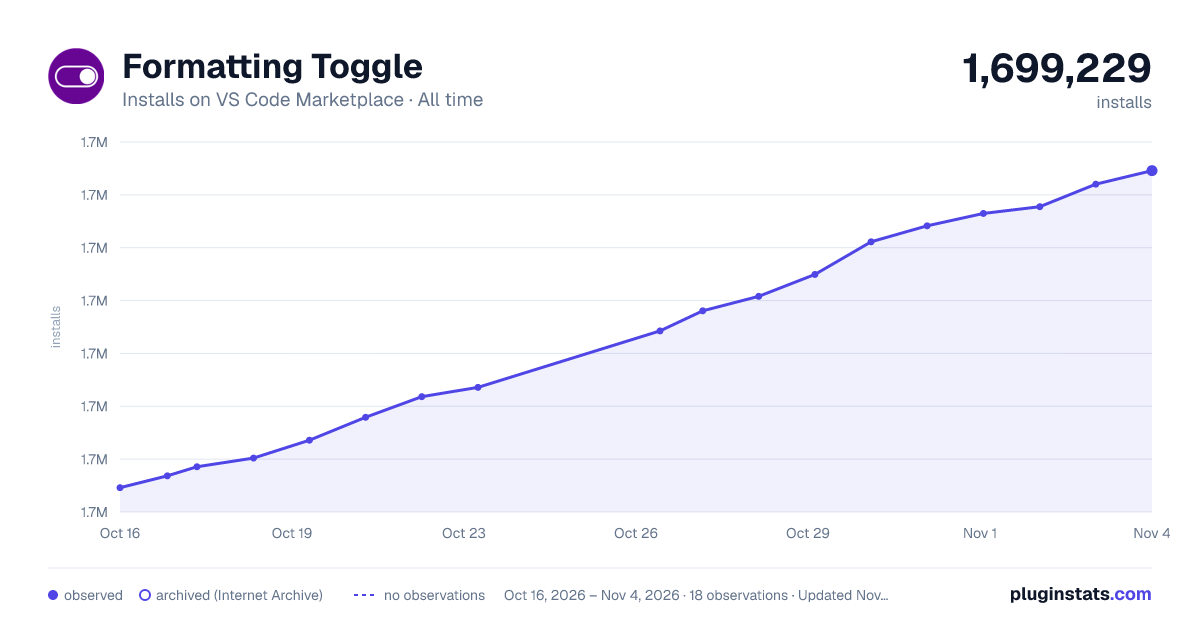

Adoption over time
7/30/90-day growth
Ranking history
Ratings over time
Listing placement
Listing placement
Filled points are observed values; hollow points come from Internet Archive snapshots of the listing page. Dashed segments span periods with no observations — values between points are not interpolated.
Each band is one page of 20. Installs on a linear scale. Placement is projected from installs, so it can differ from the marketplace's own sort order. Hover a dot to see the listing.
Recent observations
Full history (6)Similar VS Code Marketplace Formatters plugins
All 20 Formatting Toggle alternativesData source
Install counts, average rating, and rating counts come from the public Visual Studio Marketplace gallery API. Installs are cumulative and exclude updates.
Listing: https://marketplace.visualstudio.com/items?itemName=tombonnike.vscode-status-bar-format-toggle. First seen Oct 16, 2026; last successful collection Oct 21, 2026. See the methodology.