 PluginStats
COBOL installs statistics
By BitLang · VS Code Marketplace · Programming Languages
IntelliSense, highlighting, snippets, and code browsing for COBOL and more
COBOL has 202,440 recorded installs on VS Code Marketplace.
It ranks #1495 of 2,501 tracked VS Code Marketplace listings by installs.
It is rated 5.0 out of 5 from 6 ratings.
PluginStats has 4 daily observations since Oct 16, 2026; the latest is from Oct 19, 2026.
Rating: 5.00 / 5 from 6 ratings
About COBOL
COBOL Source editing for Visual Studio Code
Release Information:
| Version | Installs | Rating |
| | | | | | | |
This unofficial extension provides syntax highlighting for Rocket ® COBOL based COBOL languages (previously Micro Focus COBOL), with some support for other COBOL dialects such as ACUCOBOL, RMCOBOL, COBOL-IT and ILECOBOL.
Plus related syntax highlighting for other related languages/file formats such JCL, PL/I and directive files and Unit Test Reports.
Some of the features this extension provides are:
• Colourisation and problem matchers for the following Rocket COBOL dialects: • Visual COBOL • ACUCOBOL-GT • COBOL-IT • Colourisation for: • RMCOBOL • ILECOBOL support to help fellow IBMi COBOL developers • COBOL tab key support (configurable) • COBOL source navigation support • Shortcuts/Commands for navigation to divisions • Fixed format margin support • Outline view/breadcrumb support • Text based find all references • Peek definition • Copybook navigation • Intellisense support for keywords in lowercase, uppercase and camelcase • Snippet support for various keywords • including callable COBOL library routines • and intrinsic functions • Source code linter for in house/internal COBOL standards • Compiler directive file colourisation • Unit test report colourisation • Drag & Drop filename into source code inserts copybook verb • COBOL Source Utilities • Remove column numbers • Remove program identification area • Remove all comments • Text based rename paragraphs/sections and variables • Make all keywords/fields/sections uppercased, lowercased or camelcased • Re-sequence column numbers • Optional xedit'ish key bindings • Align storage items • Text to hex literals & reverse • Documentation for using development containers with Visual COBOL • and more..
While also being able to use it with the official Rocket COBOL extension (for debugging for example).
Examples of features provided
Code colorization for COBOL, PL/I and JCL
Intellisense example
Breadcrumb support
Outline support
Enhanced Minimap with Structure Boundaries
The extension enhances VS Code's minimap and overview ruler to display COBOL program structure boundaries, making navigation of large COBOL programs much easier.
Features: • Division markers (orange) - Shows major divisions on the left side of overview ruler • Section markers (blue) - Shows COBOL sections on the right side of overview ruler • Paragraph markers (purple) - Shows COBOL paragraphs on the right side of overview ruler • Click navigation - Click any marker to jump directly to that location • Fully customizable colors - Configure colors through VS Code settings
Configuration:
Settings: • coboleditor.enable_minimap_section_boundaries - Master toggle to enable/disable all minimap boundary markers • coboleditor.enable_minimap_section_boundaries_for_divisions - Show division boundary markers (default: true) • coboleditor.enable_minimap_section_boundaries_for_sections - Show section boundary markers (default: true) • coboleditor.enable_minimap_section_boundaries_for_paragraphs - Show paragraph boundary markers (default: false) • coboleditor.minimap_section_colors - Customize the colors used for each boundary type • Each color configuration supports: • light - Color for light themes (hex format, e.g. "#FF6F00") • dark - Color for dark themes (hex format, e.g. "#FFB74D") • alpha - Transparency level for background highlighting (0.0 to 1.0, where 0.0 is fully transparent and 1.0 is fully opaque)
This feature is especially valuable when working with large legacy COBOL programs containing many sections and paragraphs.
Code Folding
The extension provides comprehensive code folding capabilities for COBOL source code, allowing you to collapse and expand sections of code for better readability and navigation.
Features: • Structural folding - Based on parsed COBOL structures including: • Divisions (IDENTIFICATION, ENVIRONMENT, DATA, PROCEDURE) • Sections and Paragraphs • Program/Class/Method definitions • EXEC blocks • Copybook statements • Comment block folding - Consecutive comment lines are grouped into foldable blocks • Block statement folding - IF...END-IF, EVALUATE...END-EVALUATE, PERFORM...END-PERFORM, and other structured COBOL constructs
Configuration:
Settings: • coboleditor.enable_folding_ranges - Enable/disable code folding support (default: true)
Expanded Copybook View
When coboleditor.enable_codelens_copy_replacing is enabled, COPY statements that use REPLACING provide CodeLens actions to:
• Open the original copybook • Open a read-only expanded COBOL document • Compare the original copybook with its expanded content
The expanded view applies the replacement text already calculated by the source scanner and expands nested copybooks in statement order. Use **COBOL: Refresh Expanded Copybook** after an external file change. Saving a source document or changing a COBOL setting refreshes open expanded views automatically.
F12 or Ctrl/Cmd+click on an expanded line opens the corresponding source copybook line. Source navigation is line-based; columns changed by a replacement are not mapped individually.
Copybook expansion requires coboleditor.parse_copybooks_for_references and coboleditor.enable_text_replacement to be enabled.
Go to definition
Peek definition
COBOL specific coloured comments
Keybindings
| Keys | Description |
| ctrl+alt+p | Go to procedure division | | ctrl+alt+w | Go to working-storage section | | ctrl+alt+d | Go to data division (or working-storage section if not present) | | ctrl+alt+, | Go backwards to next section/division | | ctrl+alt+. | Go forward to next next section/division | | f12 or ctrl+click | Go to copybook/file | | ctrl+hover | Peek head of copybook or symbol/field | | right mouse/peek | Peek copybook without opening the file | | ctrl+alt+a | Adjust line to cursor position | | ctrl+alt+l | Left adjust line to left margin | | alt+right | Insert spaces to column 72 |
Keybindings - xedit'ish…
Description from the VS Code Marketplace listing.
- ACUCOBOL
- acucobol-gt
- BITLANG-COBOL
- bms
- bmsmap
- cics
- cobol
- COBOL_ACU_LISTFILE
- COBOL_MF_LISTFILE
- COBOL_MF_PREP
- COBOL_PCOB_LISTFILE
- cobolit
- cobol-it
- copilot
- dir
- directivesmf
- dirfile
- hlasm
- ibmi
- ilecobol
Where COBOL sits in the listing
Each band is one page of 20. Installs on a log scale. Placement is projected from installs, so it can differ from the marketplace's own sort order. Hover a dot to see the listing.


Charts
Images: 30d · 1y · all time · 1600×900 dark


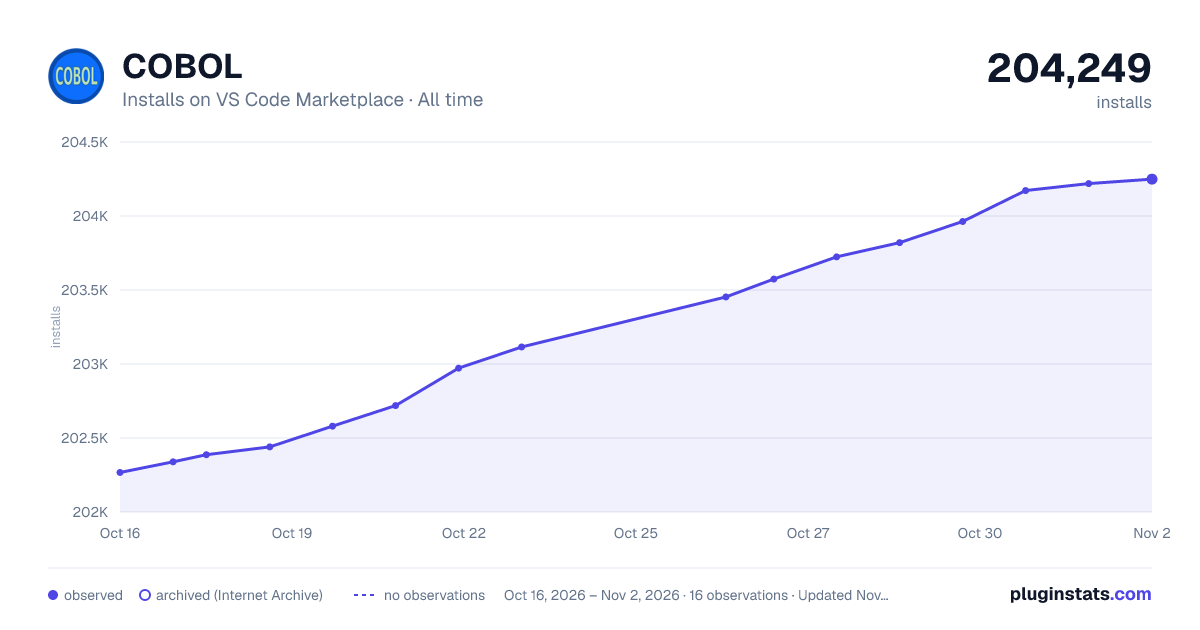

Adoption over time


7/30/90-day growth


Filled points are observed values; hollow points come from Internet Archive snapshots of the listing page. Dashed segments span periods with no observations — values between points are not interpolated.
Recent observations
Full history (4)Similar VS Code Marketplace Programming Languages plugins
Data source
Install counts, average rating, and rating counts come from the public Visual Studio Marketplace gallery API. Installs are cumulative and exclude updates.
Listing: https://marketplace.visualstudio.com/items?itemName=bitlang.cobol. First seen Oct 16, 2026; last successful collection Oct 19, 2026. See the methodology.