 PluginStats
Snyk Security installs statistics
By Snyk (4 listings) · VS Code Marketplace · Programming Languages
Easily find and fix issues in your code, open source dependencies, infrastructure as code configurations with fast and accurate scans.
Snyk Security has 471,412 recorded installs on VS Code Marketplace, ranking #875 of 2,502 tracked listings.
Rating: 2.97 / 5 from 39 ratings
About Snyk Security
Visual Studio Code extension
Scan early, fix as you develop: elevate your security posture
Integrating security checks early in your development lifecycle helps you pass security reviews seamlessly and avoid expensive fixes down the line.
The Snyk Visual Studio Code extension allows you to analyze your code, open-source dependencies, and Infrastructure as Code (IaC) configurations. With actionable insights directly in your IDE, you can address issues as they arise.
The extension also works for other VSCode-based IDEs such as Windsurf, Cursor, and Eclipse Theia.
Key features:
- In-line issue highlighting: Security issues are flagged directly within your code, categorized by type and severity for quick identification and resolution.
- Comprehensive scanning: The extension scans for a wide range of security issues, including:
- Open Source Security: Detects vulnerabilities and license issues in both direct and transitive open-source dependencies. Automated fix suggestions simplify remediation. Explore more in the Snyk Open Source documentation.
- Code Security: Identifies security vulnerabilities in your custom code. Explore more in the Snyk Code documentation.
- IaC Security: Uncovers configuration issues in your Infrastructure as Code templates (Terraform, Kubernetes, CloudFormation, Azure Resource Manager). Explore more in the IaC documentation.
- Broad language and framework support: Snyk Open Source and Snyk Code cover a wide array of package managers, programming languages, and frameworks, with ongoing updates to support the latest technologies. For the most up-to-date information on supported languages, package managers, and frameworks, see the supported language technologies pages.
How to install and set up the extension
For information about the versions of Visual Studio Code supported by the Visual Studio Code extension, see Snyk IDE plugins and extensions.
Snyk recommends always using the latest version of the Visual Studio Code extension.
You can use the Snyk Visual Studio Code extension in the following environments:
- Linux: AMD64 and ARM64
- Windows: 386, AMD64, and ARM64
- macOS: AMD64 and ARM64
Snyk Visual Studio Code extension does not support remote and containerized environments:
Install the plugin at any time free of charge from the Visual Studio Code marketplace and use it with any Snyk account, including a Free account. For more information, see the VS Code extension installation guide.
When the extension is installed, it automatically downloads the Snyk CLI, which includes the Language Server.
Continue by following the instructions in the other Visual Studio Code extension docs:
- Visual Studio Code extension configuration, environment variables, and proxy
- Authentication for Visual Studio Code extension
- Visual Studio Code Workspace trust
- Create a .dcignore file
- Run an analysis with Visual Studio Code extension
- View analysis results from Visual Studio Code extension
When the VS Code extension is installed for the first time, a modal will pop up asking users if they want to enable Secure at Inception capabilities via Snyk Studio. With Secure at Inception enabled, a file such as snyk_rules.mdc may be written to the directory.
For more information, see the Snyk Studio quickstart guides for Cursor, Windsurf, and Copilot.
Support…
Description from the VS Code Marketplace listing.
- Angular
- Code Analysis
- Code Quality
- IaC
- Infrastructure as Code
- Java
- JavaScript
- Kubernetes
- Python
- React
- Static Code Analysis
- Terraform
- ts
- TypeScript
- Vue
README badge
Show your rank in a README or on your website. The badge updates automatically.
Charts
Images: 30d · 1y · all time · 1600×900 dark


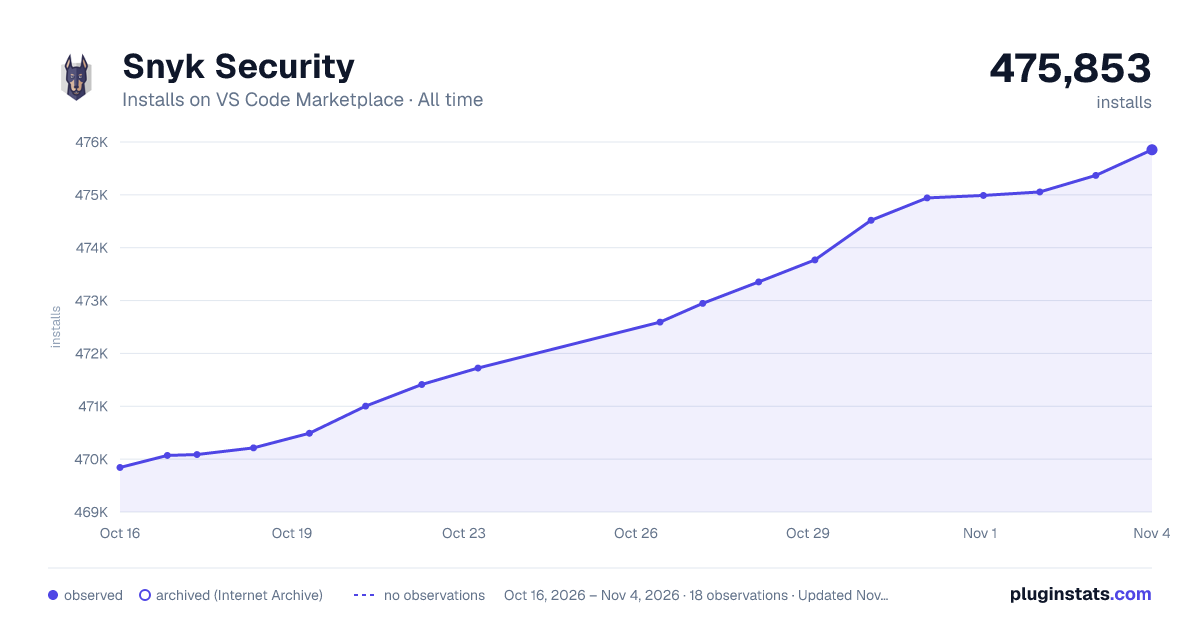

Adoption over time
7/30/90-day growth
Ranking history
Ratings over time
Listing placement
Listing placement
Listing placement
Filled points are observed values; hollow points come from Internet Archive snapshots of the listing page. Dashed segments span periods with no observations — values between points are not interpolated.
Each band is one page of 20. Installs on a linear scale. Placement is projected from installs, so it can differ from the marketplace's own sort order. Hover a dot to see the listing.
Recent observations
Full history (7)Similar VS Code Marketplace Programming Languages plugins
All 20 Snyk Security alternativesSnyk Security on other marketplaces
Data source
Install counts, average rating, and rating counts come from the public Visual Studio Marketplace gallery API. Installs are cumulative and exclude updates.
Listing: https://marketplace.visualstudio.com/items?itemName=snyk-security.snyk-vulnerability-scanner. First seen Oct 16, 2026; last successful collection Oct 22, 2026. See the methodology.