 PluginStats
SARIF Viewer installs statistics
By Microsoft DevLabs (3 listings) · VS Code Marketplace · Other
Adds support for viewing SARIF logs
SARIF Viewer has 600,229 recorded installs on VS Code Marketplace, ranking #765 of 2,501 tracked listings.
Rating: 3.83 / 5 from 6 ratings
About SARIF Viewer
SARIF Viewer for Visual Studio Code
A Visual Studio Code extension that adds support for viewing SARIF logs. SARIF log results can be viewed as squiggles in your source, in the Problems list, or in a dedicated SARIF Results Panel. The SARIF Results Panel offers richer grouping, filtering, column, and details options over the standard Problems list.

What's New?
Version 3 incorporates many feedback-based improvements:
- Improved keyboard accessibility within the SARIF Results Panel. Arrow key through the list of results.
- Resizable details section within the SARIF Results Panel.
- Generally improved performance and responsiveness.
- Automatic reconciliation of URIs between the SARIF log and your local workspace in most cases.
To focus our efforts, we have dropped some less-used and less-reliable features:
- Support for old SARIF versions - We now strictly support the public standard version 2.1.0. Older versions can be upgraded with the standalone SARIF Multitool (via nuget and npm).
- Conversion of external formats to SARIF - We recommend the standalone SARIF Multitool (via nuget and npm) for conversion.
- SARIF Results Panel (previously "SARIF Explorer") view state is no longer exposed as settings.
- The
rootpathssetting as been removed.
If these changes adversely affect your project, please let us know.
Usage
Install this extension from the Extension Marketplace within Visual Studio Code.
SARIF logs (*.sarif) can be opened several ways:
- Open as a document. The SARIF Results Panel will automatically be shown.
- Manually show the SARIF Results Panel with command
sarif.showPanel. Then click "Open SARIF log". If logs are already open, open additional logs via the folder icon at the top of the SARIF Results Panel. - Call from another extension. See the "API" section below.
We welcome feedback via issues.
API
An extension-to-extension public API is offered. This API is defined at src/extension/index.d.ts. An example of another extension calling this extension:
const sarifExt = extensions.getExtension('MS-SarifVSCode.sarif-viewer');
if (!sarifExt.isActive) await sarifExt.activate();
await sarifExt.exports.openLogs([
   Uri.file('c:/samples/demo.sarif'),
]);
Note: TypeScript typings for Extension<T> are forthcoming.
Telemetry
We collect basic anonymous information such as activation and the versions/schemas of any logs opened. Opt-in or out via the general Visual Studio Code setting telemetry.enableTelemetry.
Development
F5 launches this extension. Subsequent changes are watched and rebuilt. Use command workbench.action.reloadWindow to see the changes. For more details see Contributing to SARIF Viewer.
Other common tasks:
| Command | Comments |
|---|---|
npm run server | Run the Panel standalone at http://localhost:8000. Auto-refreshes. |
npm test | Run and watch unit tests. Bails on failure. Useful during development. |
npm test -- --bail false --watch false | Run tests once. Useful for reporting. |
npx webpack | Build manually. |
npx @vscode/vsce package | Produce a VSIX. |
Description from the VS Code Marketplace listing.
- json
- sarif
README badge
Show your rank in a README or on your website. The badge updates automatically.
Charts
Images: 30d · 1y · all time · 1600×900 dark


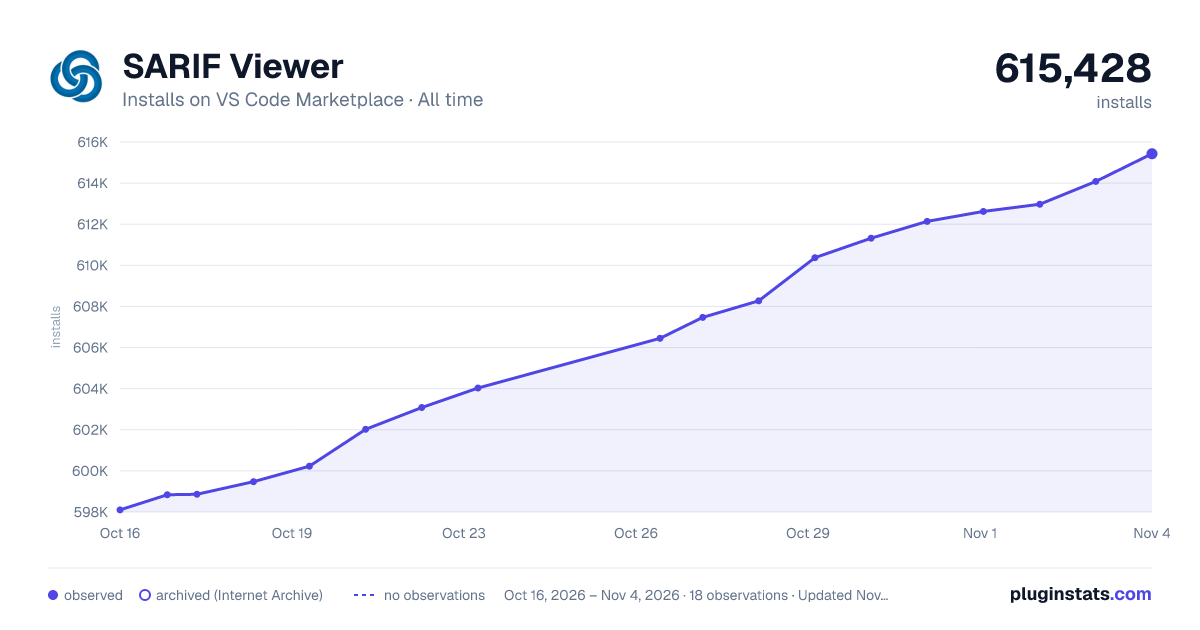

Adoption over time
7/30/90-day growth
Ranking history
Ratings over time
Listing placement
Listing placement
Filled points are observed values; hollow points come from Internet Archive snapshots of the listing page. Dashed segments span periods with no observations — values between points are not interpolated.
Each band is one page of 20. Installs on a linear scale. Placement is projected from installs, so it can differ from the marketplace's own sort order. Hover a dot to see the listing.
Recent observations
Full history (5)Similar VS Code Marketplace Other plugins
All 20 SARIF Viewer alternativesData source
Install counts, average rating, and rating counts come from the public Visual Studio Marketplace gallery API. Installs are cumulative and exclude updates.
Listing: https://marketplace.visualstudio.com/items?itemName=MS-SarifVSCode.sarif-viewer. First seen Oct 16, 2026; last successful collection Oct 20, 2026. See the methodology.