 PluginStats
Haskell GHCi Debug Adapter Phoityne installs statistics
By phoityne · VS Code Marketplace · Debuggers
Haskell GHCi Debug Adapter Phoityne for Visual Studio Code.
Haskell GHCi Debug Adapter Phoityne has 184,031 recorded installs on VS Code Marketplace, ranking #1623 of 2,501 tracked listings.
Rating: 5.00 / 5 from 6 ratings
About Haskell GHCi Debug Adapter Phoityne
Features
• The source file extension must be ".hs" • Can not use STDIN handle while debugging. • Creating tasks.json. • Shortcut keys • F5 : start / continue debugging • F6 : show command menu • Shift + F6 : stop watch • F7 : clean & build • F8 : start test • F9 : put a breakpoint on the current line • Shift + F9 : put a breakpoint on the current column • F10 : step next • F11 : step into
Install
Stack
Install haskell-dap, ghci-dap, haskell-debug-adapter at once.
Cabal
Install ghci-dap, haskell-debug-adapter.
Run
- Create a project
Stack project
Cabal project
-
VSCode debug setting
-
Select a debug configuration
Stack project
Cabal project
-
Put a breakpoint
-
Start debugging
Configuration
see sample files.
.vscode/launch.json
|NAME|REQUIRED OR OPTIONAL|DEFAULT SETTING|DESCRIPTION| |:--|:--:|:--|:--| |startup|required|${workspaceRoot}/test/Spec.hs|debug startup file, will be loaded automatically.| |startupFunc|optional|"" (empty string)|debug startup function, will be run instead of main function.| |startupArgs|optional|"" (empty string)|arguments for startup function. set as string type.| |stopOnEntry|required|false|stop or not after debugger launched. |mainArgs|optional|"" (empty string)|main arguments.| |ghciPrompt|required|H>>=|ghci command prompt string.| |ghciInitialPrompt|optional|"Prelude> "|initial pormpt of ghci. set it when using custom prompt. e.g. set in .ghci| |ghciCmd|required|cabal repl -w ghci-dap --repl-no-load --builddir=${workspaceFolder/.vscode/dist-cabal-repl|launch ghci command (special value ghci-dap will use hie-bios to determine appropriate flags).| |ghciEnv|required|{}|Environment variables for ghci exectution.| |logFile|required|${workspaceRoot}/.vscode/phoityne.log|internal log file.| |logLevel|required|WARNING|internal log level.| |forceInspect|required|false|Inspect scope variables force.|
Experimental: MCP Integration
We are currently experimenting with MCP (Model Context Protocol) support for haskell-debug-adapter.
As part of this effort, we are exploring integration with pty-mcp-server, a lightweight stdio-based MCP server that enables AI-assisted control over GHCi sessions.
We have also developed a dedicated VS Code extension named pms-vscode, which provides a frontend interface to pty-mcp-server within the editor. Although haskell-debug-adapter and pms-vscode are implemented as independent extensions and operate separately, their collaboration may deepen in the future as part of broader efforts toward AI-driven and automated Haskell development tooling.
This integration aims to:
• Allow AI agents to issue debug commands over MCP to the adapter • Provide scriptable, reproducible debugging workflows • Support new development and learning experiences in interactive Haskell debugging
Demo: Haskell Debugging with cabal repl
Ref : haskell cabal debug prompt
- Target Code Overview A function in MyLib.hs is selected to inspect its runtime state using cabal repl and an AI-driven debug interface. 2. MCP Server Initialization The MCP server is launched to allow structured interaction between the AI and the debugging commands. 3. Debugger Prompt and Environment Setup The AI receives a prompt, starts cabal repl, and loads the module to prepare for runtime inspection. 4. Debugging Execution Begins The target function is executed and paused at a predefined point for runtime observation. 5. State Inspection and Output Runtime values and control flow are displayed to help verify logic and observe internal behavior. 6. Summary Integration with pty-msp-server enables automated runtime inspection for Haskell applications.
Description from the VS Code Marketplace listing.
- cabal
- debug
- debuggers
- ghc
- ghci
- haskell
- keybindings
- stack
README badge
Show your rank in a README or on your website. The badge updates automatically.
Charts
Images: 30d · 1y · all time · 1600×900 dark


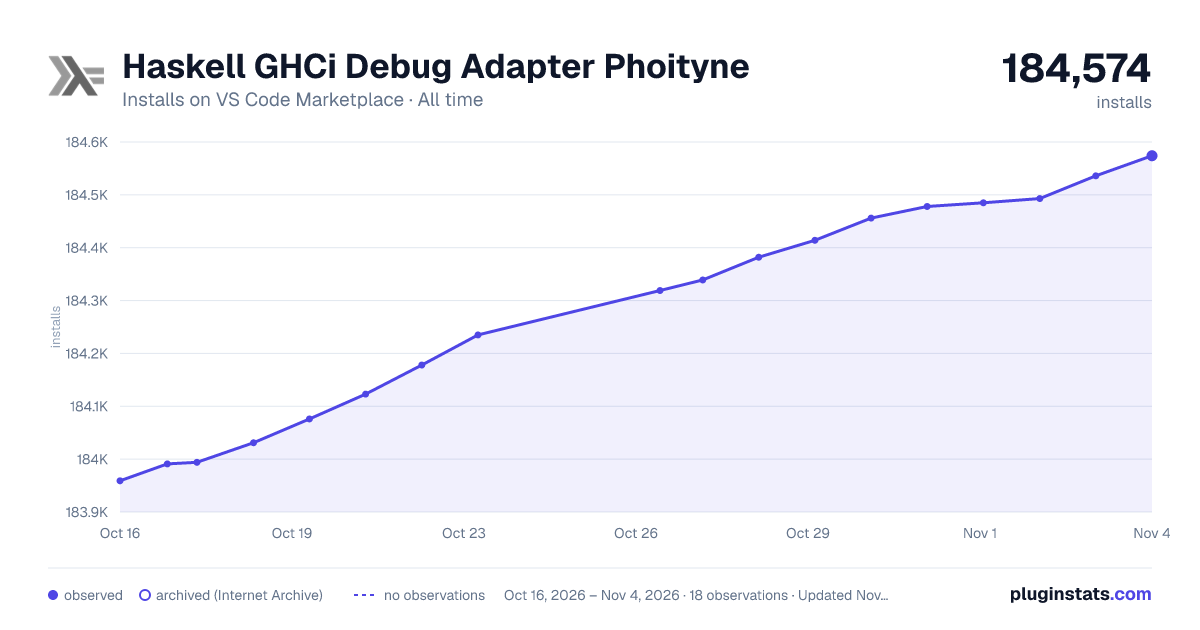

Adoption over time
7/30/90-day growth
Ranking history
Ratings over time
Listing placement
Listing placement
Filled points are observed values; hollow points come from Internet Archive snapshots of the listing page. Dashed segments span periods with no observations — values between points are not interpolated.
Each band is one page of 20. Installs on a linear scale. Placement is projected from installs, so it can differ from the marketplace's own sort order. Hover a dot to see the listing.
Recent observations
Full history (4)Similar VS Code Marketplace Debuggers plugins
All 20 Haskell GHCi Debug Adapter Phoityne alternativesData source
Install counts, average rating, and rating counts come from the public Visual Studio Marketplace gallery API. Installs are cumulative and exclude updates.
Listing: https://marketplace.visualstudio.com/items?itemName=phoityne.phoityne-vscode. First seen Oct 16, 2026; last successful collection Oct 19, 2026. See the methodology.