 PluginStats
IIS Express installs statistics
By Warren Buckley · VS Code Marketplace · Other
This allows you to run the current folder as a website using the IIS Express web server
IIS Express has 159,857 recorded installs on VS Code Marketplace, ranking #1786 of 2,501 tracked listings.
Rating: 4.52 / 5 from 21 ratings
About IIS Express
IIS Express for VSCode
This extension gives you the power to run a folder open in Visual Studio Code as a website using an IIS Express web server.




Sponsorware
<a href="https://github.com/sponsors/warrenbuckley"><img src="https://github.githubassets.com/images/modules/site/sponsors/pixel-mona-heart.gif" align="left" height="45" /></a> This is a free extension I have made for VSCode, if you find it useful to yourself or your business then <a href="https://github.com/sponsors/warrenbuckley">I would love you to consider sponsoring me on Github</a> please
Features
- Auto opens folder in browser
- Super simple way from the command pallete to start & stop the website
- See ouput from the IIS Express command line directly in Visual Studio
- Support for PHP via
ApplicationHost.configcommon changes for all sites running with IIS Express
Requirements
- Windows Machine (Sorry not for Linux, OSX or Web)
How do I Install IIS Express for VSCode?
Open the command pallete in VSCode & type ext install then search for IIS Express alternatively you can download the IIS Express for VSCode extension on the marketplace

Settings for IIS Express
IIS Express for VSCode automatically generates a default config file for you & stores it at .vscode/iisexpress.json
You can modify this file on disk inside VSCode to get intellisens/autocompletion for the available properties for you to set
| Setting | Alias | Description | Required |
|---|---|---|---|
| Port Number | port | The port number you wish to use for IIS Express | ✔ |
| Folder Path of Site | path | This property is optional & allows you to set an absolute path to the folder or subfolder as the root of your site/project for IIS Express to run. Additionally this support relative paths to the workspace folder such as ./my-sub-folder | ❌ |
| CLR | clr | This property is optional & allows you to set AppPool CLR version, 2.0 vs 4.0 | ❌ |
| Protocol | protocol | This property is optional & allows you to set http or https | ❌ |
| Url Suffix | url | This property is optional & allows you to set the page URL you wish to open eg: '/about/the-team' | ❌ |
Default Settings
By default with the file not generated it will create the following file for you on disk and setting a random port number.
{
  "port": 18420,
  "path": "./",
  "clr": "v4.0",
  "protocol": "http"
}
Global Settings for IIS Express for VSCode
Below is a table of settings that can be used to configure IIS Express for VSCode. You can easily get to these settings by using the settings (cog) icon in the IIS Express pane found by default under the file explorer.
| Setting | Alias | Description | Default Value |
|---|---|---|---|
| Path to IISExpress.exe | iisexpress.iisExpressPath | An absolute path to IISExpress.exe such as C:\Program Files\IIS Express\iisexpress.exe | null - We try to use default program path location |
| Path to AppCmd.exe | iisexpress.appcmdPath | An absolute path to appcmd.exe such as C:\Program Files\IIS Express\appcmd.exe | null - We try to use default program path location |
| Auto launch browser | iisexpress.autoLaunchBrowser | An option to disable or enable the browser from launching the site when IIS Express starts. By default this is true | true |
| Open in browser | iisexpress.autoLaunchBrowser | Decide which browser to auto launch the site with when iisexpress.autoLaunchBrowser is set to true | default (default, chrome, msedge, firefox, opera) |
Available commands
- Start Website - Start the current folder run as a website
- Stop Website - Stop the current folder run as a website
- Restart Website - Restart (Stop & Start) the current folder run as a website
- Become a supporter - Opens a webpage to my GitHub Sponsor page if you wish to donate & become a sponsor
- Open Settings - This directly opens VSCode settings for IIS Express
How do I use the extension?
The VSCode command pallete is your friend. Press F1 on the keyboard and start typing IISExpress to see the list of commands to use. Alternatively is version 1.2.0 and newer there is a new panel view that by default lives under the list of files in the file explorer, in newer versions of VSCode you are able to drag and drop this pane around to a new location if you prefer to put it elsewhere.
How do I use HTTPS for my site?
To enable HTTPS for your site use the settings file .vscode/iisexpress.json set the property protocol to https and ensure the port property is in the range between 44300 - 44399
How do I run site on a specific port number?
If you need to run your application on a specific port number, you can edit the port property in the .vscode/iisexpress.json. The next time the application runs it will use the new & updated port number.…
Description from the VS Code Marketplace listing.
- IIS
- IIS Express
- json
- keybindings
- Server
- Web Server
README badge
Show your rank in a README or on your website. The badge updates automatically.
Charts
Images: 30d · 1y · all time · 1600×900 dark


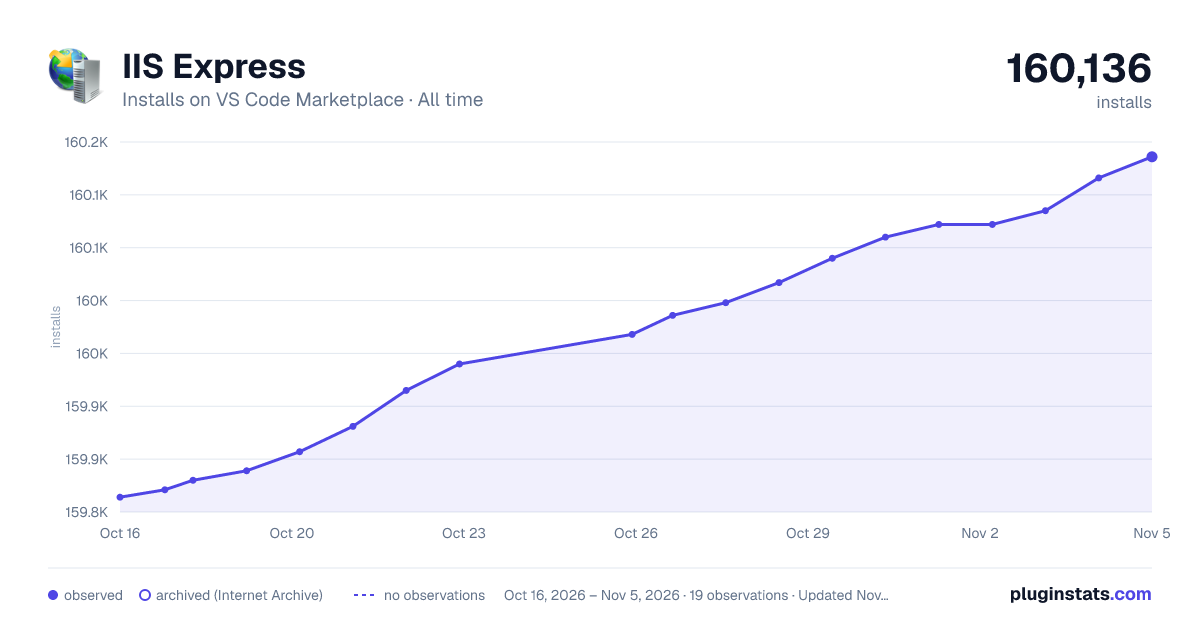

Adoption over time
7/30/90-day growth
Ranking history
Ratings over time
Listing placement
Listing placement
Filled points are observed values; hollow points come from Internet Archive snapshots of the listing page. Dashed segments span periods with no observations — values between points are not interpolated.
Each band is one page of 20. Installs on a linear scale. Placement is projected from installs, so it can differ from the marketplace's own sort order. Hover a dot to see the listing.
Recent observations
Full history (5)Similar VS Code Marketplace Other plugins
All 20 IIS Express alternativesData source
Install counts, average rating, and rating counts come from the public Visual Studio Marketplace gallery API. Installs are cumulative and exclude updates.
Listing: https://marketplace.visualstudio.com/items?itemName=warren-buckley.iis-express. First seen Oct 16, 2026; last successful collection Oct 20, 2026. See the methodology.