 PluginStats
Catppuccin for VSCode installs statistics
By Catppuccin (5 listings) · VS Code Marketplace · Themes
🦌 Soothing pastel theme for VSCode
Catppuccin for VSCode has 1,457,890 recorded installs on VS Code Marketplace, ranking #429 of 2,501 tracked listings.
Rating: 4.97 / 5 from 58 ratings
About Catppuccin for VSCode
Previews
<details> <summary>🌻 Latte</summary> <img src="https://github.com/catppuccin/vscode/raw/HEAD/assets/latte.webp"/> </details> <details> <summary>🪴 Frappé</summary> <img src="https://github.com/catppuccin/vscode/raw/HEAD/assets/frappe.webp"/> </details> <details> <summary>🌺 Macchiato</summary> <img src="https://github.com/catppuccin/vscode/raw/HEAD/assets/macchiato.webp"/> </details> <details> <summary>🌿 Mocha</summary> <img src="https://github.com/catppuccin/vscode/raw/HEAD/assets/mocha.webp"/> </details>Usage
Preferred method of installation
Install the extension from a Marketplace:
Manual method for installation
Download the VSIX from the latest GitHub release. Open the Command Palette and select "Extensions: Install from VSIX...", then open the file you just downloaded.
Using the JSON files
If you need to use the JSON files for libraries like Shiki, the theme files are published to NPM as @catppuccin/vscode.
Nix (Home-Manager) users
If you would like to change the theme configuration, the theme expects to have a mutable directory to write its JSON files into. This means that you will have to either:
- Install this extension in a non-declarative way so that the extension has permissions to write files.
This means fully excludingnixpkgs.vscode-extensions.catppuccin.catppuccin-vscfrom your configuration; Just usingprograms.vscode.mutableExtensionsDir = true;will NOT WORK. - Use our catppuccin/nix module to build it with your VSCode configuration, using overrides.
This is a declarative way to compile the theme with your preferred options. Please refer to the example below for a sample configuration.
{
  # in your inputs:
  inputs.catppuccin.url = "github:catppuccin/nix";

  # in your home-manager options:
  catppuccin = {
    enable = true;
    # optionally configure the extension settings, defaults are shown below:
    vscode = {
      accent = "mauve";
      settings = {
        boldKeywords = true;
        italicComments = true;
        italicKeywords = true;
        colorOverrides = {};
        customUIColors = {};
        workbenchMode = "default";
        bracketMode = "rainbow";
        extraBordersEnabled = false;
      };
    };
  };
  programs.vscode = {
    enable = true;
  };
}
Customization
[!Note] We also have a Catppuccin Icon Pack!
VSCode settings
The following settings inside your settings.json are recommended for this plugin:
{
  // we try to make semantic highlighting look good
  "editor.semanticHighlighting.enabled": true,
  // prevent VSCode from modifying the terminal colors
  "terminal.integrated.minimumContrastRatio": 1,
  // make the window's titlebar use the workbench colors
  "window.titleBarStyle": "custom",

  // applicable if you use Go, this is an opt-in flag!
  "gopls": {
    "ui.semanticTokens": true,
  },
}
Catppuccin settings
Catppuccin for VSCode can be customized to your liking. If you like the Catppuccin colors but feel that they are a bit too bright for working at night, customization got you covered!
{
  // use Mocha as the base
  "workbench.colorTheme": "Catppuccin Mocha",
  // pink as the accent color
  "catppuccin.accentColor": "pink",
  // make Mocha specifically very dark
  // (this preserves other flavors!)
  "catppuccin.colorOverrides": {
    "mocha": {
      "base": "#000000",
      "mantle": "#010101",
      "crust": "#020202",
    },
  },
  // use your accent (pink) on the statusBar as well
  "catppuccin.customUIColors": {
    "mocha": {
      "statusBar.foreground": "accent",
    },
  },
}
To see all available options, open your settings and look for Extensions > Catppuccin.
Custom accent color
catppuccin.accentColor
You can choose any color as your "accent" color. mauve is our default, but you can add more personality by using your favorite!
Disable italics & bold fonts
You can toggle whether to use
- italics for keywords:
catppuccin.italicKeywords - italics for comments:
catppuccin.italicComments - bold for keywords:
catppuccin.boldKeywords
Flat appearance…
Description from the VS Code Marketplace listing.
- color-theme
- theme
README badge
Show your rank in a README or on your website. The badge updates automatically.
Charts
Images: 30d · 1y · all time · 1600×900 dark


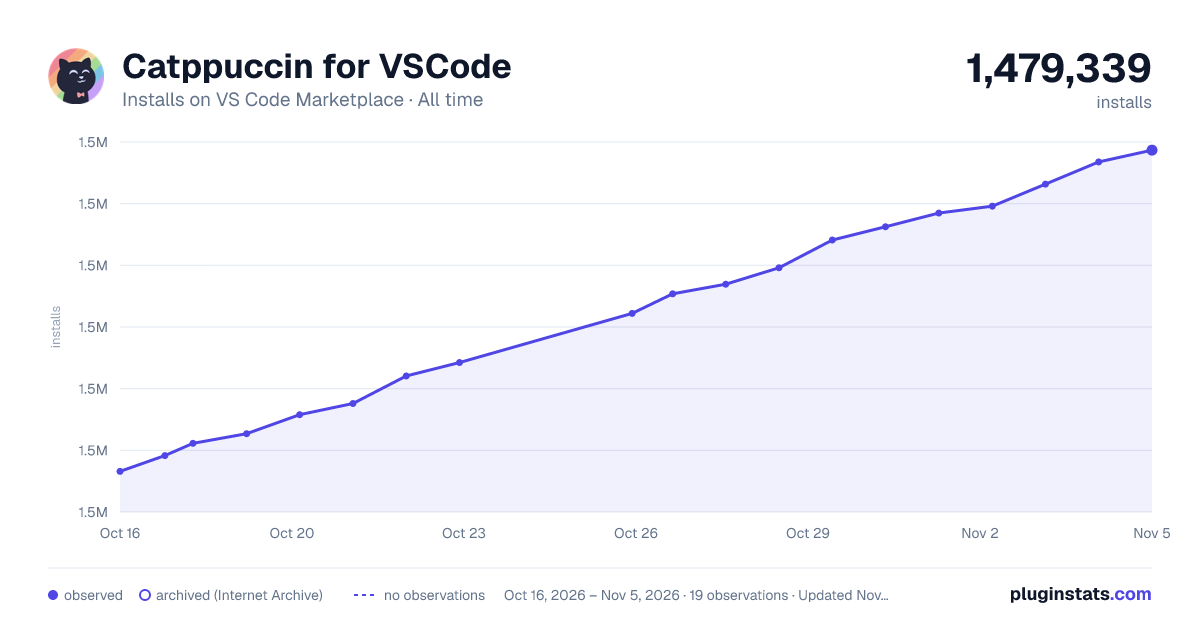

Adoption over time
7/30/90-day growth
Ranking history
Ratings over time
Listing placement
Listing placement
Filled points are observed values; hollow points come from Internet Archive snapshots of the listing page. Dashed segments span periods with no observations — values between points are not interpolated.
Each band is one page of 20. Installs on a linear scale. Placement is projected from installs, so it can differ from the marketplace's own sort order. Hover a dot to see the listing.
Recent observations
Full history (5)Similar VS Code Marketplace Themes plugins
All 20 Catppuccin for VSCode alternativesData source
Install counts, average rating, and rating counts come from the public Visual Studio Marketplace gallery API. Installs are cumulative and exclude updates.
Listing: https://marketplace.visualstudio.com/items?itemName=Catppuccin.catppuccin-vsc. First seen Oct 16, 2026; last successful collection Oct 20, 2026. See the methodology.