 PluginStats
WSL workspaceFolder installs statistics
By lfurzewaddock · VS Code Marketplace · Other
Returns `workspaceFolder` as a WSL path. Useful where WSL format workspaceFolder path is required, e.g. for debug 'remoteRoot' property in launch config, etc.
WSL workspaceFolder has 102,014 recorded installs on VS Code Marketplace.
It ranks #2337 of 2,500 tracked VS Code Marketplace listings by installs.
It is rated 5.0 out of 5 from 7 ratings.
PluginStats has 3 daily observations since Oct 16, 2026; the latest is from Oct 18, 2026.
Rating: 5.00 / 5 from 7 ratings
About WSL workspaceFolder
VS Code extension: WSL workspaceFolder
Translates workspaceFolder path into WSL path format, using WSL wslpath tool.
Use command as a placeholder where WSL path for the workspaceFolder is required, e.g. the remoteRoot attribute in launch config for debug, etc.
Features
This extension returns the workspaceFolder path, converted from Windows path format to WSL path format. For example, a workspaceFolder with a windows path of c:\\Users\\Me\\Projects\\project would return a WSL path of /mnt/c/Users/Me/Projects/project.
Requirements
• MS Windows 10 using WSL (Windows Subsystem for Linux) • MS Windows 10 => version 17046 for wslpath tool • Extension code contributors should either install current release of WSL workspaceFolder or replace command reference in .vscode/launch.json • VS Code version 1.18.1+ (support multi-root features)
Extension Settings
This extension contributes the following command:
• extension.vscode-wsl-workspaceFolder: returns WSL format path string to workspaceFolder
Usage
standard single-root project
e.g. .vscode/launch.json
multi-root project
Optional: add windows.name property to config (used to link/associate an 'Attach to remote' debug config with a workspace folder)
e.g. .vscode/launch.json
Known Issues
single/multi-root projects
• When invoked by VS Code in MS Windows 10 environment, which does not use WSL, this extension will still attempt to return a WSL path format, even when this is not possible/required.
multi-root projects
• This extension translates the file system path from a workspace folder URI into a WSL path. However, presently there is no elegant way in multi-root projects to link/associate an 'Attach to remote' debug config with a workspace folder. Therefore, I suggest using the optional windows.name .vscode/launch.json property to avoid being required to select a workspace folder from the picker UI for every debug session. • If the optional windows.name .vscode/launch.json property is not present, a 'Select workspace folder' picker will open centre, top of screen. If you fail to make a selection before changing focus the picker will close automatically and the extension will fail.
Release Notes
1.1.2
Add support for multi-root projects
1.0.2
Initial release of VS Code extension vscode-wsl-workspacefolder
Extension Icon
Folder icon (no text) sourced from theSquid.ink 40, under Creative Commons (Attribution 3.0 Unported) licence.
Description from the VS Code Marketplace listing.
- multi-root ready
- path
- Windows path format
- workspaceFolder
- WSL
- WSL path format
Where WSL workspaceFolder sits in the listing
Each band is one page of 20. Installs on a log scale. Placement is projected from installs, so it can differ from the marketplace's own sort order. Hover a dot to see the listing.


Charts
Images: 30d · 1y · all time · 1600×900 dark


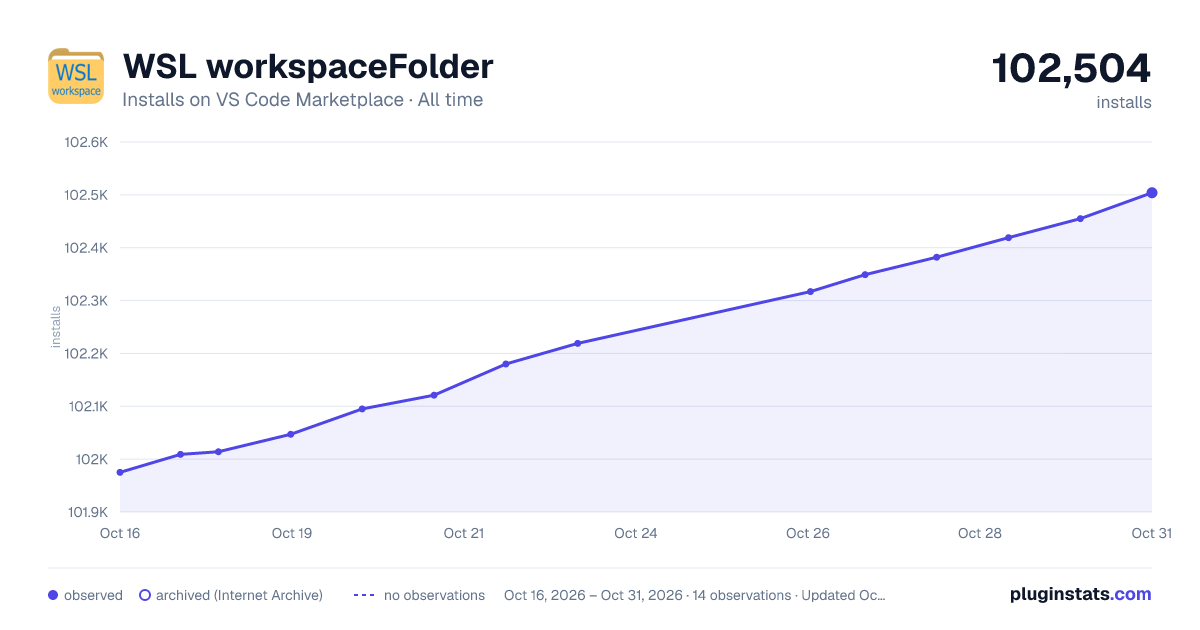

Adoption over time


7/30/90-day growth


Ranking history


Filled points are observed values; hollow points come from Internet Archive snapshots of the listing page. Dashed segments span periods with no observations — values between points are not interpolated.
Recent observations
Full history (3)Similar VS Code Marketplace Other plugins
Data source
Install counts, average rating, and rating counts come from the public Visual Studio Marketplace gallery API. Installs are cumulative and exclude updates.
Listing: https://marketplace.visualstudio.com/items?itemName=lfurzewaddock.vscode-wsl-workspacefolder. First seen Oct 16, 2026; last successful collection Oct 18, 2026. See the methodology.