 PluginStats
Compare Folders installs statistics
By MoshFeu (2 listings) · VS Code Marketplace · Other
Compare folders by contents, present the files that have differences and display the diffs side by side
Compare Folders has 718,628 recorded installs on VS Code Marketplace, ranking #675 of 2,501 tracked listings.
Rating: 4.39 / 5 from 92 ratings
About Compare Folders
The extension allows you to compare folders, show the diffs in a list and present diff in a splitted view side by side.
Thanks
The extension uses the great dir-compare package made by Liviu Grigorescu. If you like this extension, please give a star to dir-compare!
Limitations
Currently seems like there might be issues [#81, #83] with comparing local and remote folders over ssh. Please take this under consideration.
How to use?
There are several ways to choose folders to compare:
• Command Palette • Compare a folder against workspace choose a folder to compare against the workspace's folder (when workspace is not empty) • Choose 2 folders and compare - opens OS folder chooser twice • Compare Folders Panel (Click on the icon in the Activity Bar) • Click to select a folder see 1st item • Click to select folders see 2nd item • File explorer • Select 2 folders, right click and click on Compare selected folders see 2nd item • From history • Pick from recent compares chose one of the pairs you compared in the past. • (The list can be reset by Clear recent compares)
UI Features per Panel Section:
Differences
• Toolbar • Pick from History: Choose one of the pairs you compared in the past. • Swap Sides: Swap the sides of the compared folders. • Refresh: Re-compare the folders if there are changes in the compared folders' files. • View as List / View as Tree: Toggle between list and tree view modes. • Files • Dismiss: Remove the file from the list of compared items. • Take My File / Take Compared File: Replace the file with the one from the other side. • Exclude from Comparison: Add the file or folder to the excludeFilter setting to permanently exclude it from comparisons.
Only in My Folder / Only in Compared Folder
• Files • Copy to My Folder / Copy to Compared Folder: Copy the file to the other side. • Delete: Permanently delete the file from the file system. • Exclude from Comparison: Add the file or folder to the excludeFilter setting to permanently exclude it from comparisons.
Options (under vscode settings)
• excludeFilter - glob string • includeFilter - glob string
Example
• compareContent - boolean - Compares files by content • diffViewTitle - One of the options: "name only", "compared path", "full path" • ignoreFileNameCase - boolean - Compare files with the same name but different case • diffLayout - One of the options: "local compared" or "compared local" • showIdentical - boolean - Whether or not show the identical files panel • showFileCount - boolean - Show the number of files in each view section title • useDiffMerge - boolean - Whether or not using Diff & Merge extension as the Diff viewer. In order to use this option, you should install the extension • folderLeft + folderRight - strings - paths of 2 folders, compare them on the extension load. • fileParsingRules - Array of rules for parsing specific file patterns with external tools when viewing diffs. Files are parsed on-demand only when you select "View Parsed Diff" button, which will show up next to files which match a parsing rule.
Example
• ignoreExtension - Set groups of extensions so while comparing, pairs of files considered the same file if both of the files extension are in the same group. Note: each extension can show only once it this list Example • ignoreLineEnding - boolean - ignore crlf/lf line ending differences • ignoreWhiteSpaces - boolean - ignore white spaces at the beginning and ending of a line (similar to diff -b) • ignoreAllWhiteSpaces - boolean - ignore all white space differences (similar to diff -w) • ignoreEmptyLines - boolean - ignore differences caused by empty lines (similar to diff -B) • ignoreStrings - string[] - list of strings to ignore when comparing file contents. Files that differ only by these strings are treated as identical. Example: ["dev", "staging", "prod"] to compare configuration files across environments. Only applies when compareContent is enabled. Binary files are always compared normally. ⚠️ This option reads and transforms every compared text file in memory and may be slow on large files. • respectGitIgnore - boolean - include / exclude files based on .gitignore - this option works together with includeFilter and excludeFilter options. ⚠️ The extension supports the main basic gitignore rules. For instance, it supports negation (!), but it doesn't support .gitignore files in subfolders. If there is an important use case that is not supported, please open an issue. • warnBeforeDelete - boolean - Show a warning message before deleting files • warnBeforeTake - boolean - Show a warning message before taking/replacing files • defaultDiffViewMode - One of the options: "tree" or "list". The default view mode when vscode is opened. Later it can be toggled by the "View as list / View as tree" button
CLI
By calling the following command from the terminal / command line, the extension will be calling on vscode load and show the differences view
Contributors
llgcode
Per Persson
orellabac
Niccolò Mineo
Sam Pellino
Michael Messer
koby08
Localization
Compare Folders is available in the following languages:
• English - Default • 한국어 (Korean) - Thanks to @justcontributor
Want to help translate this extension into your language? See the Localization Guide for instructions.
Like the extension?
Show your love
• ⭐️ • Give it 5 ⭐️
Isn't working as expected?
Please create an issue
Changelog
You can find it here
Credits
Activity bar's icon (and more) by Stockio.com Null icon made from Icon Fonts is licensed by CC BY 3.0 External link icon made by Dave Gandy from www.flaticon.com
Read more about the development process
You can find the series of the posts about how this extension developed step by step in medium.com.
Description from the VS Code Marketplace listing.
- compare
- compare folders
- diff
- diff folders
README badge
Show your rank in a README or on your website. The badge updates automatically.
Charts
Images: 30d · 1y · all time · 1600×900 dark


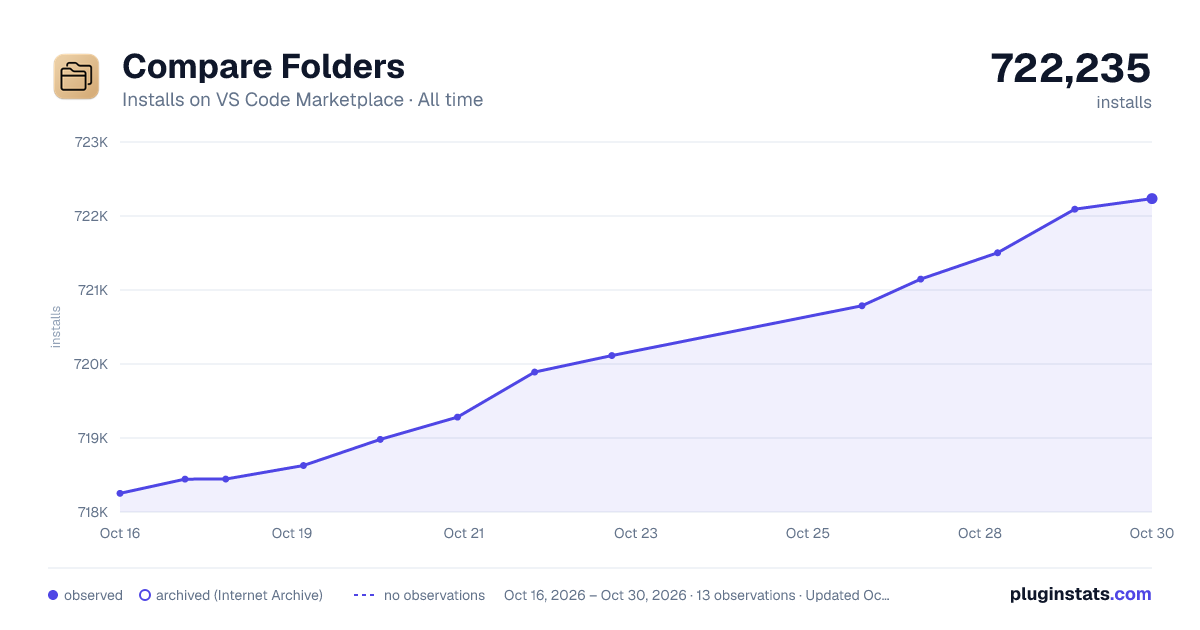

Adoption over time
7/30/90-day growth
Ranking history
Ratings over time
Listing placement
Listing placement
Filled points are observed values; hollow points come from Internet Archive snapshots of the listing page. Dashed segments span periods with no observations — values between points are not interpolated.
Each band is one page of 20. Installs on a linear scale. Placement is projected from installs, so it can differ from the marketplace's own sort order. Hover a dot to see the listing.
Recent observations
Full history (4)Similar VS Code Marketplace Other plugins
All 20 Compare Folders alternativesData source
Install counts, average rating, and rating counts come from the public Visual Studio Marketplace gallery API. Installs are cumulative and exclude updates.
Listing: https://marketplace.visualstudio.com/items?itemName=moshfeu.compare-folders. First seen Oct 16, 2026; last successful collection Oct 19, 2026. See the methodology.