 PluginStats
Peripheral Inspector installs statistics
By Eclipse CDT Cloud (3 listings) · VS Code Marketplace · Debuggers
Standalone Peripheral Inspector extension extracted from cortex-debug
Peripheral Inspector has 196,756 recorded installs on VS Code Marketplace, ranking #1534 of 2,501 tracked listings.
About Peripheral Inspector
Peripheral Inspector
This standalone SVD Viewer extension is extracted from cortex-debug and allows you to view and change on-chip peripheral settings.
Usage
The Peripheral Inspector displays information about peripheral registers.
Depending on the context, the following icons may be visible:
| Icon | Use it to |
| | Collapse currently viewed peripherals | | | Open search bar to find specific properties | | | Refresh the current view | | | Export peripheral registers | | | Update the register value |
Specifying SVD Files
The SVD Viewer extension uses System View Description (SVD) files to display information about the selected part, including the Cortex Peripherals view.
Choose one of the following methods to specify your SVD file in your launch.json configuration(s):
Use the CMSIS pack asset service
Set the definitionPath configuration variable to a qualified pack reference in the form ::@ e.g.:
If the pack supports multiple devices and/or processors, you will be prompted to select these. Alternatively, set them in your configuration using the optional deviceName and processorName variables:
TIP: The pack reference and device name can be automatically derived if you use the Arm Device Manager extension in VS Code using these commands:
Install a Cortex Debug Support Pack
Find a Cortex Debug Support Pack for your device and install it. You can then specify just the deviceName variable in your launch configuration:
Specify the path to your SVD file
You can obtain an SVD file from a CMSIS pack or from your device manufacturer. For example use these instructions for ST devices.
Other vendors may ship SVD files when you install their software or device packs or you could write your own custom SVD file.
Once you have the SVD file, specify the location of it in your launch.json using the definitionPath variable:
Extending Peripheral Inspector
It is possible to extend the Peripheral Inspector with new file extension providers in your VSCode extension. This method will provide reading new file formats and load the peripherals information into the Peripheral Inspector.
For more details about the implementation, please check the Extending Peripheral Inspector document.
Settings
All variable key names used to extract data from debug launch configurations can be modified. This allows variable name clashes to be avoided as well as the need to duplicate configuration entries.
The following list outlines the setting names and default values:
• peripheral-inspector.definitionPathConfig - Debug configuration key to use to get the SVD path (default definitionPath) • peripheral-inspector.deviceConfig - Debug configuration key to use to get the device name (default: deviceName) • peripheral-inspector.processorConfig - Debug configuration key to use to get the processor name (default: processorName) • peripheral-inspector.packAssetUrl - Base URL for CMSIS pack assets (default: https://pack-content.cmsis.io) • peripheral-inspector.svdAddrGapThreshold- If the gap between registers is less than this threshold (multiple of 8), combine into a single read from device. -1 means never combine registers and is very slow (default: 0, means combine but no gaps)
Additionally the following settings can be used to customize the Peripheral Inspector:
• peripheral-inspector.saveLayout- Save layout of peripheral view between sessions (default: true) • peripheral-inspector.ignorePeripherals - List of peripheral names to ignore. They will not show up in the tree view and no values are read from the target system. The user can add variables by using the context menu (Workspace only) in the tree view, or by setting them manually in the User and Workspace preferences.
Contributing
We welcome contributions on GitHub. Check our contribution guidelines for more info. This open-source project is part of Eclipse CDT Cloud.
Description from the VS Code Marketplace listing.
- debuggers
README badge
Show your rank in a README or on your website. The badge updates automatically.
Charts
Images: 30d · 1y · all time · 1600×900 dark


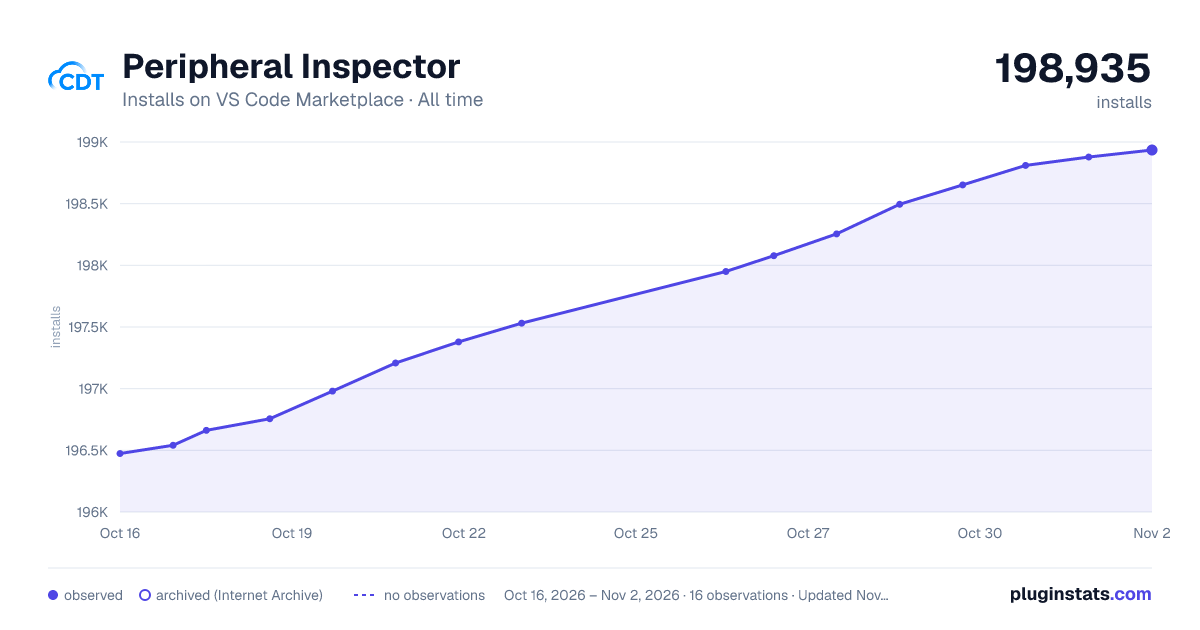

Adoption over time
7/30/90-day growth
Ranking history
Ratings over time
Listing placement
Listing placement
Filled points are observed values; hollow points come from Internet Archive snapshots of the listing page. Dashed segments span periods with no observations — values between points are not interpolated.
Each band is one page of 20. Installs on a linear scale. Placement is projected from installs, so it can differ from the marketplace's own sort order. Hover a dot to see the listing.
Recent observations
Full history (4)Similar VS Code Marketplace Debuggers plugins
All 20 Peripheral Inspector alternativesData source
Install counts, average rating, and rating counts come from the public Visual Studio Marketplace gallery API. Installs are cumulative and exclude updates.
Listing: https://marketplace.visualstudio.com/items?itemName=eclipse-cdt.peripheral-inspector. First seen Oct 16, 2026; last successful collection Oct 19, 2026. See the methodology.