 PluginStats
waldo's CRS AL Language Extension installs statistics
By waldo (2 listings) · VS Code Marketplace · Snippets
Make working with the (Dynamics NAV / 365) AL Language easier and more efficient.
waldo's CRS AL Language Extension has 340,269 recorded installs on VS Code Marketplace, ranking #1069 of 2,501 tracked listings.
Rating: 5.00 / 5 from 9 ratings
About waldo's CRS AL Language Extension



crs-al-language-extension
A bunch of useful commands, settings and snippets to improve your life as an al developer for Microsoft Dynamics 365 Business Central (or "Microsoft Dynamics NAV").
You can support me here:

Features
These features are concluded at this moment:
Install waldo's modules (Temporarily disabled):
Download all PowerShell modules of author "waldo" from the PowerShellGallery. Basically resulting in:
- Cloud.Ready.Software.NAV
- Cloud.Ready.Software.SQL
- Cloud.Ready.Software.Windows
- Cloud.Ready.Software.PowerShell
Visualize dependencies by generating a GraphViz .dot file
Command: CRS: Create GraphViz Dependency Graph
This command will read all app.json files in your workspace (so this function is really useful in a Multi-root workspace) and create a .dot dependency file from it. To display this file graphically, I recommend to also install the extension Graphviz Interactive Preview. If you have, this command will automatically open the preview after generating the graph.
This functionality will take these settings into account:
CRS.DependencyGraph.IncludeTestApps: Whether to include all dependencies to test apps in the Dependency Graph.CRS.DependencyGraph.ExcludeAppNames: List of apps you don't want in the dependency graph.CRS.DependencyGraph.ExcludePublishers: List of publishers you don't want in the dependency graph.CRS.DependencyGraph.RemovePrefix: Remove this prefix from the appname in the graph. Remark: this has no influence on the 'Exluce AppNames' setting.
To generate a DGML (using the ALC.EXE):
CRS: Compile DGML, which enables the new capabilities of the compiler to generate a DGML document that can be opened by a DGML reader (usually Visual Studio).
Run Object
The idea is to be able to run an object straight from the development environment. There are four functions in the Command Palette:
CRS: Run Object (Web Client)CRS: Run Object (Tablet Client)CRS: Run Object (Phone Client)CRS: Run Object (Windows Client)Depending on which client, you will be asked for object type and object id. The functionality looks at the settings (launch.json and configuration settings).
Furthermore, there are ways to open certain object directly:
CRS: Run Current Object (Web Client)(CTRL+SHIFT+r) - runs the object from the open file (the extension needs to be published first). You can also run this command from the status bar ('Run In Web Client') and the context menu from the explorer.`CRS: Publish and Run Current ObjectCRS: Run AL Test Tool in Web ClientCRS: Run Event Subscribers Page in Web ClientCRS: Run Database Locks Page in Web Client
Reorganize Files
The commands can rename your file, and move the file to the folder, corresponding to the object type. There are four functions in the Command Palette:
- CRS: Rename - Current File
- CRS: Rename - All Files
- CRS: Reorganize - Current File
- CRS: CRS: Reorganize - All Files Note - "Reorganize" will move a test-codeunit to the test-folder
With the command CRS: Configure Best-practice File Naming, it will set up your user settings or workspace settings with some settings that are considered to be best practice.
Search on Google / Microsoft Docs
Two commands have been added to search for any given search string on Google or Microsoft Docs. The search string "Business Central" will automatically be added.
- CRS: Search Microsoft Docs
- CRS: Search Google
The selected word in the editor will be added by default as a search string.

Snippets
al Snippets:
- tpagewizard3stepswaldo
- creates a wizard with 3 steps
- includes placeholders
- ttableextensionwaldo
- Quite the same as the default snippet, but with the comment to include an TargetTableId to be able to properly rename the file (which might need that ID).
- tpageextensionwaldo
- Quite the same as the default snippet, but with the comment to include an TargetPageId to be able to properly rename the file (which might need that ID).
- tpagecustomizationwaldo
- Quite the same as the default snippet, but with the comment to include an TargetPageId to be able to properly rename the file (which might need that ID).
- tvarwaldo
- Some easier way to greate a variable
- tfieldgroup(s)waldo
- To work with fieldgroups (Like "Brick" & "DropDown")
- tProcedureFromClipboard
- to convert a piece of code into a function, just cut the code and use this snippet - pretty cool ;-).
- tTestHandler..
- multiple snippets for easily adding handlers in test-codeunits…
Description from the VS Code Marketplace listing.
- al
- Dynamics 365 Business Central
- Dynamics NAV
- ERP
- multi-root ready
- snippet
README badge
Show your rank in a README or on your website. The badge updates automatically.
Charts
Images: 30d · 1y · all time · 1600×900 dark


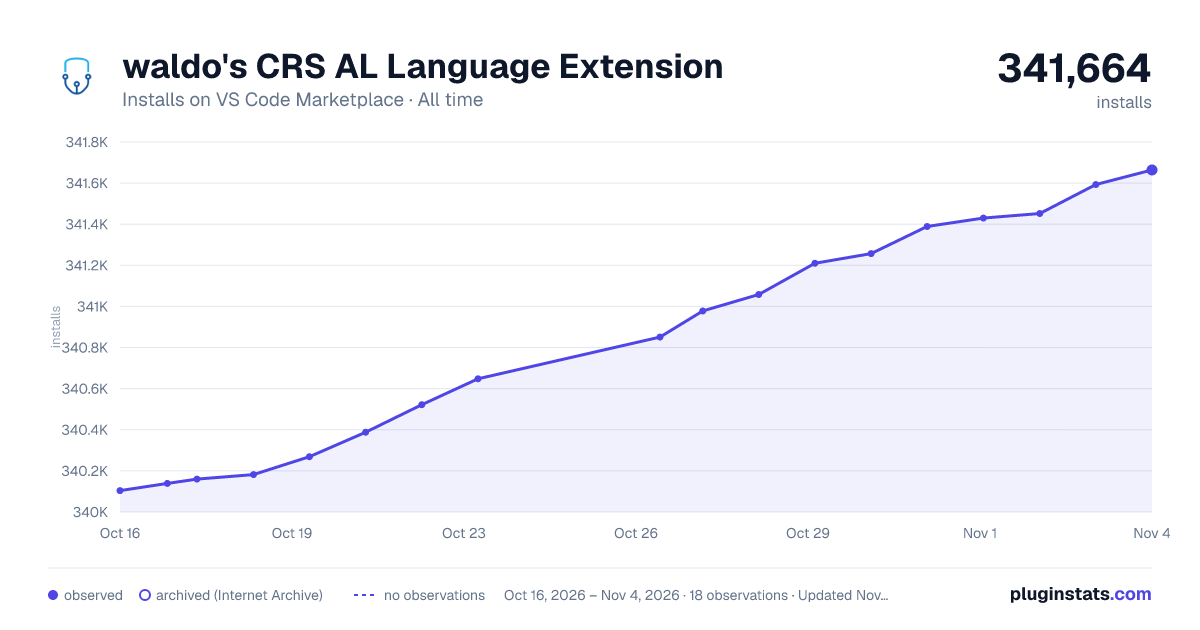

Adoption over time
7/30/90-day growth
Ranking history
Ratings over time
Listing placement
Listing placement
Listing placement
Filled points are observed values; hollow points come from Internet Archive snapshots of the listing page. Dashed segments span periods with no observations — values between points are not interpolated.
Each band is one page of 20. Installs on a linear scale. Placement is projected from installs, so it can differ from the marketplace's own sort order. Hover a dot to see the listing.
Recent observations
Full history (5)Similar VS Code Marketplace Snippets plugins
All 20 waldo's CRS AL Language Extension alternativesData source
Install counts, average rating, and rating counts come from the public Visual Studio Marketplace gallery API. Installs are cumulative and exclude updates.
Listing: https://marketplace.visualstudio.com/items?itemName=waldo.crs-al-language-extension. First seen Oct 16, 2026; last successful collection Oct 20, 2026. See the methodology.