 PluginStats
Todo Tree installs statistics
By Gruntfuggly (2 listings) · VS Code Marketplace · Other
Show TODO, FIXME, etc. comment tags in a tree view
Todo Tree has 7,871,373 recorded installs on VS Code Marketplace.
It ranks #118 of 2,501 tracked VS Code Marketplace listings by installs.
It is rated 4.7 out of 5 from 215 ratings.
PluginStats has 4 daily observations since Oct 16, 2026; the latest is from Oct 19, 2026.
Rating: 4.72 / 5 from 215 ratings
About Todo Tree
Todo Tree
This extension quickly searches (using ripgrep) your workspace for comment tags like TODO and FIXME, and displays them in a tree view in the activity bar. The view can be dragged out of the activity bar into the explorer pane (or anywhere else you would prefer it to be).
Clicking a TODO within the tree will open the file and put the cursor on the line containing the TODO.
Found TODOs can also be highlighted in open files.
*Please see the wiki for configuration examples.*
*Notes:*
• *User* rg.conf *files are ignored.*
Highlighting
*New!:* If you just want to set different colours for tags, you can now enable todo-tree.highlights.useColourScheme. This will apply a set of colours (which can be changed) to the tags in the order that they are defined.
Highlighting tags is configurable. Use defaultHighlight to set up highlights for all tags. If you need to configure individual tags differently, use customHighlight. If settings are not specified in customHighlight, the value from defaultHighlight is used.
Custom highlights can also be specified for sub tags (if used).
*Note: defaultHighlight is not applied to sub tags.*
Both defaultHighlight and customHighlight allow for the following settings:
foreground - used to set the foreground colour of the highlight in the editor and the marker in the ruler.
background - used to set the background colour of the highlight in the editor.
*Note: Foreground and background colours can be specified using HTML/CSS colour names (e.g. "Salmon"), RGB hex values (e.g. "#80FF00"), RGB CSS style values (e.g. "rgb(255,128,0)" or colours from the current theme, e.g. peekViewResult.background. See Theme Color for the details. Hex and RGB values can also have an alpha specified, e.g. "#ff800080" or "rgba(255,128,0,0.5)".*
opacity - percentage value used with the background colour. 100% will produce an opaque background which will obscure selection and other decorations.
*Note: opacity can only be specified when hex or RGB colours are used.*
fontWeight, fontStyle, textDecoration - can be used to style the highlight with standard CSS values.
borderRadius - used to set the border radius of the background of the highlight.
icon - used to set a different icon in the tree view. Must be a valid octicon (see ) or codicon (see ). If using codicons, specify them in the format "$(*icon*)". The icon defaults to a tick if it's not valid. You can also use "todo-tree", or "todo-tree-filled" if you want to use the icon from the activity view.
iconColour - used to set the colour of the icon in the tree. If not specified, it will try to use the foreground colour or the background colour. Colour can be specified as per foreground and background colours, but see note below.
*Note: Theme colours are only supported when using codicons. Hex, RGB and HTML colours are only supported when using octicons or the default icon.*
gutterIcon - set to true to show the icon in the editor gutter.
*Note: Unfortunately, only octicons and the todo-tree icon can be displayed in the gutter.*
rulerColour - used to set the colour of the marker in the overview ruler. If not specified, it will default to use the foreground colour. Colour can be specified as per foreground and background colours.
rulerOpacity - used to set the opacity of the ruler markers.
*Note: Only works with hex and RGB colour settings.*
rulerLane - used to set the lane for the marker in the overview ruler. If not specified, it will default to the right hand lane. Use one of "left", "center", "right", or "full". You can also use "none" to disable the ruler markers.
type - used to control how much is highlighted in the editor. Valid values are:
• tag - highlights just the tag • text - highlights the tag and any text after the tag • tag-and-comment - highlights the comment characters (or the start of the match) and the tag • tag-and-subTag - as above, but allows the sub tag to be highlight too (with colours defined in custom highlights) • text-and-comment - highlights the comment characters (or the start of the match), the tag and the text after the tag • line - highlights the entire line containing the tag • whole-line - highlights the entire line containing the tag to the full width of the editor • capture-groups:n,m... - highlights capture groups from the regex, where 'n' is the index into the regex • none - disable highlightling in the document
hideFromTree - used to hide tags from the tree, but still highlight in files
hideFromStatusBar - prevents the tag from being included in the status bar counts
hideFromActivityBar - prevents the tag from being included in the activity bar badge count
Example:
*Note: The highlight configuration is separate from the settings for the search. Adding settings in customHighlight does not automatically add the tags into todo-tree.general.tags.*
*Note: Using the capture-groups setting in type may have an impact on performance with large files.
Installing
You can install the latest version of the extension via the Visual Studio Marketplace here.
Alternatively, open Visual Studio code, press Ctrl+P or Cmd+P and type:
ext install Gruntfuggly.todo-tree
Source Code
The source code is available on GitHub here.
Controls
The tree view header can contain the following buttons:
• Collapse all tree nodes • Expand all tree nodes • Show the tree view as a flat list, with the full filename for each TODO • Show the view as a list of tags • Show the tree view as a tree with expandable nodes for each folder (default) • Group the TODOs in the tree by the tag • Organise the TODOs by file (default) • Only show items in the tree which match the entered filter text • Remove any active filter • Rebuild the tree • Show tags from open files only • Show tags from the current file • Show tags from workspace only • Show tags from workspace and open files • Show the current file in the tree • Export the tree content to a file
Folder Filter Context Menu…
Description from the VS Code Marketplace listing.
- multi-root ready
- task
- tasklist
- todo
Charts
Images: 30d · 1y · all time · 1600×900 dark


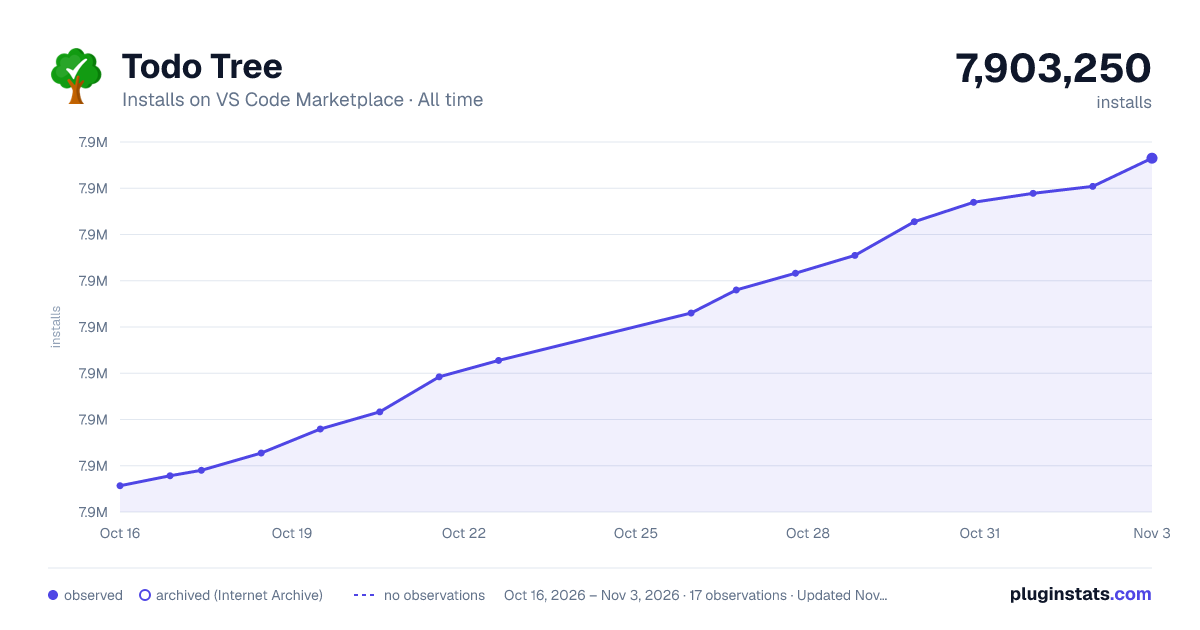

Adoption over time


7/30/90-day growth


Ratings over time


Listing placement


Filled points are observed values; hollow points come from Internet Archive snapshots of the listing page. Dashed segments span periods with no observations — values between points are not interpolated.
Each band is one page of 20. Installs on a log scale. Placement is projected from installs, so it can differ from the marketplace's own sort order. Hover a dot to see the listing.
Recent observations
Full history (4)Similar VS Code Marketplace Other plugins
All 20 Todo Tree alternativesData source
Install counts, average rating, and rating counts come from the public Visual Studio Marketplace gallery API. Installs are cumulative and exclude updates.
Listing: https://marketplace.visualstudio.com/items?itemName=Gruntfuggly.todo-tree. First seen Oct 16, 2026; last successful collection Oct 19, 2026. See the methodology.