 PluginStats
MemoryView installs statistics
By mcu-debug (4 listings) · VS Code Marketplace · Other
Provide memory views for debuggers
MemoryView has 1,641,262 recorded installs on VS Code Marketplace, ranking #390 of 2,501 tracked listings.
Rating: 5.00 / 5 from 4 ratings
About MemoryView
memview
https://marketplace.visualstudio.com/items?itemName=mcu-debug.memory-view is available as a preview. Please read the following first though.
This is a memory viewer extension specially built to work with debuggers. It can be used with any debugger that supports memory reads (and optional writes). Currently cppdbg, cortex-debug and cspy are the debuggers supported but you can add your own by editing the extension settings. This extension is more suitable for low level programmers or embedded developers. The debugger has to support the Debug Adapter Protocol. This protocol specifies how to format/make requests and responses. However it does not say what happens when a request fails so there may be issues in failure conditions -- we try our best to recover.
Our goal is to provide a good memory viewer, editing memory is lower in priority. For editing, we have not decided on what the usage paradigm is and how to do error recovery.
VSCode provides a mechanism to launch a memory visualizer for certain types of items in Variables and Watch. Generally most C/C++ debuggers provide a memory-reference for pointers. By default, VSCode uses its own HexEditor. If you hover on items that are pointers, you will see a special button to launch the HexEditor. There is no user setting to change which editor/visualizer to use. It is hardcoded. As a temporary (and experimental) workaround, we can duplicate the HexEditor view to one of our memory windows. We can do this silently or with a prompt (default). We can optionally (default false) also close the HexEditor for you. Please review the Memory-view Tracking settings in VSCode Settings. Give us feedback if you find this as annoying, helpful, issues, etc. Please refer to https://github.com/mcu-debug/memview/issues/25
Features
This was originally conceived as part of the Cortex-Debug extension. But I decided to make it a stand-alone extension so it can be useful for other debuggers. The design thoughts and goals are documented here
• Infinite scroll capable. Currently, artificially limited to 4MB and this may change. • Very little data is fetched depending on what is being viewed and more is loaded as you scroll. • 1/4/8 byte views. Decoded bytes are only shown in 1-byte mode. Saving to clipboard/file is always done in 1-byte more • Persistent views that survive multiple debug sessions and VSCode restarts. • Visually tell which bytes were modified since last 'resume' of a program. Changed cells (byte, word or double-word) are highlighted. • One panel hosts multiple views that you can switch between. This was a deliberate choice. • Separate views can interfere with the performance of the debug session single stepping because of too much traffic • Coming soon: Paste. Selection and copy to clipboard already available. • Coming soon: memory editing. You can edit now but there is capability to commit changes to program memory. • Coming soon: Ability to host the window either in the 'Panel' area (alongside Debug Console) or in the editor area. • Coming soon: We have an issue pending with VSCode for the ability to launch the memory viewer from withing the Variable/Watch Windows. See https://github.com/microsoft/vscode/issues/155597 and submit your vote.
Following customizations exist for a memory view
We would like to eventually launch memory views from the Variables and Watch windows. But this will require some cooperation from core VSCode.
Usage (Manually within VSCode)
• Use the Command Palette and select MemoryView: Add new memory view... while a debug session is paused. • It will ask you for an address or a C-style expression that can be interpreted by the debugger (GDB or other) to return an address. In expressions, try to use global variables or else things might not work when we try to refresh the view • When successfully attached, a MEMORY tab will appear in the Panel area • All memory requests are aligned to a 16 byte boundary. Memory is fetched and rendered in 512B chunks as needed. May change in the future • NOTE: Editing features are not yet ready for use. You can edit but the edits will not be saved to your program
Your views are preserved across restarts of VSCode window. They are saved on a workspace basis. We have three states for a memory view
• Orphaned: Not connected to a debugger and will display the last seen values if they were ever extracted. Every time a new debug session starts (of the supported debuggers), we try to see if an orphaned memory view can be re-attached to the session. You will see an indication of that in the toolbar. • Busy: Attached to the debugger but the program is busy. While it is busy, no updates to memory views can happen, while it is possible to read memory while the program is running, most gdb based debuggers do not allow this and we don't know which debuggers are capable of that. • Paused: The program is in paused state and we are ready to update memory. A refresh is automatically done for visible areas and more data is fetched as needed. When a refresh occurs and there is previous data available, changed areas are marked as seen in the screenshot above
Usage (Manually from a browser)
You can enter URL that of the form vscode://mch-debug.memory-view/ADDRESS-OR-EXPRESSION to open a new view (best done when the debugger is in paused state). For instance entering vscode://mcu-debug.memory-view/0x20000670 will open a view for address 0x20000670. All the options mentioned in the section below also apply
Usage (programmatically by another extension)
• We can provide an API and it is planned and we will implement as soon as there is some extension that needs it. • Any extension can create a memory view using the VSCode API to open a URI. The first extension to use it will probably be Cortex-Debug and this will be refined as needed • Please don't use this in production yet until the API is deemed ready. Feel free to experiment.
The interface for options is as follows…
Description from the VS Code Marketplace listing.
- cortex
- cortex-debug
- cppdbg
- embedded
- hex
- memory
README badge
Show your rank in a README or on your website. The badge updates automatically.
Charts
Images: 30d · 1y · all time · 1600×900 dark


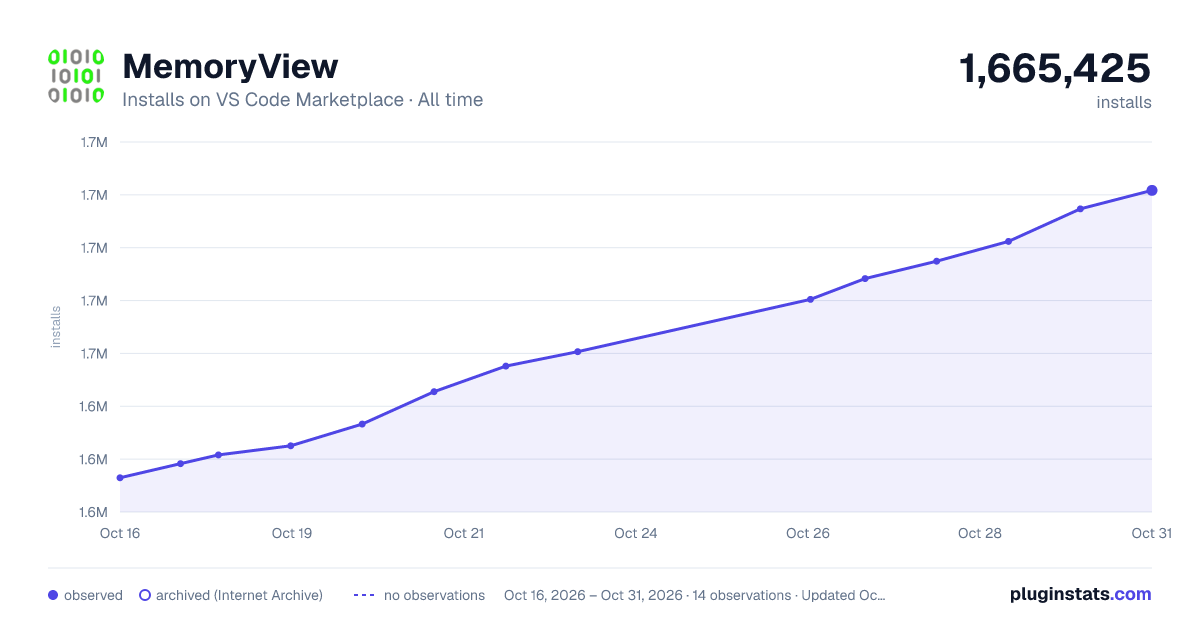

Adoption over time
7/30/90-day growth
Ranking history
Ratings over time
Listing placement
Listing placement
Filled points are observed values; hollow points come from Internet Archive snapshots of the listing page. Dashed segments span periods with no observations — values between points are not interpolated.
Each band is one page of 20. Installs on a linear scale. Placement is projected from installs, so it can differ from the marketplace's own sort order. Hover a dot to see the listing.
Recent observations
Full history (4)Similar VS Code Marketplace Other plugins
All 20 MemoryView alternativesData source
Install counts, average rating, and rating counts come from the public Visual Studio Marketplace gallery API. Installs are cumulative and exclude updates.
Listing: https://marketplace.visualstudio.com/items?itemName=mcu-debug.memory-view. First seen Oct 16, 2026; last successful collection Oct 19, 2026. See the methodology.