 PluginStats
Vision for Copilot Preview installs statistics
By Microsoft (224 listings) · VS Code Marketplace · AI
A chat extension providing vision capabilities in VS Code, with a focus on accessibility.
Vision for Copilot Preview has 102,545 recorded installs on VS Code Marketplace, ranking #2332 of 2,501 tracked listings.
Rating: 4.00 / 5 from 4 ratings
About Vision for Copilot Preview
Description
Vision is currently available in the latest version of VS Code. Read more about the feature in our release notes. This extension will soon be deprecated in favor of this built-in image flow in Github Copilot Chat.
Vision for Copilot Preview is an extension that enhances chat interactions by enabling users to leverage advanced vision capabilities. This preview feature allows users to attach images directly as contextual input, enriching conversations and enabling more dynamic, visually-supported responses.
Chat
For now, users can experience the image attachment flow in the chat panel by using their own OpenAI, Azure OpenAI, Anthropic, or Gemini keys. Get started by easily attaching images from the clipboard or dragging them directly into the chat.
Quick Fixes
Additionally, users can generate or refine alt text for images in markdown, HTML, JSX, or TSX documents with the provided code actions, simplifying the process of incorporating descriptive text for better context and accessibility. Alt text quick fixes work for images in the workspace and image URLs.
Contributed Commands and Settings
Commands
• Set a Provider and Model. • Set Current Model's API Key. • Remove Current Model's API Key. • Troubleshoot (screenshots the VS Code window and sends it to chat).
Settings
• copilot.vision.provider: The selected provider (currently limted to OpenAI, Anthropic, and Gemini). • copilot.vision.model: The model for the currently selected provider.
Notes
• For each of the providers, users may be required to have credit in their respective accounts already, or the API key will be invalid.
How do I attach images to the chat panel?
- Copy and Paste an image from the clipboard. 2. With an image in the clipboard, select the Attach Context button and select Image from Clipboard from the quick pick. 3. Click the Attach Context button and select an image in the workspace or Screenshot Window. 4. Drag and drop from anywhere outside VS Code into the chat panel. 5. From the command palette, select Copilot Vision: Troubleshoot. This is very useful for screen reader and beginner users for diagnosing issues in one's workspace.
How do I use Azure OpenAI?
- In VS Code, set "copilot.vision.provider": "AzureOpenAI" 2. Create the required Azure resources: https://learn.microsoft.com/en-us/azure/ai-services/openai/how-to/create-resource?pivots=web-portal 3. Set your full endpoint URL. a. Go to https://ai.azure.com/ b. Choose "Deployments" from the options. c. Create a deployment if you don't have one. d. Click on the Name of the depoloyment. Here you'll be able to see the Target URI and Key. e. In VS Code, set copilot.vision.azureEndpoint to your Target URI. f. In VS Code, run "Copilot Vision: Set Current Model's API Key" and paste the key from step d.
Trademarks
This project may contain trademarks or logos for projects, products, or services. Authorized use of Microsoft trademarks or logos is subject to and must follow Microsoft's Trademark & Brand Guidelines. Use of Microsoft trademarks or logos in modified versions of this project must not cause confusion or imply Microsoft sponsorship. Any use of third-party trademarks or logos are subject to those third-party's policies.
Description from the VS Code Marketplace listing.
- accessibility
- ai
- anthropic
- chat-participant
- claude
- co-pilot
- gemini
- html
- images
- javascriptreact
- markdown
- openai
- pilot
- typescriptreact
- vision
README badge
Show your rank in a README or on your website. The badge updates automatically.
Charts
Images: 30d · 1y · all time · 1600×900 dark


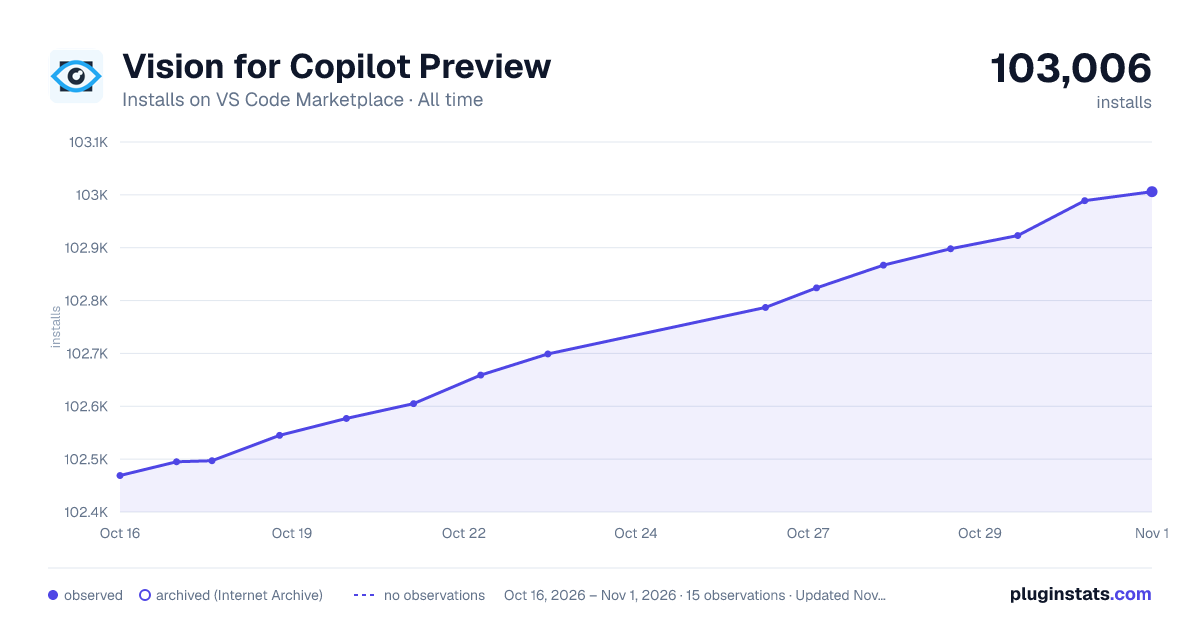

Adoption over time
7/30/90-day growth
Ranking history
Ratings over time
Listing placement
Listing placement
Listing placement
Filled points are observed values; hollow points come from Internet Archive snapshots of the listing page. Dashed segments span periods with no observations — values between points are not interpolated.
Each band is one page of 20. Installs on a linear scale. Placement is projected from installs, so it can differ from the marketplace's own sort order. Hover a dot to see the listing.
Recent observations
Full history (4)Similar VS Code Marketplace AI plugins
All 20 Vision for Copilot Preview alternativesData source
Install counts, average rating, and rating counts come from the public Visual Studio Marketplace gallery API. Installs are cumulative and exclude updates.
Listing: https://marketplace.visualstudio.com/items?itemName=ms-vscode.vscode-copilot-vision. First seen Oct 16, 2026; last successful collection Oct 19, 2026. See the methodology.