 PluginStats
Auto Hide installs statistics
By sirmspencer · VS Code Marketplace · Other
A tool to autohide the sidebar and terminal panel.
Auto Hide has 91,987 recorded installs on VS Code Marketplace, ranking #2486 of 2,501 tracked listings.
Rating: 4.42 / 5 from 33 ratings
About Auto Hide
*This project is in maintenance mode. It does everything I need. I will accept PRs for new features, but I won't be adding any new features myself
Auto Hide
Extension install page: https://marketplace.visualstudio.com/items?itemName=sirmspencer.vscode-autohide
Features
Auto-hide side bar
Causes the side bar to be hidden whenever the user clicks into the text editor.
I highly recommend trying the sidebar on the right side. The side bar does not so when on the left, the editor text will shift when the side panel opening and closing.

Auto-hide bottom panel
Same thing as above, except for the bottom panel (output, terminal, etc. are contained in the panel).
Settings
autoHide.autoHideSideBar: Hide the side bar when the user clicks into a text editor. [boolean, default:true]autoHide.autoHidePanel: Hide the panel (output, terminal, etc.) when the user clicks into a text editor. [boolean, default:true]autoHide.autoHideReferences: Hide the References panel (Go to References) when the user clicks into a text editor. [boolean, default:true]autoHide.sideBarDelay: How long to wait before hiding the side bar. A delay prevents text from being selected. A longer delay allows the horizontal scroll to adjust to the change in selection before the side bar hiding causes the horizontal scroll to adjust, avoiding conflicts. [number, default:450]autoHide.panelDelay: How long to wait before hiding the panel. Same as for the side bar when the panel is on the side. If the panel is on the bottom, there is no need for delay. [number, default:300]autoHide.hideOnOpen: Hide side bar and panel when VSCode first opens. [boolean, default:false]
Commands
autoHide.toggleHideSideBar: ToggleautoHide.autoHideSideBarsetting for current workspace. Use this command to pin/unpin the side bar.autoHide.toggleHidePanel: ToggleautoHide.autoHidePanelsetting for current workspace. Use this command to pin/unpin the panel.
Developing
- Clone/download repo: https://github.com/sirmspencer/vscode-autohide.git
- Make code changes in "src" folder.
- Run "npm run compile". (this will start compiler in watch mode) [if editing in vscode, Ctrl+Shift+B also works]
- In vscode, open the Debug panel and launch the extension from there.
Publishing
Get access token
login
vsce login [username]
Publish package
vsce package
vsce publish
https://code.visualstudio.com/api/working-with-extensions/publishing-extensionn>
Credit to 'VTools for Visual Studio Code'
This extension is a heavily modified version of: https://marketplace.visualstudio.com/items?itemName=venryx.vscode-vtools
Description from the VS Code Marketplace listing.
- auto
- bar
- hide
- panel
- side
- sidebar
- terminal
README badge
Show your rank in a README or on your website. The badge updates automatically.
Charts
Images: 30d · 1y · all time · 1600×900 dark


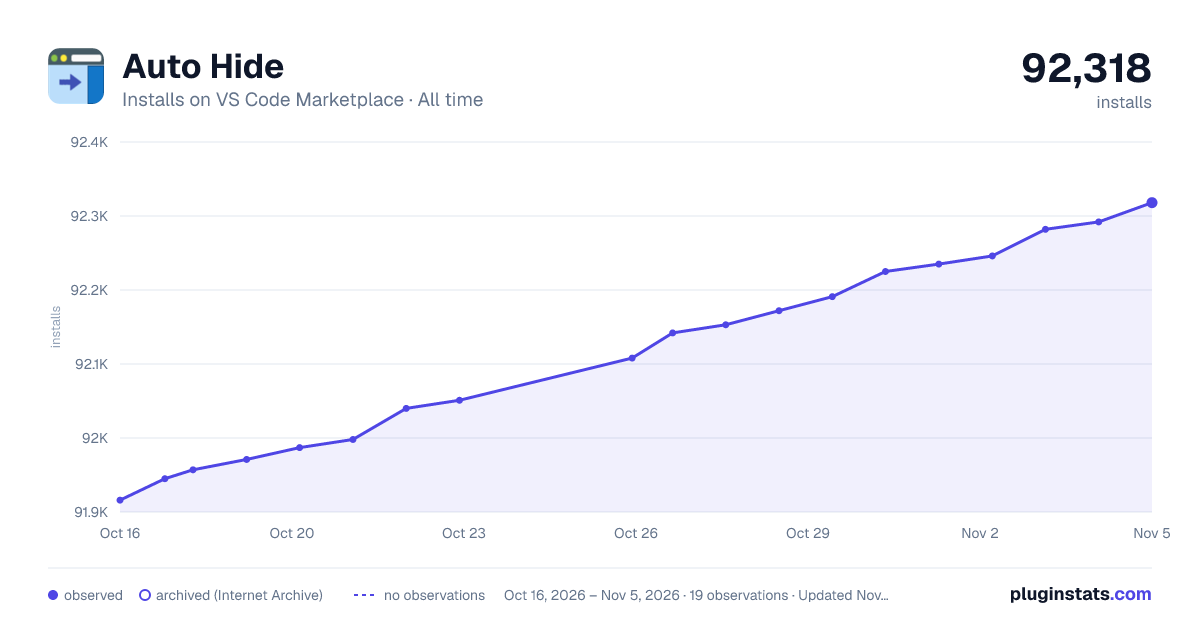

Adoption over time
7/30/90-day growth
Ranking history
Ratings over time
Listing placement
Listing placement
Filled points are observed values; hollow points come from Internet Archive snapshots of the listing page. Dashed segments span periods with no observations — values between points are not interpolated.
Each band is one page of 20. Installs on a linear scale. Placement is projected from installs, so it can differ from the marketplace's own sort order. Hover a dot to see the listing.
Recent observations
Full history (5)Similar VS Code Marketplace Other plugins
All 20 Auto Hide alternativesData source
Install counts, average rating, and rating counts come from the public Visual Studio Marketplace gallery API. Installs are cumulative and exclude updates.
Listing: https://marketplace.visualstudio.com/items?itemName=sirmspencer.vscode-autohide. First seen Oct 16, 2026; last successful collection Oct 20, 2026. See the methodology.