 PluginStats
Code Spell Checker installs statistics
By Street Side Software (10 listings) · VS Code Marketplace · Linters
Spelling checker for source code
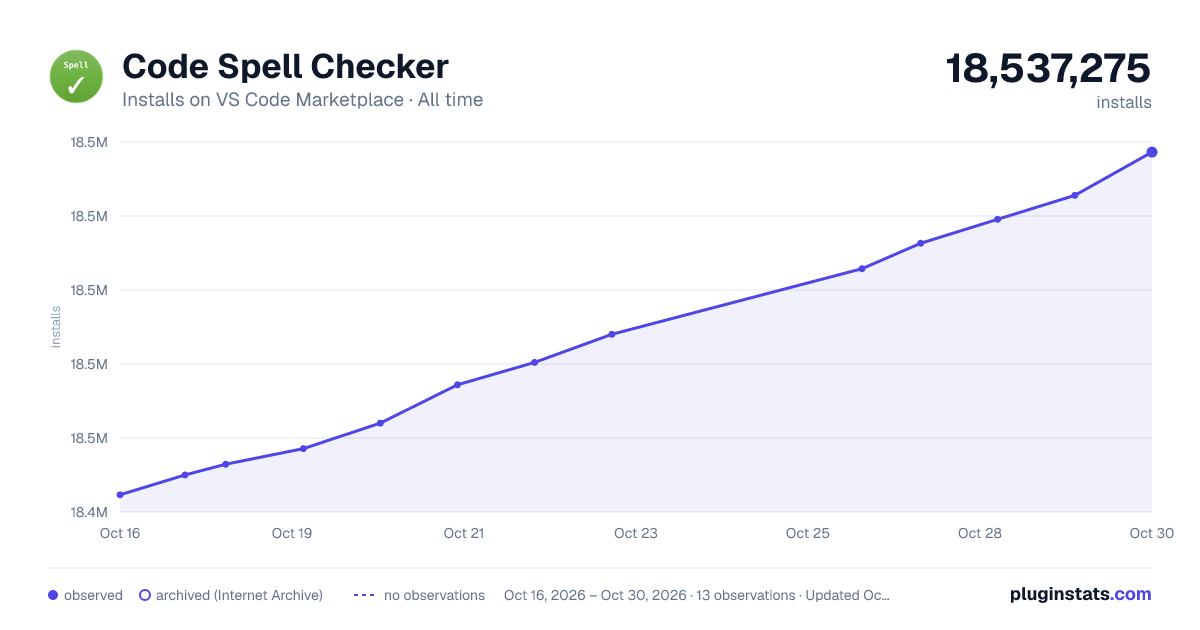
Code Spell Checker has 18,457,135 recorded installs on VS Code Marketplace.
It ranks #58 of 2,501 tracked VS Code Marketplace listings by installs.
It is rated 4.5 out of 5 from 314 ratings.
PluginStats has 4 daily observations since Oct 16, 2026; the latest is from Oct 19, 2026.
Rating: 4.47 / 5 from 314 ratings
About Code Spell Checker
Spelling Checker for Visual Studio Code
A basic spell checker that works well with code and documents.
The goal of this spell checker is to help catch common spelling errors while keeping the number of false positives low.
Support Further Development
Functionality
Load a TypeScript, JavaScript, Text, etc. file. Words not in the dictionary files will have a squiggly underline.
Example
Suggestions
To see the list of suggestions:
After positioning the cursor in the word, any of the following should display the list of suggestions:
• Click on the 💡 (lightbulb) in the left hand margin. • Quick Fix Editor action command: • Mac: ⌘+. or Cmd+. • PC: Ctrl+.
Install
Open up VS Code and hit F1 and type ext select install and type code-spell-checker hit enter and reload window to enable.
Supported Languages
• English (US) • English (GB) - turn on by changing "cSpell.language": "en" to "cSpell.language": "en-GB"
Add-On Dictionaries
Language Dictionaries
• Ancient Greek - Ancient Greek dictionary extension for VS Code. • Arabic - Arabic dictionary extension for VS Code. • Armenian - Armenian dictionary extension for VS Code. • Australian English - Australian English dictionary extension for VS Code. • Austrian German - Austrian German dictionary extension for VS Code. • Azerbaijani - Azerbaijani dictionary extension for VS Code. • Basque - Basque dictionary extension for VS Code. • Belarusian - Belarusian dictionary extension for VS Code. • British English - British English dictionary extension for VS Code. • British English - British English -ise dictionary extension for VS Code. • Bulgarian - Bulgarian dictionary extension for VS Code. • Canadian English - Canadian English dictionary extension for VS Code. • Catalan - Catalan dictionary extension for VS Code. • Croatian - Croatian dictionary extension for VS Code. • Czech - Czech dictionary extension for VS Code. • Danish - Danish dictionary extension for VS Code. • Dutch - Dutch / Nederlands dictionary extension for VS Code. • Esperanto - Esperanto dictionary extension for VS Code. • Estonian - Estonian dictionary extension for VS Code. • Finnish - Finnish dictionary extension for VS Code. • French - French dictionary extension for VS Code. • French Réforme 90 - French Réforme 90 dictionary extension for VS Code. • Galician - Galician dictionary extension for VS Code. • German - German dictionary extension for VS Code. • Greek - Greek dictionary extension for VS Code. • Hebrew - Hebrew dictionary extension for VS Code. • Hungarian - Hungarian dictionary extension for VS Code. • Indonesian - Indonesian dictionary extension for VS Code. • Italian - Italian dictionary extension for VS Code. • Latin - Latin dictionary extension for VS Code. • Latvian - Latvian dictionary extension for VS Code. • Lithuanian - Lithuanian dictionary extension for VS Code. • Macedonian - Macedonian dictionary extension for VS Code. • Mongolian - Mongolian dictionary extension for VS Code. • Norwegian Bokmål - Norwegian Bokmål dictionary extension for VS Code. • Persian - Persian dictionary extension for VS Code. • Polish - Polish dictionary extension for VS Code. • Portuguese - Portuguese dictionary extension for VS Code. • Brazilian Portuguese - Brazilian Portuguese dictionary extension for VS Code. • Romanian - Romanian dictionary extension for VS Code. • Russian - Russian dictionary extension for VS Code. • Serbian - Serbian dictionary extension for VS Code. • Slovak - Slovak dictionary extension for VS Code. • Slovenian - Slovenian dictionary extension for VS Code. • Spanish - Spanish Add-On for Code Spell Checker • Swedish - Swedish dictionary extension for VS Code. • Swiss German - Swiss German dictionary extension for VS Code. • Turkish - Turkish dictionary extension for VS Code. • Ukrainian - Ukrainian dictionary extension for VS Code. • Vietnamese - Vietnamese dictionary extension for VS Code.
Technical Dictionaries
• Medical Terms - Medical Terms Add-On for Code Spell Checker • Scientific Terms - Scientific Terms dictionary extension for VS Code. • Win32 - Win32 dictionary extension for VS Code.
Enabled File Types
• AsciiDoc • C, C++ • C# • css, less, scss • Dart • Elixir • Go • Html • Java • JavaScript • JSON / JSONC • LaTeX • Markdown • PHP • PowerShell • Pug / Jade • Python • reStructuredText • Ruby • Rust • Scala • Text • TypeScript • YAML • SQL
Enable / Disable File Types
To _Enable_ or _Disable_ spell checking for a file type:
1. Click on the Spell Checker status in the status bar:
2. On the Info screen, click the checkbox.
How it works with camelCase
The concept is simple, split camelCase words before checking them against a list of known English words.
• camelCase -> camel case • HTMLInput -> html input -- Notice that the I is associated with Input and not HTML • snake\_case\_words -> snake case words • camel2snake -> camel snake -- (the 2 is ignored)
Special case with ALL CAPS words
There are a few special cases to help with common spelling practices for ALL CAPS words.
Trailing s, ing, ies, es, ed are kept with the previous word.
• CURLs -> curls -- trailing s • CURLedRequest -> curled request -- trailing ed
Things to note
• This spellchecker is case insensitive. It will not catch errors like english which should be English. • The spellchecker uses a local word dictionary. It does not send anything outside your machine. • The words in the dictionary can and do contain errors. • There are missing words. • Only words longer than 3 characters are checked. "jsj" is not checked, while "jsja" is checked and will be marked as incorrect because it does not exist in any of the dictionaries. • All symbols and punctuation are ignored.
In Document Settings
It is possible to add spell check settings into your source code. This is to help with file specific issues that may not be applicable to the entire project.
All settings are prefixed with cSpell: or spell-checker:.…
Description from the VS Code Marketplace listing.
- checker
- json
- jsonc
- spell
- spellchecker
- spelling
Charts
Images: 30d · 1y · all time · 1600×900 dark



Adoption over time


7/30/90-day growth


Ranking history


Ratings over time


Listing placement


Filled points are observed values; hollow points come from Internet Archive snapshots of the listing page. Dashed segments span periods with no observations — values between points are not interpolated.
Each band is one page of 20. Installs on a log scale. Placement is projected from installs, so it can differ from the marketplace's own sort order. Hover a dot to see the listing.
Recent observations
Full history (4)Similar VS Code Marketplace Linters plugins
All 20 Code Spell Checker alternativesData source
Install counts, average rating, and rating counts come from the public Visual Studio Marketplace gallery API. Installs are cumulative and exclude updates.
Listing: https://marketplace.visualstudio.com/items?itemName=streetsidesoftware.code-spell-checker. First seen Oct 16, 2026; last successful collection Oct 19, 2026. See the methodology.