 PluginStats
Language Server for Java by Apache NetBeans installs statistics
By Apache Software Foundation (3 listings) · VS Code Marketplace · Programming Languages
Apache NetBeans Language Server Extension for Visual Studio Code
Language Server for Java by Apache NetBeans has 302,321 recorded installs on VS Code Marketplace, ranking #1153 of 2,501 tracked listings.
Rating: 4.67 / 5 from 12 ratings
About Language Server for Java by Apache NetBeans
Apache NetBeans Language Server Extension for VS Code
<!-- Licensed to the Apache Software Foundation (ASF) under one or more contributor license agreements. See the NOTICE file distributed with this work for additional information regarding copyright ownership. The ASF licenses this file to you under the Apache License, Version 2.0 (the "License"); you may not use this file except in compliance with the License. You may obtain a copy of the License at http://www.apache.org/licenses/LICENSE-2.0 Unless required by applicable law or agreed to in writing, software distributed under the License is distributed on an "AS IS" BASIS, WITHOUT WARRANTIES OR CONDITIONS OF ANY KIND, either express or implied. See the License for the specific language governing permissions and limitations under the License. -->


This is Apache NetBeans Language Server extension for VS Code. Use it to get all the goodies of NetBeans via the VS Code user interface! Runs on JDK21 and all newer versions.
Apache NetBeans Language Server brings full featured Java development (edit-compile-debug & test cycle) for Maven and Gradle projects to VSCode. As well as other features.
Getting Started
-
Use command Java: JDK Configuration to set same JDK in Apache NetBeans Language Server and all other Java settings in VSCode like Integrated terminal
JAVA_HOMEandPATH, Maven Runtime and JDK for MS Java as well if installed:
- Select installed JDK to use for these settings in step 2/3
- In step 3/3 select if settings will be applied at User level for all Workspaces (Folders open) or for current Workspace (Folder) only.
- NetBeans Language Server JDK Home setting
netbeans.jdkhomeis also available inVSCode | Preferences | Settings ...Netbeans: Jdkhome. More below in section Selecting the JDK - Setting
netbeans.project.jdkhomeholds a path to a JDK that is used as a default platform for opened folder/workspace (e.g. Java project). To avoid possible issues with default platform changing (i.e. changes from JDK21 to JDK8), NBLS is restarted whennetbeans.project.jdhomechanges.
-
Use Java: New Project... " command to start creating new project, or
-
Open the folder with existing pom.xml for Maven or Gradle project files (build.gradle, gradle.properties).
- Language Server opens the project, performs priming build and might ask for Resolving problems, usually related to opening subprojects etc.
-
Or simply create a new Java class file with
public static void main(String[] args)method in opened folder and start coding, compiling, debugging. Works on JDK 8 and newer.
Supported Actions
- Java: New Project... allows creation of new Maven or Gradle project
- Java: New from Template... add various files to currently selected open project. Files are:
- Java - broad selection of various predefined Java classes
- Unit tests - JUnit and TestNG templates for test suites and test cases
- HTML5/JavaScript - Templates for JS, HTML, CSS,... files
- Other - various templates for JSON, YAML, properties, ... files
- Java: Compile Workspace - invoke Maven or Gradle build
- Debugger Java+... - start main class or test on selected JDK. More in Debugger section
- Progress shown for long running operations with cancel support for selected types
- Native Image Debugger is a new Run configuration added which allows Java style debugging of Ahead of Time compiled native-images, produced by GraalVM. It is experimental feature which works with GDB on Linux. GDB 7.11 or GDB 10.1+ is required due to known issue #26139 in GDB 8 and 9.
- It is also possible to attach to running native image process using Attach to Native Image launch configuation.
- Micronaut and Spring support especially for YAML configuration files with code completion and source code navigation to Java.
- Test Explorer for Java tests results visualization and execution including editor code Lenses.
- Maven and Gradle support including multi-project projects, subprojects opening and Gradle priming builds.
Project Explorer
Project Explorer provides an overview of logical project structure, groups sources together and greatly simplifies Java package structure exploration. Project Explorer is an addition to the classical workspace explorer. Use it to build, test, execute and operate your Maven and Gradle Java projects.
 …
…
Description from the VS Code Marketplace listing.
- debuggers
- jackpot-hint
- java
- Java Hints
- javascript
- json
- keybindings
- multi-root ready
README badge
Show your rank in a README or on your website. The badge updates automatically.
Charts
Images: 30d · 1y · all time · 1600×900 dark


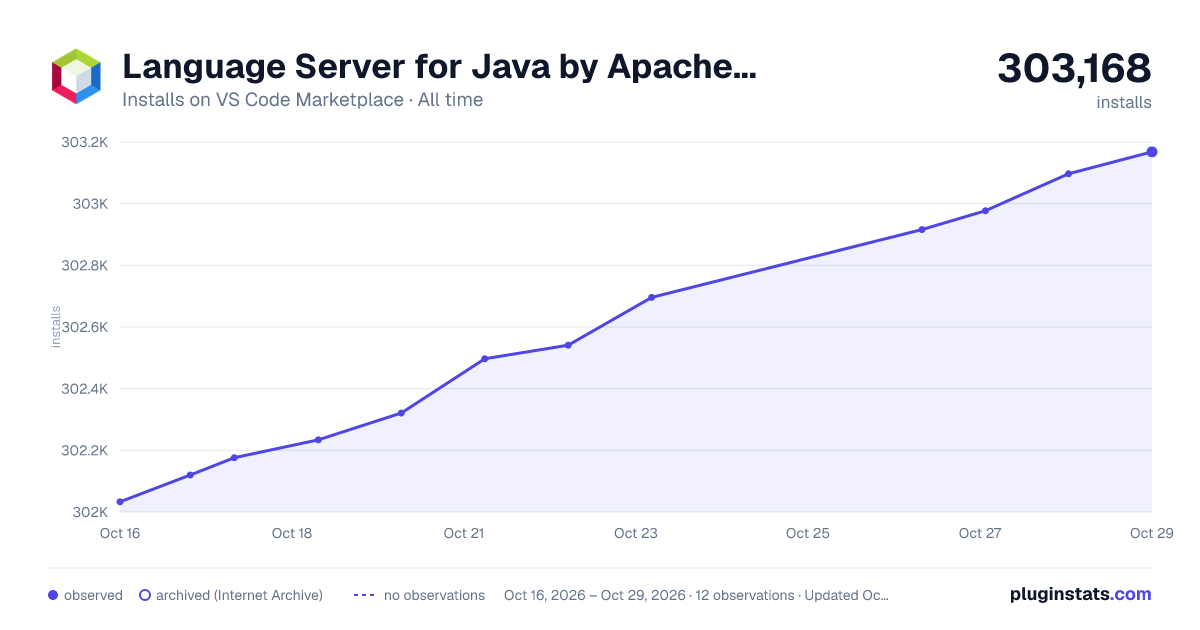

Adoption over time
7/30/90-day growth
Ranking history
Ratings over time
Listing placement
Listing placement
Listing placement
Listing placement
Filled points are observed values; hollow points come from Internet Archive snapshots of the listing page. Dashed segments span periods with no observations — values between points are not interpolated.
Each band is one page of 20. Installs on a linear scale. Placement is projected from installs, so it can differ from the marketplace's own sort order. Hover a dot to see the listing.
Recent observations
Full history (5)Similar VS Code Marketplace Programming Languages plugins
All 20 Language Server for Java by Apache NetBeans alternativesData source
Install counts, average rating, and rating counts come from the public Visual Studio Marketplace gallery API. Installs are cumulative and exclude updates.
Listing: https://marketplace.visualstudio.com/items?itemName=ASF.apache-netbeans-java. First seen Oct 16, 2026; last successful collection Oct 20, 2026. See the methodology.