 PluginStats
Smarty Template Support installs statistics
By Aswin Kumar · VS Code Marketplace · Programming Languages
Smarty template support with formatting, folding, snippets, syntax highlighting and more
Smarty Template Support has 249,416 recorded installs on VS Code Marketplace, ranking #1309 of 2,501 tracked listings.
Rating: 4.69 / 5 from 13 ratings
About Smarty Template Support
Smarty Template for Visual Studio Code





This extension provides Smarty Template support for Visual Studio Code.
Supports {...} and {{...}} delimiters. Available for both VSCode desktop and web.
Features
- Syntax highlighting
- Snippet completion
- Code formatting
- Code folding
- Code navigation
- Comment toggling
- Bracket autoclosing
- Bracket autosurrounding
- Hover documentation
- Auto Indentation
What it looks like

Requirements
- VS Code
1.43.0or higher
Extension Settings

smarty.highlight: Enable/disable highlight decoration of smarty tags documents.smarty.highlightColor: Highlight decoration color based on dark/light theme kind.
For example:
"smarty.highhlight": true,
"smarty.highlightColor": {
  "dark": "#FFFFFF25",
  "light": "#FFFA0040"
}
Formatting Settings
Here is the list of native vscode settings used in smarty document formatting.
{
  // The number of spaces a tab is equal to.
  "editor.tabSize": 4,

  // Indent using spaces.
  "editor.insertSpaces": true,

  // End with a newline.
  "html.format.endWithNewline": false,

  // Indent `<head>` and `<body>` sections.
  "html.format.indentInnerHtml": false,

  // Maximum number of line breaks to be preserved in one chunk. Use `null` for unlimited.
  "html.format.maxPreserveNewLines": null,

  // Controls whether existing line breaks before elements should be preserved.
  "html.format.preserveNewLines": true,

  // Wrap attributes.
  //  - auto: Wrap attributes only when line length is exceeded.
  //  - force: Wrap each attribute except first.
  //  - force-aligned: Wrap each attribute except first and keep aligned.
  //  - force-expand-multiline: Wrap each attribute.
  //  - aligned-multiple: Wrap when line length is exceeded, align attributes vertically.
  //  - preserve: Preserve wrapping of attributes.
  //  - preserve-aligned: Preserve wrapping of attributes but align.
  "html.format.wrapAttributes": "auto",

  // Maximum amount of characters per line (0 = disable).
  "html.format.wrapLineLength": 120
}
User Settings
For Emmet Abbreviations:
Paste the following into your settings.json
"emmet.includeLanguages": {
  "smarty": "html"
}
For Netbeans Style Theme:

Paste the following into your settings.json
"editor.tokenColorCustomizations": {
  "textMateRules": [
    {
      "scope": [
        "punctuation.section.embedded.begin.smarty",
        "punctuation.section.embedded.end.smarty"
      ],
      "settings": {
        "foreground": "#FFA500",
        "fontStyle": "bold"
      }
    },
    {
      "scope": [
        "keyword.control.smarty",
        "support.function.built-in.smarty"
      ],
      "settings": {
        "foreground": "#16A016",
        "fontStyle": "bold"
      }
    },
    {
      "scope": ["variable.parameter.smarty"],
      "settings": {
        "foreground": "#AE23A3",
        "fontStyle": "bold"
      }
    },
    {
      "scope": ["source.smarty"],
      "settings": {
        "foreground": "#D17C32"
      }
    }
  ]
}
Issues
Submit the issues if you find any bug or have any suggestion.
Release Notes
Detailed release notes are available here.
Description from the VS Code Marketplace listing.
- php
- smarty
- smarty 3
- smarty template formatting
- snippet
- tpl
README badge
Show your rank in a README or on your website. The badge updates automatically.
Charts
Images: 30d · 1y · all time · 1600×900 dark


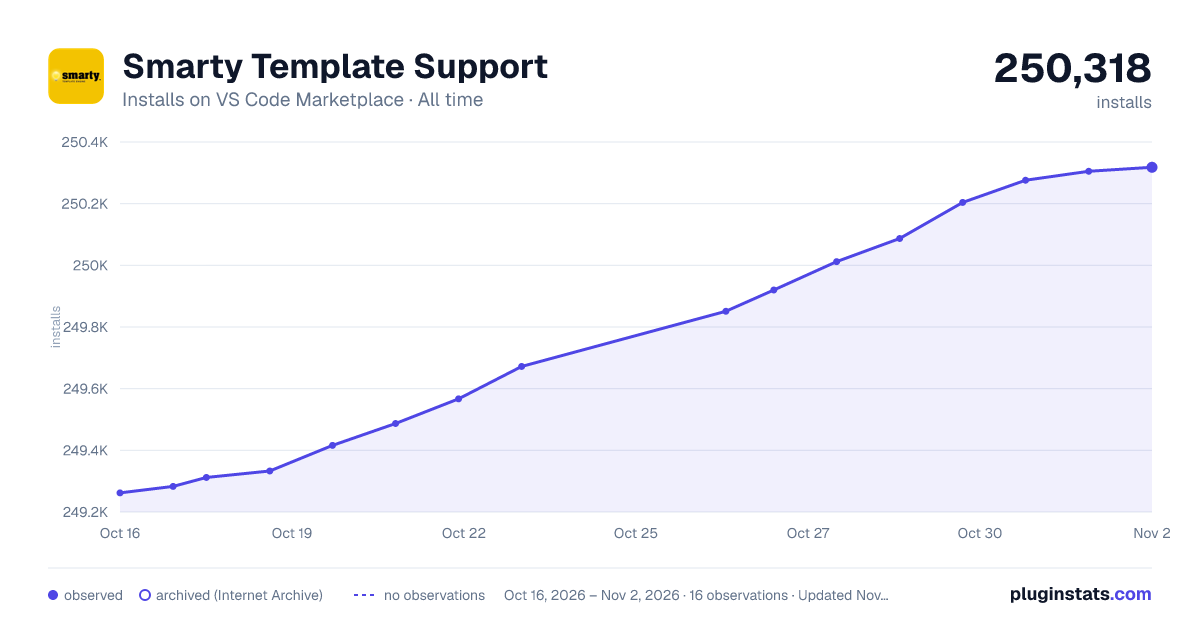

Adoption over time
7/30/90-day growth
Ranking history
Ratings over time
Listing placement
Listing placement
Listing placement
Listing placement
Filled points are observed values; hollow points come from Internet Archive snapshots of the listing page. Dashed segments span periods with no observations — values between points are not interpolated.
Each band is one page of 20. Installs on a linear scale. Placement is projected from installs, so it can differ from the marketplace's own sort order. Hover a dot to see the listing.
Recent observations
Full history (5)Similar VS Code Marketplace Programming Languages plugins
All 20 Smarty Template Support alternativesData source
Install counts, average rating, and rating counts come from the public Visual Studio Marketplace gallery API. Installs are cumulative and exclude updates.
Listing: https://marketplace.visualstudio.com/items?itemName=aswinkumar863.smarty-template-support. First seen Oct 16, 2026; last successful collection Oct 20, 2026. See the methodology.