 PluginStats
Awesome Emacs Keymap installs statistics
By Yuichiro Tachibana (Tsuchiya) · VS Code Marketplace · Keymaps
Emacs emulation for VSCode with multi-cursor support, clipboard-integrated kill-ring, well-emulated mark-mode, and more.
Awesome Emacs Keymap has 122,067 recorded installs on VS Code Marketplace, ranking #2123 of 2,502 tracked listings.
Rating: 4.90 / 5 from 49 ratings
About Awesome Emacs Keymap
Awesome Emacs Keymap (emacs-mcx)








<a href="https://flatt.tech/oss/gmo/trampoline" target="_blank"><img src="https://flatt.tech/assets/images/badges/gmo-oss.png" height="20px"/></a>
<a href="https://www.buymeacoffee.com/whitphx" target="_blank"><img src="https://cdn.buymeacoffee.com/buttons/v2/default-yellow.png" alt="Buy Me A Coffee" width="180" height="50" ></a>
<a href="https://ko-fi.com/D1D2ERWFG" target="_blank"><img src="https://storage.ko-fi.com/cdn/brandasset/kofi_button_red.png" alt="Support me on Ko-fi" width="180" ></a>

Emacs emulation for Visual Studio Code
- Emacs-like cursor movements and editing commands
- Customizable meta key assignment (
alt,ESC,ctrl+[, orcommandon macOS) - Shift-selection with movement commands
- Search behavior like Emacs' isearch
- Compatibility with VSCode's built-in multi cursor feature
- Kill-ring integrated with the system clipboard
- Mark-ring
- Prefix argument
- Rectangle commands
- Text/position/rectangle registers
- Sexp operations (with ParEdit commands)
- Available both in Desktop and Web
It's inspired by Emacs Keymap by hiro-sun and its forks such as Emacs Friendly Keymap by Sebastian Zaha, Emacs Keymap Improved by rkwan94, and Emacs Friendly Keybindings (Neon) by NotKyon, but totally revamped and improved for better feature coverage, Emacs emulation, and usability (also getting rid of some bugs).
FAQ/Tips
The cursor cannot be moved on the find widget as the widget closes with movement keys.
It's an intended design that simulates the original Emacs' behavior.
You can disable it with emacs-mcx.cursorMoveOnFindWidget option described below.
See https://github.com/whitphx/vscode-emacs-mcx/issues/137 for the details about this topic.
i-search (C-s) is initialized with the currently selected string and the previous search is removed.
Setting editor.find.seedSearchStringFromSelection as "never" can change this behavior.
It makes the find widget work similarly to Emacs.
Refs:
- The official doc about
editor.find.seedSearchStringFromSelectionsetting - The GitHub issue where we discuss about it
I want to customize the META key (ESC, ctrl+[, alt, or Command (⌘) key on macOS).
You can configure the key to be used as a META prefix with the following settings.
emacs-mcx.useMetaPrefixAlt(trueby default)emacs-mcx.useMetaPrefixEscapeemacs-mcx.useMetaPrefixCtrlLeftBracketemacs-mcx.useMetaPrefixMacCmd
Read the extension settings section below for more details.
I want to use keyboard macro
Check out Keyboard Macro Beta by tshino (tshino.kb-macro) and its keybindings.
The extension has been broken!
Try the Developer: Reinstall Extension... command from the command palette to reinstall the extension. I fixed a problem by this way somehow.
I find a bug. I want a feature X to be implemented. I have a question.
Post a bug report or a feature request to GitHub Issues.
Extension settings
This extension has some custom settings named with a prefix emacs-mcx.
You can configure those settings.
(See this page to know how to change the settings.)
Configurable options of this extension are the followings.
emacs-mcx.moveBeginningOfLineBehavior
Determines the behavior of the move-beginning-of-line command.
If set as 'vscode', it works as VSCode's native Home key behavior.
If set as 'emacs', it works as the original Emacs' move-beginning-of-line.
emacs-mcx.moveEndOfLineBehavior…
Description from the VS Code Marketplace listing.
- emacs
- keybindings
- mark mode
- multi cursor
- selection
README badge
Show your rank in a README or on your website. The badge updates automatically.
Charts
Images: 30d · 1y · all time · 1600×900 dark


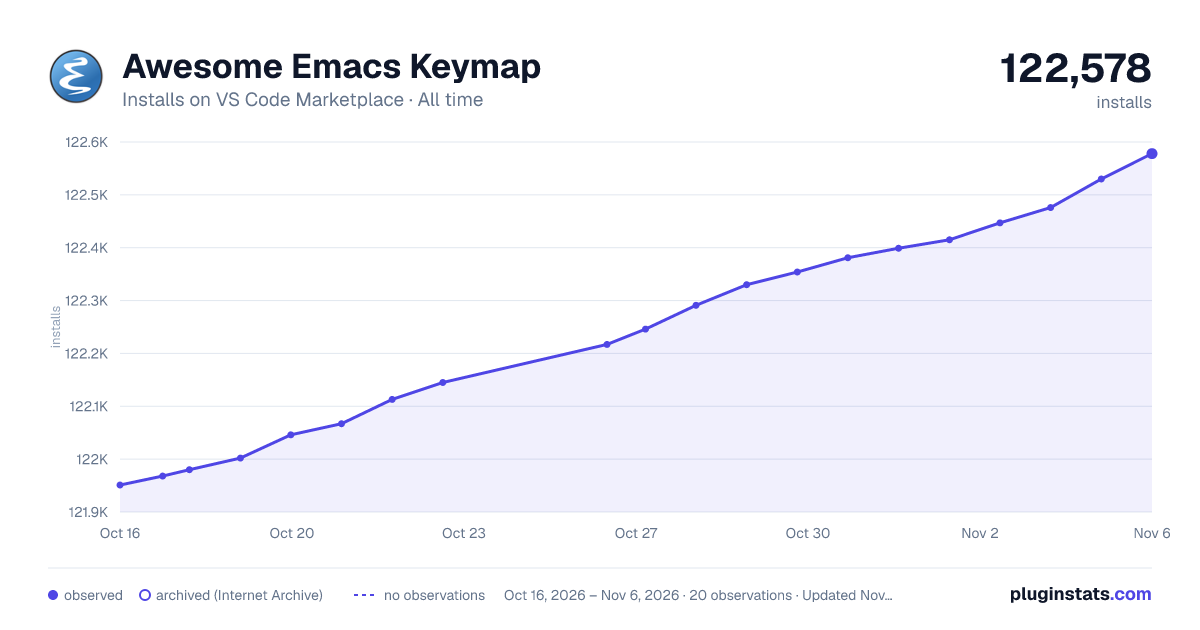

Adoption over time
7/30/90-day growth
Ranking history
Ratings over time
Listing placement
Listing placement
Filled points are observed values; hollow points come from Internet Archive snapshots of the listing page. Dashed segments span periods with no observations — values between points are not interpolated.
Each band is one page of 20. Installs on a linear scale. Placement is projected from installs, so it can differ from the marketplace's own sort order. Hover a dot to see the listing.
Recent observations
Full history (6)Similar VS Code Marketplace Keymaps plugins
All 20 Awesome Emacs Keymap alternativesData source
Install counts, average rating, and rating counts come from the public Visual Studio Marketplace gallery API. Installs are cumulative and exclude updates.
Listing: https://marketplace.visualstudio.com/items?itemName=tuttieee.emacs-mcx. First seen Oct 16, 2026; last successful collection Oct 21, 2026. See the methodology.