 PluginStats
Power Mode installs statistics
By Cody Hoover (4 listings) · VS Code Marketplace · Themes
Your code is powerful, unleash it! The extension made popular by Code in the Dark has finally made its way to VS Code.
Power Mode has 1,468,903 recorded installs on VS Code Marketplace, ranking #426 of 2,501 tracked listings.
Rating: 4.82 / 5 from 85 ratings
About Power Mode
VSCODE POWER MODE!!!
Power Mode is one of the most requested extensions for VS Code. Unfortunately, they said it couldn't be done...

However, after seeing this list and realizing that VS Code was the only modern editor without it, I knew I had to try. I couldn't let VS Code live in the shadow of its big brother or Atom.
I present you, VSCODE POWER MODE!!! (now with atom-like explosions and an improved combo meter!)

Features:
- NEW: POWERFUL Combo Meter!
- Strong default settings
- Easily choose from a variety of built-in effects including explosions, interdeminsional portals, and clippy. Or quickly edd your own!
- Extremely Customizable -- 20+ settings to get exactly the experience you want

Get started
- Enable in the settngs UI, or edit the JSON file directly to add
"powermode.enabled": true - Enjoy the default experience, or choose from a set of built-in effects
- Enable/Disable via a command
- Customize the experience using the advanced settings
- Find more effects or share your own on here.
Known Issues
They weren't completely wrong when they said it can't be done. VS Code does not expose the DOM as part of the API. Instead this extension relies on using TextEditorDecorations to set css properties for ranges in the editor. This has a few limitations:
- The cursor doesn't move with the text as it shakes
- The new combo meter moves off the screen when the editor has long lines unless "word wrap" is enabled
- There are (literal) edge cases when typing in the first or last lines of the editor
- Gifs must be used instead of CSS animations for the particles/explosions
Choose Your Explosions:
You can choose explosions with a single setting: powermode.presets. Check out the options below
(note: it looks better IRL than in these gifs):
Particles (Default)

Rift (Simple)

Rift (Exploding)

Note: If your code becomes hard to read, you may need to set editor.lineHighlightBackground in your user or workspace settings. For example, if your theme is Default Dark+, try:
"editor.lineHighlightBackground": "#1E1E1EAA"
Fireworks

Flames

Magic

Clippy

Advanced Settings:
Power Mode should work great right out of the box, but if it doesn't I've tried to make it as configurable as possible. Tweak the settings for performance or for fun. From doge to clippy, the only limit is your imagination. Some of the options are explained below:
powermode.shake.enabled: Uncheck this to disable screen shaking entirelypowermode.combo.location: Control where the combo counter appearspowermode.explosions.customExplosions: Choose your own explosions with base64 encoded gifs or full web URLs (i.e. "data:image/gif;base64,1337GIF", "https://coolgif.io"). NOTE: Security precautions in the browser engine prevent referencing local files, so for offline-support, please base64 encode the gif.powermode.explosions.backgroundMode:maskwill use the gif as a mask, letting the shape of the gif through with the color of the text.imagewill use the gif itself as the background.
powermode.explosions.gifMode:restartwill restart a gif each time it is displayed,continuewill play the gif from the place it stopped.continueis particularly useful when you only have 1 visible gif,restartis useful when you have multiple, but may reduce performance.powermode.explosions.maxExplosions: Reducing this will reduce the number of explosions rendered at once.powermode.explosions.explosionFrequency: Increasing this will increase the number of keystrokes between explosions. It means that there will be gaps between explosions as you type but may help performance.powermode.explosions.customExplosions: Provide your own gifs to use (And share them here)powermode.explosions.customCss: Changes the CSS applied to the "after" pseudoelement. You can experiment with ways to make it look or perform better.powermode.explosions.explosionOrder:sequentialwill cycle through explosions in order,randomwill pick one randomly, and providing a number will select the explosion at that (zero-based) index in the list of explosions.
Help Wanted:
If you can provide some lightweight, attractive gifs that improve how power mode looks and performs, I would be happy to include them! Share them here.…
Description from the VS Code Marketplace listing.
README badge
Show your rank in a README or on your website. The badge updates automatically.
Charts
Images: 30d · 1y · all time · 1600×900 dark


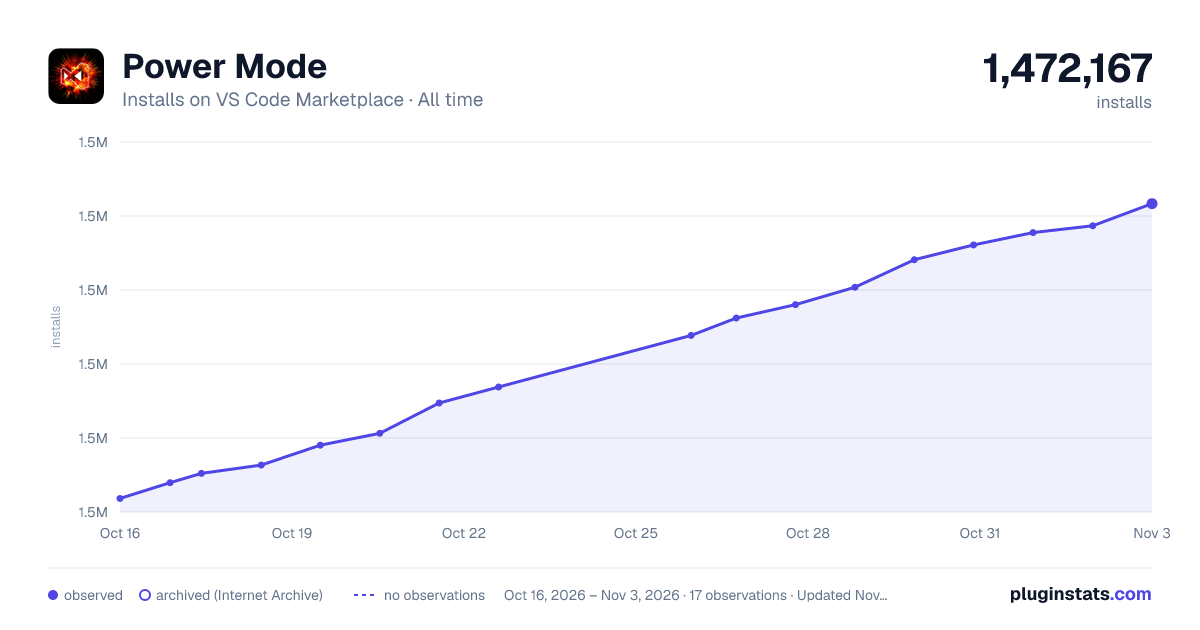

Adoption over time
7/30/90-day growth
Ranking history
Ratings over time
Listing placement
Listing placement
Filled points are observed values; hollow points come from Internet Archive snapshots of the listing page. Dashed segments span periods with no observations — values between points are not interpolated.
Each band is one page of 20. Installs on a linear scale. Placement is projected from installs, so it can differ from the marketplace's own sort order. Hover a dot to see the listing.
Recent observations
Full history (5)Similar VS Code Marketplace Themes plugins
All 20 Power Mode alternativesData source
Install counts, average rating, and rating counts come from the public Visual Studio Marketplace gallery API. Installs are cumulative and exclude updates.
Listing: https://marketplace.visualstudio.com/items?itemName=hoovercj.vscode-power-mode. First seen Oct 16, 2026; last successful collection Oct 20, 2026. See the methodology.