 PluginStats
Azure Account installs statistics
By Microsoft (224 listings) · VS Code Marketplace · Azure
A common Sign In and Subscription management extension for VS Code.
Azure Account has 9,225,823 recorded installs on VS Code Marketplace, ranking #107 of 2,501 tracked listings.
Rating: 2.13 / 5 from 56 ratings
About Azure Account
(Deprecated) Azure Account and Sign In
<!-- region exclude-from-marketplace -->

⚠️ Attention extension authors! The Azure Account extension is deprecated (January 2025). If you own an Azure extension that relies on Azure Account, or are creating a new extension that needs authentication to Azure, please see the deprecation announcement for guidance.
The Azure Account extension provides a single Azure sign in and subscription filtering experience for all other Azure extensions. It makes Azure's Cloud Shell service available in VS Code's integrated terminal.
Signing In/Out
There are multiple commands accessible via the command palette that may be used to sign into Azure.

Sign out of Azure using the Azure: Sign Out command.

Azure Cloud Shell
Note: The Azure Cloud Shell feature has moved to the Azure Resources extension. Apart from moving codebases, the feature is the same from a users perspective. Authentication for the Cloud Shell feature is now handled by the VS Code built-in Microsoft authentication provider, which means you may have to login upon first use of the migrated feature.
Azure Cloud Shell instances can be started via the terminal view in VS Code. To begin, click the
dropdown arrow in the terminal view and select from either Azure Cloud Shell (Bash) or
Azure Cloud Shell (PowerShell).

If this is your first time using the Cloud Shell, the following notification will appear prompting you to set it up.

The Cloud Shell will load in the terminal view once you've finished configuring it.

You may also upload to the Cloud Shell using the Azure: Upload to Cloud Shell command.
Commands
| Command | |
|---|---|
Azure: Sign In | Sign in to your Azure subscription. |
Azure: Sign In with Device Code | Sign in to your Azure subscription with a device code. Use this in setups where the Sign In command does not work. |
Azure: Sign In to Azure Cloud | Sign in to your Azure subscription in one of the sovereign clouds. |
Azure: Sign Out | Sign out of your Azure subscription. |
Azure: Select Subscriptions | Pick the set of subscriptions you want to work with. Extensions should respect this list and only show resources within the filtered subscriptions. |
Azure: Create an Account | If you don't have an Azure Account, you can sign up for one today and receive $200 in free credits. |
Azure: Upload to Cloud Shell<sup>1</sup> | Upload a file to your Cloud Shell storage account |
<sup>1</sup> On Windows: Requires Node.js 6 or later to be installed (https://nodejs.org).
Settings
| Name | Description | Default |
|---|---|---|
azure.resourceFilter | The resource filter, each element is a tenant id and a subscription id separated by a slash. | |
azure.showSignedInEmail | Whether to show the email address (e.g., in the status bar) of the signed in account. | true |
azure.tenant | A specific tenant to sign in to. The default is to sign in to the common tenant and use all known tenants. | |
azure.cloud | The current Azure Cloud to connect to. | Azure |
azure.ppe | Development setting: The PPE environment for testing. |
Contributing
This project welcomes contributions and suggestions. Most contributions require you to agree to a Contributor License Agreement (CLA) declaring that you have the right to, and actually do, grant us the rights to use your contribution. For details, visit https://cla.microsoft.com.
When you submit a pull request, a CLA-bot will automatically determine whether you need to provide a CLA and decorate the PR appropriately (e.g., label, comment). Simply follow the instructions provided by the bot. You will only need to do this once across all repos using our CLA.
This project has adopted the Microsoft Open Source Code of Conduct. For more information see the Code of Conduct FAQ or contact opencode@microsoft.com with any additional questions or comments.
<!-- endregion exclude-from-marketplace -->Telemetry…
Description from the VS Code Marketplace listing.
- azure
README badge
Show your rank in a README or on your website. The badge updates automatically.
Charts
Images: 30d · 1y · all time · 1600×900 dark


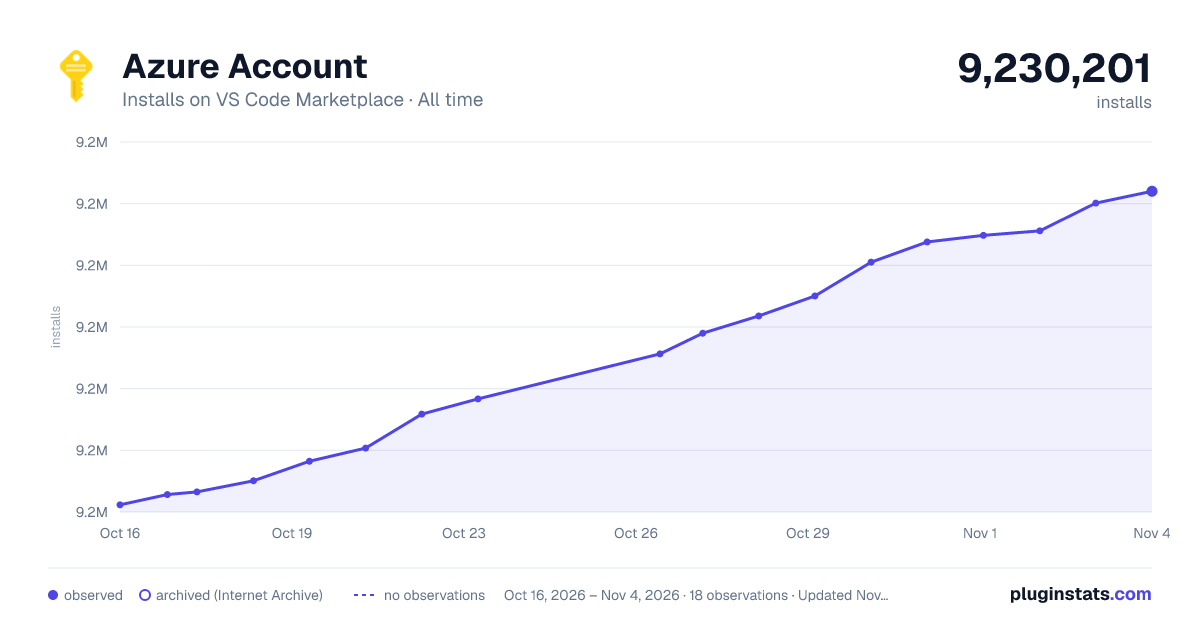

Adoption over time
7/30/90-day growth
Ranking history
Ratings over time
Listing placement
Listing placement
Filled points are observed values; hollow points come from Internet Archive snapshots of the listing page. Dashed segments span periods with no observations — values between points are not interpolated.
Each band is one page of 20. Installs on a linear scale. Placement is projected from installs, so it can differ from the marketplace's own sort order. Hover a dot to see the listing.
Recent observations
Full history (5)Similar VS Code Marketplace Azure plugins
All 20 Azure Account alternativesData source
Install counts, average rating, and rating counts come from the public Visual Studio Marketplace gallery API. Installs are cumulative and exclude updates.
Listing: https://marketplace.visualstudio.com/items?itemName=ms-vscode.azure-account. First seen Oct 16, 2026; last successful collection Oct 20, 2026. See the methodology.