 PluginStats
HashiCorp Terraform installs statistics
By HashiCorp (104 listings) · VS Code Marketplace · Programming Languages
Syntax highlighting and autocompletion for Terraform
HashiCorp Terraform has 6,850,311 recorded installs on VS Code Marketplace.
It ranks #136 of 2,501 tracked VS Code Marketplace listings by installs.
It is rated 2.4 out of 5 from 209 ratings.
PluginStats has 4 daily observations since Oct 16, 2026; the latest is from Oct 19, 2026.
Rating: 2.39 / 5 from 209 ratings
About HashiCorp Terraform
Terraform Extension for Visual Studio Code
The HashiCorp Terraform Extension for Visual Studio Code (VS Code) with the Terraform Language Server adds editing features for Terraform, Terraform Stacks, Terraform Search, Terraform Policy files such as syntax highlighting, IntelliSense, code navigation, code formatting, module explorer and much more!
Quick Start
Get started writing Terraform configurations with VS Code in three steps:
• Step 1: If you haven't done so already, install Terraform • Step 2: Install the Terraform Extension for VS Code. • Step 3: To activate the extension, open any folder or VS Code workspace containing Terraform, Terraform Stacks, Terraform Search, Terraform Policy files. Once activated, the Terraform language indicator will appear in the bottom right corner of the window.
New to Terraform? Read the Terraform Learning guides
See Usage for more detailed getting started information.
Read the Troubleshooting Guide for answers to common questions.
Features
This extension provides Terraform, Terraform Stacks, Terraform Search, Terraform Policy language features. For most features Terraform Stacks, Terraform Search, Terraform Policy support is implied, specific functionality is called out where approprite.
• IntelliSense Edit your code with auto-completion of providers, resource names, data sources, attributes, components and more • Syntax validation Provides inline diagnostics for invalid configurations as you type • Syntax highlighting Highlighting syntax for Terraform 0.12 to 1.X, Terraform Stacks, Terraform Search, Terraform Policy • Code Navigation Navigate through your codebase with Go to Definition and Symbol support • Code Formatting Format your code with terraform fmt automatically • Code Snippets Shortcuts for common snippets like for_each and variable • HCP Terraform Integration View HCP Terraform Workspaces and Run details inside VS Code • Terraform Module Explorer View all modules and providers referenced in the currently open document. • Terraform commands Directly execute commands like terraform init or terraform plan from the VS Code Command Palette.
IntelliSense and Autocomplete
The Terraform Extension for VS Code provides IntelliSense support for Terraform, Terraform Stacks, Terraform Search, Terraform Policy.
IntelliSense is a general term for a variety of code editing features including: code completion, parameter info, quick info, and member lists. IntelliSense features are sometimes called by other names such as autocomplete, code completion, and code hinting.
For Terraform constructs like resource and data, labels, blocks and attributes are auto completed both at the root of the document and inside other blocks. This also works for Terraform modules that are installed in the workspace, attributes and other constructs are autocompleted.
For Terraform Stacks constructs like component and resource, blocks and attributes are auto completed both at the root of the document and inside other blocks. This also works for Terraform Stack components that are installed in the workspace, attributes and other constructs are autocompleted.
For Terraform Search files, the extension provides auto-completion for search specific blocks and attributes, helping you build effective queries to find resources and configurations across your Terraform codebase.
For Terraform Policy files, the extension provides auto-completion for policy specific blocks and attributes in *.policy.hcl and *.policytest.hcl files, helping you author policies and policy tests more efficiently.
This means that you can benefit from auto-completion, parameter info, quick info, and member lists when working with Terraform, Terraform Stacks, Terraform Search, Terraform Policy files. Whether you're defining stacks, resources, variables, search queries, policies the extension will provide context-specific completions to help you write your code more efficiently.
Note: If there are syntax errors present in the document upon opening, intellisense may not provide all completions. Please fix the errors and reload the document and intellisense will return. See hcl-lang#57 for more information.
Invoking intellisense is performed through the keyboard combination for your platform and the results depend on where the cursor is placed.
If the cursor is at the beginning of a line and no other characters are present, then a list of constructs like data, provider, resource, etc are shown.
If inside a set of quotes or inside a block, the extension provides context specific completions appropriate for the location. For example, inside a resource block attributes for a given provider are listed.
Combining editor.suggest.preview with the pre-fill required fields setting will provide inline snippet suggestions for blocks of code:
Completing the snippet allows you to tab complete through each attribute and block.
Syntax Validation
Terraform, Terraform Stacks, Terraform Search, Terraform Policy configuration files are validated when opened and on change, and invalid code is marked with diagnostics.
HCL syntax is checked for e.g. missing control characters like }, " or others in the wrong place.
Enhanced validation of selected Terraform language constructs in both *.tf, *.tfvars files based on detected Terraform version and provider versions is also provided. This validation also extends to language constructs for Terraform Search (*.tfquery.hcl), Terraform Stacks (*.tfcomponent.hcl and *.tfdeploy.hcl), Terraform Policy (*.policy.hcl and *.policytest.hcl).
This can highlight deprecations, missing required attributes or blocks, references to undeclared variables and more, as documented.
The enhanced validation feature is enabled by default but can be disabled using the following setting:…
Description from the VS Code Marketplace listing.
- devops
- hcl
- json
- terraform
- terraform-deploy
- TerraformDeployment
- TerraformMock
- terraform-mock
- TerraformPolicy
- terraform-policy
- TerraformPolicyTest
- terraform-policytest
- TerraformSearch
- terraform-search
- TerraformStack
- terraform-stack
- TerraformTest
- terraform-test
- terraform-vars
- TerraformVersion
Charts
Images: 30d · 1y · all time · 1600×900 dark


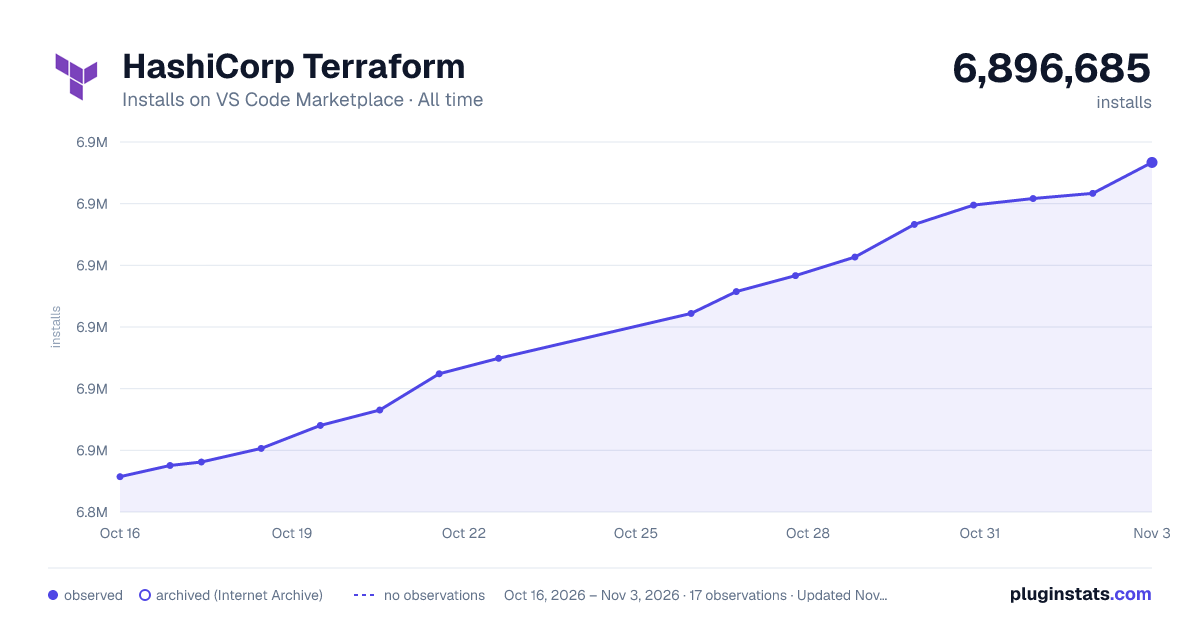

Adoption over time


7/30/90-day growth


Ranking history


Ratings over time


Listing placement


Listing placement


Listing placement


Filled points are observed values; hollow points come from Internet Archive snapshots of the listing page. Dashed segments span periods with no observations — values between points are not interpolated.
Each band is one page of 20. Installs on a log scale. Placement is projected from installs, so it can differ from the marketplace's own sort order. Hover a dot to see the listing.
Recent observations
Full history (4)Similar VS Code Marketplace Programming Languages plugins
All 20 HashiCorp Terraform alternativesData source
Install counts, average rating, and rating counts come from the public Visual Studio Marketplace gallery API. Installs are cumulative and exclude updates.
Listing: https://marketplace.visualstudio.com/items?itemName=HashiCorp.terraform. First seen Oct 16, 2026; last successful collection Oct 19, 2026. See the methodology.