 PluginStats
PHP Sniffer & Beautifier installs statistics
By Samuel Hilson · VS Code Marketplace · Linters
PHP Sniffer & Beautifier for Visual Studio Code
PHP Sniffer & Beautifier has 318,571 recorded installs on VS Code Marketplace, ranking #1107 of 2,501 tracked listings.
Rating: 4.91 / 5 from 22 ratings
About PHP Sniffer & Beautifier
PHP Sniffer & Beautifier for VS Code




This linter plugin for Visual Studio Code provides an interface to phpcs & phpcbf. It will be used with files that have the “PHP” language mode. This extension is designed to use auto configuration search mechanism to apply rulesets to files within a workspace. This is useful for developers who work with many different projects that have different coding standards.
This extension is available on both VS Code Marketplace and Open VSX Registry.
<details open> <summary><b>Table of Contents</b></summary>- PHPCS Version Support
- Maintenance Status
- Installation
- Usage
- Multi-Root Workspace Support
- Single File Mode Support
- Linter Installation
- Basic Configuration
- phpsab.fixerEnable
- phpsab.fixerArguments
- phpsab.snifferEnable
- phpsab.snifferArguments
- phpsab.executablePathCS
- phpsab.executablePathCBF
- phpsab.standard
- phpsab.autoRulesetSearch
- phpsab.allowedAutoRulesets
- phpsab.snifferMode
- phpsab.snifferTypeDelay
- phpsab.snifferShowSources
- phpsab.snifferShowFixabilityIcons
- Advanced Configuration
- Diagnosing common errors
- Acknowledgements
- Contributing and Licensing
PHPCS Version Support
This extension supports the latest stable version of PHPCS 3.x. If you are using an older version of PHPCS, please upgrade to the latest 3.x version.
NOTE: PHPCS 4.x is not currently supported.
As of v0.0.22, the extension will detect if PHPCS/PHPCBF version 4.x is being used and will display a warning message to the user. Some features may not work as expected when using version 4.x. Please consider downgrading to the latest 3.x version.
Maintenance Status
My focus has shifted away from PHP to .NET development, I'm currently unable to dedicate much time to maintaining this project. However, the extension is fully operational in its current state. If you're interested in contributing as a co-maintainer to address any outstanding issues, please feel free to get in touch with me.
Active Maintainers
In Sept of 2025 yCodeTech was added as a maintainer.
In June 2023 jonathanbossenger reached out to me and offered to help with maintaining the extension. I have added him as a contributor and he will be monitoring new issues and helping me review PRs. I will still be around to help out if needed.
In January 2024 seebeen signed on to be a maintainer for this project and has been granted contributor status. (Currently Inactive)
Installation
Visual Studio Code (VS Code) must be installed in order to use this plugin. If VS Code is not installed, please follow VS Code's instructions.
Usage
<kbd>F1</kbd> -> PHPCBF: Fix this file
or keyboard shortcut alt+shift+f vs code default formatter shortcut
or right mouse context menu Format Document.
Format on save
You can also use this formatter with Format on Save enabled via the setting editor.formatOnSave.
Format on save has two modes: File and Modified, via the setting editor.formatOnSaveMode. To enable usage of the modified mode, this extension supports the Git Modified filter argument provided by PHPCBF: --filter=GitModified. Just add it to the extension's phpsab.fixerArguments setting.
Multi-Root Workspace Support
This extension now fully supports Multi-Root Workspaces. The extension previously used the first root folder in your workspace to configure and run both phpcs and phpcbf. The new system allows each workspace to be configured and run independently with respect to the root folder of the open file being sniffed. This means you can have phpcs functionality in one folder and have it disabled in another within a workspace.
Single File Mode Support…
Description from the VS Code Marketplace listing.
- fixer
- linter
- php
- phpcbf
- phpcs
README badge
Show your rank in a README or on your website. The badge updates automatically.
Charts
Images: 30d · 1y · all time · 1600×900 dark


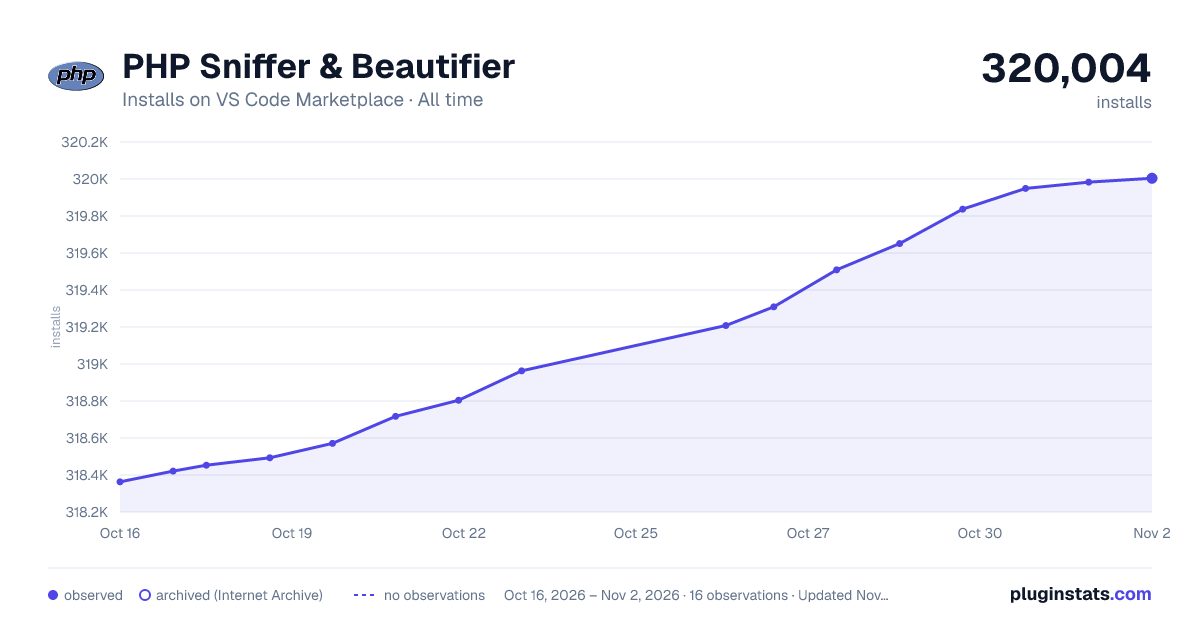

Adoption over time
7/30/90-day growth
Ranking history
Ratings over time
Listing placement
Listing placement
Listing placement
Filled points are observed values; hollow points come from Internet Archive snapshots of the listing page. Dashed segments span periods with no observations — values between points are not interpolated.
Each band is one page of 20. Installs on a linear scale. Placement is projected from installs, so it can differ from the marketplace's own sort order. Hover a dot to see the listing.
Recent observations
Full history (5)Similar VS Code Marketplace Linters plugins
All 20 PHP Sniffer & Beautifier alternativesData source
Install counts, average rating, and rating counts come from the public Visual Studio Marketplace gallery API. Installs are cumulative and exclude updates.
Listing: https://marketplace.visualstudio.com/items?itemName=ValeryanM.vscode-phpsab. First seen Oct 16, 2026; last successful collection Oct 20, 2026. See the methodology.