 PluginStats
DAX for Power BI installs statistics
By jianfajun · VS Code Marketplace · Programming Languages
Power BI DAX syntax highlighting, formatting, and diagnostics
DAX for Power BI has 95,358 recorded installs on VS Code Marketplace, ranking #2442 of 2,501 tracked listings.
Rating: 4.14 / 5 from 7 ratings
About DAX for Power BI
DAX Language - Syntax Highlighting, Formatting & Diagnostics
The DAX extension provides comprehensive support for Power BI's Data Analysis Expressions (DAX) language, including syntax highlighting, code formatting, and real-time error detection.
DAX 扩展为 Power BI 的数据分析表达式 (DAX) 语言提供全面支持,包括语法高亮、代码格式化和实时错误检测。
Features
- Syntax Highlighting
• Full syntax highlighting for DAX language • Supports .dax file extension • Works in Markdown code blocks (DAX, dax, Dax) • 高亮显示函数、关键字、字符串、注释和运算符
- 代码格式化
• 一键格式化代码(Cmd+Shift+F / Ctrl+Shift+F) • 右键选择命令 "Format Document" • 自动缩进嵌套函数 • 在运算符周围添加空格 • 保留注释和空行
- 实时诊断
• 检测中文字符(括号、逗号、全角空格) • 检查括号和方括号是否匹配 • 识别未闭合的字符串 • 用红色下划线显示错误信息
Usage Examples
Before Formatting:
After Formatting:
Error Detection:
The extension will highlight errors like: • Chinese parentheses: CALCULATE(SUM([Sales])) ❌ • Chinese comma: CALCULATE(SUM([Sales]),FILTER(...)) ❌ • Unmatched parentheses: CALCULATE(SUM([Sales]) ❌
Installation
- Install from VS Code Marketplace 2. Open any .dax file 3. The extension will activate automatically
Commands
• Format DAX Document: Format the current DAX file • Keyboard: Cmd+Shift+F (Mac) / Ctrl+Shift+F (Windows) • Command Palette: Format DAX Document
Requirements
• VS Code 1.29.0 or higher
Release Notes
Version 0.1.1 (2026-02-26)
• Fixed formatter bugs for improved code formatting quality
Version 0.1.0 (2026-02-23)
• Updated to 2026-02 DAX function list (466 functions total, +21 new functions) • Added 8 week-related time intelligence functions • CLOSINGBALANCEWEEK, DATESWTD, ENDOFWEEK, STARTOFWEEK • NEXTWEEK, PREVIOUSWEEK, OPENINGBALANCEWEEK, TOTALWTD • Added 11 type checking functions • ISBOOLEAN, ISCURRENCY, ISDATETIME, ISDECIMAL, ISDOUBLE • ISINT64, ISINTEGER, ISNUMERIC, ISSTRING • EXTERNALMEASURE, TABLEOF • Added 2 visual calculation lookup functions • LOOKUP, LOOKUPWITHTOTALS • Added syntax highlighting support for Markdown editor and Markdown Preview • Added code formatting with automatic indentation and operator spacing • Added real-time diagnostics for Chinese characters and syntax errors
Version 0.0.13 (2025-03-18)
• Updated to 2025 DAX function list (445 functions total) • Added 12 visual calculation functions for Power BI visual-level calculations • COLLAPSE, COLLAPSEALL, EXPAND, EXPANDALL • FIRST, ISATLEVEL, LAST, MOVINGAVERAGE • NEXT, PREVIOUS, RANGE, RUNNINGSUM • Enhanced code snippets with function categories (DATETIME, FILTER, WINDOW, etc.) • Added support for financial functions (ACCRINT, DB, XIRR, etc.) • Added support for engineering functions (BITAND, BITOR, BITXOR, etc.) • Added support for system functions (INFO.* series)
Version 0.0.12 (2024-03-22)
• Added visual calculation functions: • COLLAPSE, COLLAPSEALL, EXPAND, EXPANDALL • FIRST, ISATLEVEL, LAST, LOOKUP • MOVINGAVERAGE, NEXT, PREVIOUS • RANGE, RUNNINGSUM
References
• Official DAX Reference • Power BI Documentation
Enjoy coding with DAX! 🚀
Description from the VS Code Marketplace listing.
- Data Analysis Expressions
- dax
- markdown
- snippet
README badge
Show your rank in a README or on your website. The badge updates automatically.
Charts
Images: 30d · 1y · all time · 1600×900 dark


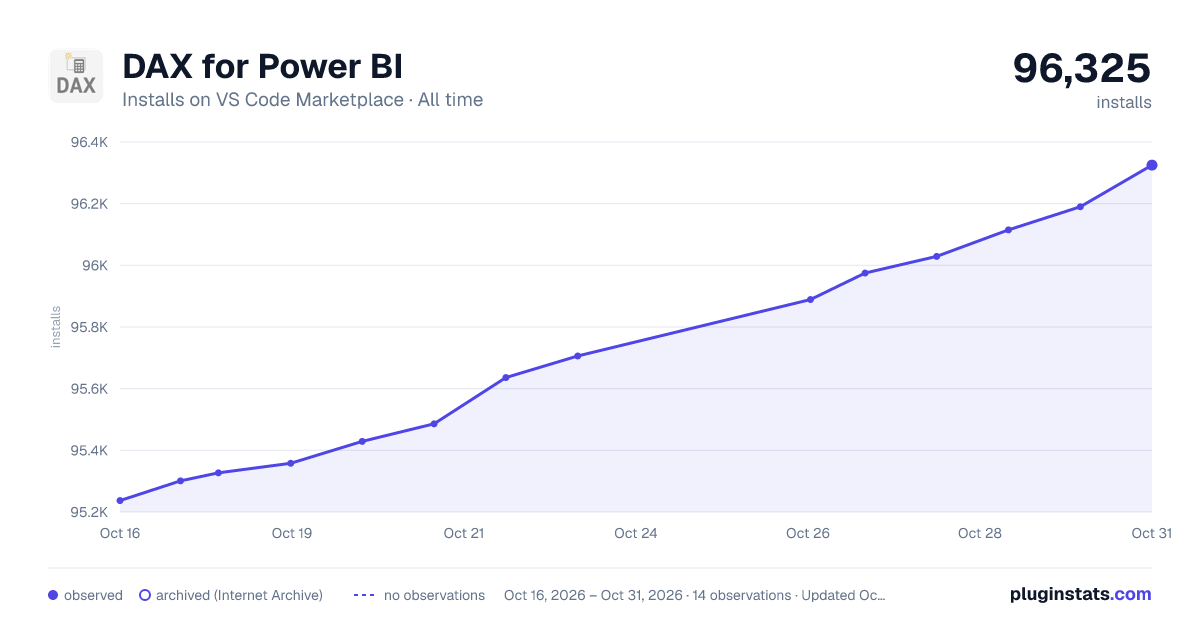

Adoption over time
7/30/90-day growth
Ranking history
Ratings over time
Listing placement
Listing placement
Listing placement
Listing placement
Filled points are observed values; hollow points come from Internet Archive snapshots of the listing page. Dashed segments span periods with no observations — values between points are not interpolated.
Each band is one page of 20. Installs on a linear scale. Placement is projected from installs, so it can differ from the marketplace's own sort order. Hover a dot to see the listing.
Recent observations
Full history (4)Similar VS Code Marketplace Programming Languages plugins
All 20 DAX for Power BI alternativesData source
Install counts, average rating, and rating counts come from the public Visual Studio Marketplace gallery API. Installs are cumulative and exclude updates.
Listing: https://marketplace.visualstudio.com/items?itemName=jianfajun.dax-language. First seen Oct 16, 2026; last successful collection Oct 19, 2026. See the methodology.