 PluginStats
OpenShift Toolkit installs statistics
By Red Hat (18 listings) · VS Code Marketplace · Debuggers
Fast iterative application development on Red Hat OpenShift and Kubernetes
OpenShift Toolkit has 154,021 recorded installs on VS Code Marketplace, ranking #1824 of 2,501 tracked listings.
Rating: 5.00 / 5 from 3 ratings
About OpenShift Toolkit
The OpenShift Toolkit Extension revolutionizes cloud-native application development by seamlessly integrating with Red Hat OpenShift Hybrid Cloud and Kubernetes. With this powerful extension, developers can harness the full potential of OpenShift and Kubernetes directly within their favorite code editor, streamlining the development process and enhancing productivity.
OpenShift Toolkit extension provides an end-to-end developer experience for Red Hat OpenShift. From seamless deployment to effortless scaling, the toolkit offers comprehensive support for building, testing, and deploying applications. Enjoy features like automatic containerization, built-in debugging, and real-time monitoring, empowering developers to focus on writing quality code while the toolkit handles the complexities of container orchestration and management.
OpenShift Application Development • Developers can easily create, deploy, and live debug container applications running on OpenShift, podman, and Hybrid Cloud. • Convert local codebases and git repositories into components that can be debugged on OpenShift through the Create Component guided workflow. • Create new devfile based components from a template project using the Create Component or Devfile Registries View guided workflows.
OpenShift Serverless Workflow • This extension provides the app developer the tools and experience needed when working with Knative & OpenShift Serverless Functions on a Kubernetes/OpenShift cluster. Using this extension, developers can develop and deploy functions in a serverless way through guided IDE workflow. • Users can create, run, deploy, build, invoke functions, and manage repositories directly from the UI.
OpenShift and Helm Integration • Browse & Install Helm Charts on to the cluster directly from IDE. • Developers can view and edit Resources YAML manifests, and view logs for pods, deployments, and deployment configs.
OpenShift Cluster Provisioning • Run local instance of OpenShift 4.x using OpenShift Local directly from IDE • Connect & Provision free Developer Sandbox for Red Hat OpenShift instance without leaving the IDE
Getting Started
Install
Open this extension in the Visual Studio Code Marketplace
The OpenShift Toolkit extension provides multiple views to the user once it is launched.
-
Application Explorer View: Showcases the cluster connected to and the resources present in the cluster. The cluster URL, Project, Deployment, and Deployment Configs are shown in the tree view.
-
Components View: Displays the components created and also the actions associated with the component based on the state in which it is (running or stopped). Allows users to create components from an existing local codebase, from an existing git repository, or a template project.
-
Devfile Registries View: Contains the Default Devfile Registry to browse and create components from the devfile stacks provided. Users can add their custom registry to the view and create components.
-
Serverless Functions View: Lists the available functions created in the cluster and provides the option to Create, Build, Deploy, and Run functions. It also allows you to Manage Repositories for the function template.
-
Debug Sessions View: Once the debug session is active, the associated component running in debug mode is displayed in this view.
Provision new OpenShift Cluster
The extension provides users with multiple ways to provision an instance of OpenShift to get started. Click on Add OpenShift Cluster which opens webview to select the way to get connected with a new OpenShift instance.
Red Hat OpenShift Developer Sandbox
The extension allows users FREE access to the Developer Sandbox for Red Hat OpenShift. From Add Cluster View, users can provision and connect to the dev sandbox instance using the guided workflow. The sandbox provides you with a private OpenShift environment in a shared, multi-tenant OpenShift cluster that is pre-configured with a set of developer tools.
Local instance of OpenShift
The extension allows the developers to provision a local instance of the OpenShift cluster using the guided workflow from the extension. It runs OpenShift Local which provides a single node local OpenShift 4.x cluster.
[!TIP] Please follow this guide to understand the guided workflow to provision OpenShift locally.
Provision Hybrid Cloud
To install OpenShift Container Platform 4 in the public cloud, in your data center, or on your laptop please visit Red Hat Hybrid Cloud console. Here are different scenarios to try OpenShift:
• Red Hat OpenShift Cluster Manager - This 60-day, self-supported trial lets you install and run the Red Hat OpenShift Container Platform on the infrastructure you manage. • Red Hat OpenShift Dedicated - Red Hat OpenShift Dedicated is a fully managed service of Red Hat OpenShift on Amazon Web Services (AWS) and Google Cloud. • Azure Red Hat OpenShift - Azure Red Hat OpenShift is a fully-managed service of Red Hat OpenShift on Azure, jointly engineered, managed and supported by Microsoft and Red Hat. • Red Hat OpenShift Service on AWS (ROSA) - Build, deploy, and manage Kubernetes applications with Red Hat OpenShift running natively on AWS.
Quick Start - Showcasing Component Creation
Users can create components in a faster and intuitive way in a few clicks using the following workflows:
Create Component
This guided workflow allows you to configure a project so that it can be run and debugged on OpenShift/Kubernetes. Users can deploy applications from: • Existing local code base, • Existing code base on a remote git repository, • Create a new project from a pre-defined template directly from IDE.…
Description from the VS Code Marketplace listing.
- Cloud
- debuggers
- devsandbox
- Functions
- Helm
- k8s
- keybindings
- kubernetes
- kubernetes-extension-cloud-provider
- openshift
- podman
- Red Hat
- Serverless
README badge
Show your rank in a README or on your website. The badge updates automatically.
Charts
Images: 30d · 1y · all time · 1600×900 dark


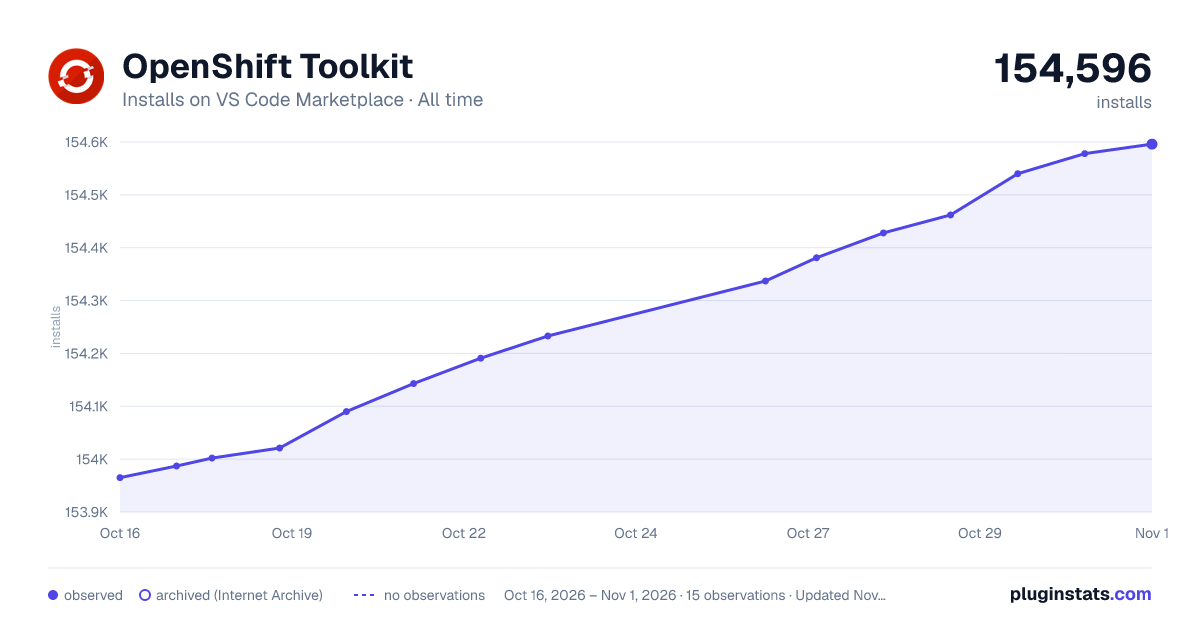

Adoption over time
7/30/90-day growth
Ranking history
Ratings over time
Listing placement
Listing placement
Listing placement
Filled points are observed values; hollow points come from Internet Archive snapshots of the listing page. Dashed segments span periods with no observations — values between points are not interpolated.
Each band is one page of 20. Installs on a linear scale. Placement is projected from installs, so it can differ from the marketplace's own sort order. Hover a dot to see the listing.
Recent observations
Full history (4)Similar VS Code Marketplace Debuggers plugins
All 20 OpenShift Toolkit alternativesData source
Install counts, average rating, and rating counts come from the public Visual Studio Marketplace gallery API. Installs are cumulative and exclude updates.
Listing: https://marketplace.visualstudio.com/items?itemName=redhat.vscode-openshift-connector. First seen Oct 16, 2026; last successful collection Oct 19, 2026. See the methodology.