 PluginStats
ev3dev-browser has 299,792 recorded installs on VS Code Marketplace, ranking #1160 of 2,502 tracked listings.
Rating: 5.00 / 5 from 2 ratings
About ev3dev-browser
ev3dev browser for Visual Studio Code
This extension allows you to browse ev3dev devices from Visual Studio Code, send files to these devices and remotely run programs.
Learn more about ev3dev at http://www.ev3dev.org.
Requirements
This extension is only compatible with devices running ev3dev-stretch. It will not work with earlier versions of ev3dev.
Additional information can be found on the wiki.
Features
-
Discover devices: Any connected ev3dev device should be automatically discovered. No configuration necessary.


-
Remotely browse files: Files for each device are listed just as they are in Brickman.

-
Download files to the device: The current VS Code project can be sent to an ev3dev device with a single click.

-
Remotely run programs: Click any executable file to run it.

Right-clicking works too.

Error messages will be displayed in the output pane.

-
Build, Download and Run with a single click (or <kbd>F5</kbd>): Create a
launch.jsonfile with an"ev3devBrowser"type to use this feature.{ "version": "0.2.0", "configurations": [ { "name": "Download and Run", "type": "ev3devBrowser", "request": "launch", "program": "/home/robot/${workspaceRootFolderName}/hello", "preLaunchTask": "build" } ] } -
Start a remote SSH session: You can start an SSH session in the terminal pane by right-clicking on a device.

-
Take a screenshot: You can easily take screenshot by right-clicking a device.


Extension Settings
This extension contributes the following settings:
ev3devBrowser.password: If you changed the password on your ev3dev device, you will need to set the password here. If you want to manually enter the password when you connect or use public key authentication, set this tonull.ev3devBrowser.env: If you need to set environment variables for running remote programs, you can set them here. Each variable is defined as a key/value pair.ev3devBrowser.interactiveTerminal.env: This is similar toev3devBrowser.envbut the environment variables are only applied when running a program in the interactive terminal.ev3devBrowser.download.include: Use this to specify which files to included when downloading files to the remote device. Can use glob patterns.ev3devBrowser.download.exclude: Use this to specify which files to exclude when downloading files to the remote device. Can use glob patterns.ev3devBrowser.download.directory: By default files are downloaded to a folder with the same name as the VS Code project. Use this setting to save the project files somewhere else. Paths are relative to the/home/robotdirectory.ev3devBrowser.additionalDevices: A list of additional devices to show in the list when connecting to a device. This should only be needed in cases where there are network problems interfering with device discover.ev3devBrowser.confirmDelete: Setting tofalsewill suppress the confirmation message when deleting a remote file or directory.ev3devBrowser.connectTimeout: The connection timeout when connecting to a device. Longer times may fix "Timeout while waiting for handshake".
More details and examples on the wiki.
Description from the VS Code Marketplace listing.
- debuggers
README badge
Show your rank in a README or on your website. The badge updates automatically.
Charts
Images: 30d · 1y · all time · 1600×900 dark


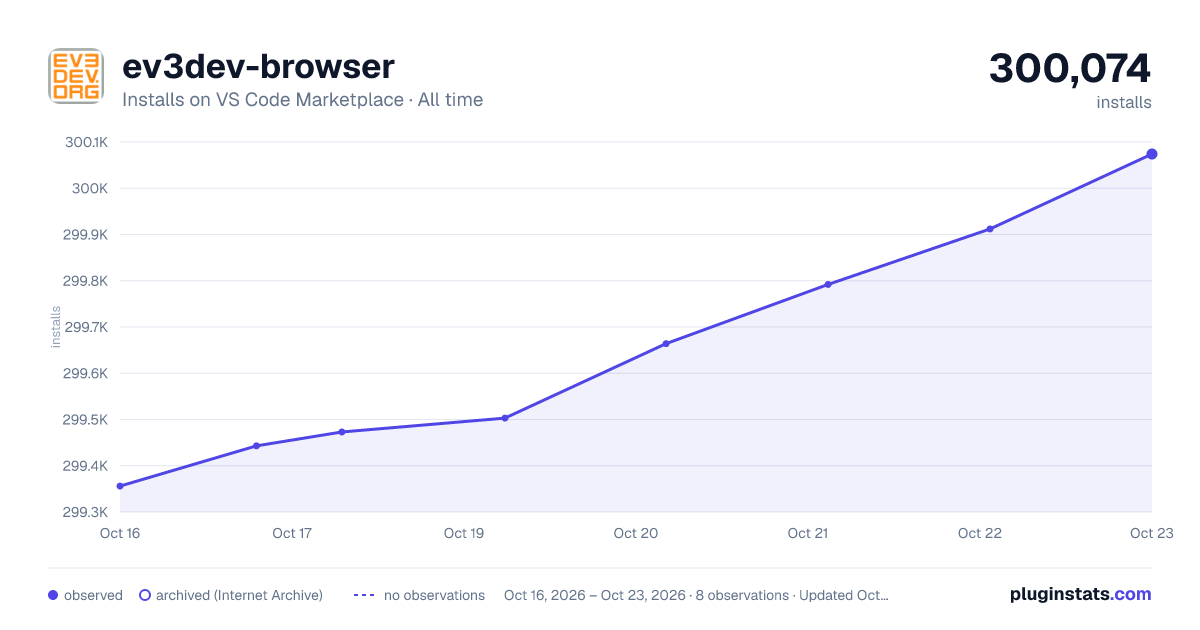

Adoption over time
7/30/90-day growth
Ranking history
Ratings over time
Listing placement
Listing placement
Filled points are observed values; hollow points come from Internet Archive snapshots of the listing page. Dashed segments span periods with no observations — values between points are not interpolated.
Each band is one page of 20. Installs on a linear scale. Placement is projected from installs, so it can differ from the marketplace's own sort order. Hover a dot to see the listing.
Recent observations
Full history (6)Similar VS Code Marketplace Other plugins
All 20 ev3dev-browser alternativesData source
Install counts, average rating, and rating counts come from the public Visual Studio Marketplace gallery API. Installs are cumulative and exclude updates.
Listing: https://marketplace.visualstudio.com/items?itemName=ev3dev.ev3dev-browser. First seen Oct 16, 2026; last successful collection Oct 21, 2026. See the methodology.