 PluginStats
Terminal Keeper installs statistics
By Nguyen Ngoc Long · VS Code Marketplace · Programming Languages
Elevate your terminal experience! Effortlessly configuration, seamlessly restore your last session, and manage sessions with ease. Personalize your workspace with colorful themes and boost productivity by importing commands swiftly.
Terminal Keeper has 228,799 recorded installs on VS Code Marketplace, ranking #1376 of 2,501 tracked listings.
Rating: 5.00 / 5 from 14 ratings
About Terminal Keeper






Terminal Keeper
<p align="center"> <img src="https://github.com/nguyenngoclongdev/cdn/raw/HEAD/images/terminal-keeper/terminal-keeper-showcase.gif"> <img src="https://github.com/nguyenngoclongdev/cdn/raw/HEAD/images/terminal-keeper/terminal-keeper-showcase-reverse.gif"> </p>Terminal Keeper helps you define, launch, and manage repeatable VS Code terminal sessions. Create named sessions for your projects, restore them automatically when VS Code starts, import commands from common project files, and keep terminals recognizable with colors, icons, and themes.
If you find this extension useful for your projects, please consider supporting me by Github, Patreon, KO-FI or Paypal. It's a great way to help me maintain and improve this tool in the future. Your support is truly appreciated!




Our Sponsors ❤️
<a href="https://dev.to/webia1"><img src="https://media2.dev.to/dynamic/image/width=320,height=320,fit=cover,gravity=auto,format=auto/https%3A%2F%2Fdev-to-uploads.s3.amazonaws.com%2Fuploads%2Fuser%2Fprofile_image%2F394714%2F0cab7789-c023-4b2d-a22d-757f369e6fcd.JPG" width="50px" alt="webia1" /></a> <a href="https://github.com/sponsors/nguyenngoclongdev"><img src="https://raw.githubusercontent.com/nguyenngoclongdev/vs-terminal-keeper/main/assets/sponsor.png" width="35px" alt="sponsor" /></a>
Our Contributors 🤝
<a href="https://github.com/nguyenngoclongdev/vs-terminal-keeper/graphs/contributors"> <img src="https://contrib.rocks/image?repo=nguyenngoclongdev/vs-terminal-keeper" /> </a>Installation
Install Terminal Keeper from one of these registries:
Why use Terminal Keeper?
Terminal Keeper is useful when you often open the same terminals for a project, such as a dev server, test watcher, background worker, or documentation server. Instead of reopening and retyping commands manually, save those workflows as sessions and activate them when you need them.
Highlights
- 🚀 Launch repeatable terminal workflows with a single command.
- 🔄 Automatically restore sessions whenever VS Code starts.
- 🗂️ Organize terminals into named sessions for different projects or environments.
- 📥 Import commands from
package.json,composer.json,Makefile,Pipfile, Gradle, Ant, Grunt, Gulp, and more. - 🎨 Customize terminal colors and icons or let Terminal Keeper generate them automatically.
- ⌨️ Run terminals directly from keyboard shortcuts using built-in keybinding support.
- 🧩 Works with both Visual Studio Marketplace and Open VSX.
- 🚫 No ads. No telemetry. No unnecessary setup.
Features
Session Management
- Named terminal sessions – Organize terminals into reusable sessions for different workflows.
- Automatic startup activation – Restore your preferred session automatically when VS Code starts.
- Session picker – Quickly switch between saved sessions from the Command Palette.
- Session cleanup – Remove sessions you no longer need with a single command.
Productivity
- Workspace configuration – Generate a starter configuration and customize it for each workspace.
- Command importing – Import commands from common project files instead of writing them manually.
- Activity Bar integration – Create, edit, activate, copy, import, and manage sessions from a dedicated explorer view.
- Keybinding support – Launch a terminal or session directly from your own keyboard shortcuts.
Customization…
Description from the VS Code Marketplace listing.
- bash
- cmd
- command
- console
- csh
- dash
- execute
- history
- internal
- ksh
- macro
- manager
- powershell
- presets
- pwsh
- quick
- remove
- restore
- run
- save
README badge
Show your rank in a README or on your website. The badge updates automatically.
Charts
Images: 30d · 1y · all time · 1600×900 dark


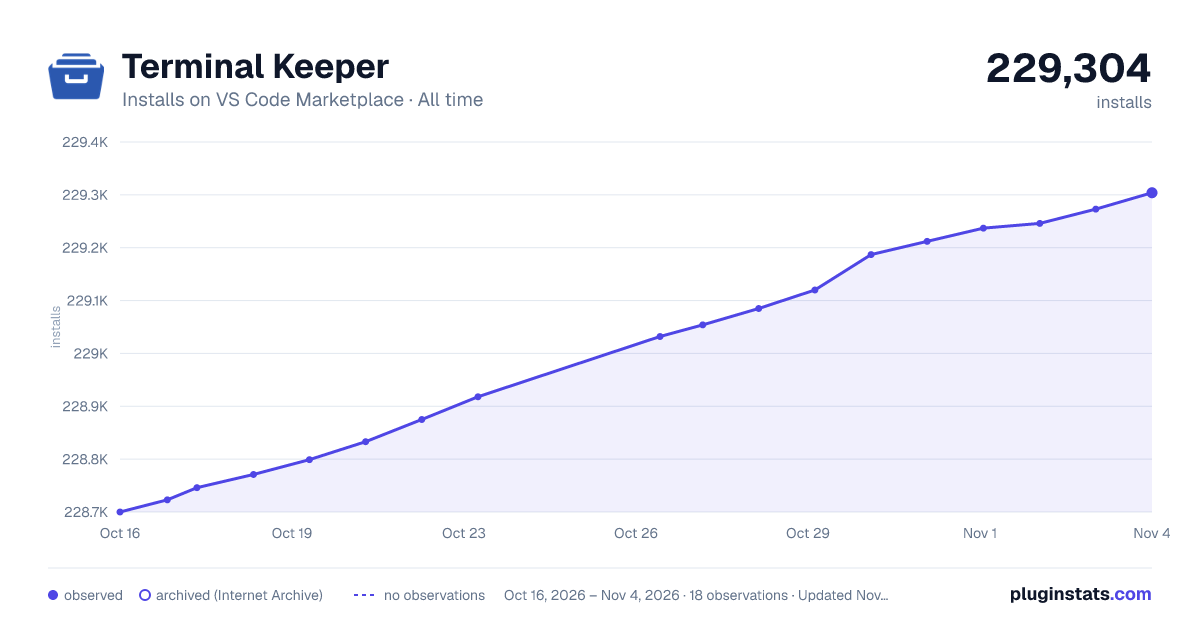

Adoption over time
7/30/90-day growth
Ranking history
Ratings over time
Listing placement
Listing placement
Listing placement
Listing placement
Filled points are observed values; hollow points come from Internet Archive snapshots of the listing page. Dashed segments span periods with no observations — values between points are not interpolated.
Each band is one page of 20. Installs on a linear scale. Placement is projected from installs, so it can differ from the marketplace's own sort order. Hover a dot to see the listing.
Recent observations
Full history (5)Similar VS Code Marketplace Programming Languages plugins
All 20 Terminal Keeper alternativesData source
Install counts, average rating, and rating counts come from the public Visual Studio Marketplace gallery API. Installs are cumulative and exclude updates.
Listing: https://marketplace.visualstudio.com/items?itemName=nguyenngoclong.terminal-keeper. First seen Oct 16, 2026; last successful collection Oct 20, 2026. See the methodology.