 PluginStats
MinGW C Configuration installs statistics
By brunomnsilva · VS Code Marketplace · Programming Languages
Creates or Updates a VS Code Workspace Configuration for MinGW
MinGW C Configuration has 91,359 recorded installs on VS Code Marketplace, ranking #2499 of 2,504 tracked listings.
About MinGW C Configuration
MinGW C Configuration
Description
Automatically injects MinGW build and debug configurations into the current VS Code workspace and creates a PowerShell terminal profile with the MinGW installation path set.
The extension is intended for Windows only.
Its very useful when:
- You are having problems with your system environment variables when using MinGW;
- You wish to have MinGW installed on a USB pen, e.g., you don't have administrative rights on the machine you're developing in.
Features
-
Prompts the user for a MinGW installation folder;
-
Adds a PowerShell terminal profile with MinGW path and
makealias, so you can usegcc,gdbandmakedirectly; -
Sets up the workspace configuration
.vscodefolder with:tasks.jsonandlaunch.jsonto debug the program through VS Code UI;c_cpp_properties.jsonthat is required for the C/C++ extension (ms-vscode.cpptools) to configure intellisense in the editor.
Commands
Create or Update MinGW Configuration for C Language
Prompts the user for the MinGW installation folder and then performs the necessary updates to the workspace configuration folders.

Example launch.json Template
{
    "name": "Debug project (MinGW)",
    "type": "cppdbg",
    "request": "launch",
    "program": "${workspaceFolder}\\prog.exe",
    "args": [],
    "stopAtEntry": false,
    "cwd": "${workspaceFolder}",
    "environment": [],
    "MIMode": "gdb",
    "externalConsole": false,
    "setupCommands": [
        {
            "description": "Enable pretty-printing for gdb",
            "text": "-enable-pretty-printing",
            "ignoreFailures": true
        }
    ],
    "preLaunchTask": "Make debug (MinGW)",
    "miDebuggerPath": "{{gdbPath}}"
}
where {{gdbPath}} is replaced with the gdb path of the prompted installation folder.
Limitations and Known Issues
The makefile of your C project should produce an executable called prog.exe for the configuration provided by the extension to work without any modification.
Extension Settings
The extension does not use any settings at the moment.
How to Contribute
-
Fork the repository on GitHub: https://github.com/brunomnsilva/mingw-c-configuration
-
Clone the repository to your local machine:
git clone https://github.com/brunomnsilva/mingw-c-configuration.git -
Install dependencies:
-
Make sure you have Node.js installed.
-
Inside the project directory, run:
npm ci
-
-
Run and test the extension in VS Code:
- Press
F5to open a new VS Code window with the extension loaded. - Test the functionality by using the "Create or Update MinGW Configuration for C Language" command.
- Press
-
Make a pull request.
Author
License
This extension releases under the MIT License.
Description from the VS Code Marketplace listing.
- C Language
- Configuration
- MinGW
- Workspace
README badge
Show your rank in a README or on your website. The badge updates automatically.
Charts
Images: 30d · 1y · all time · 1600×900 dark


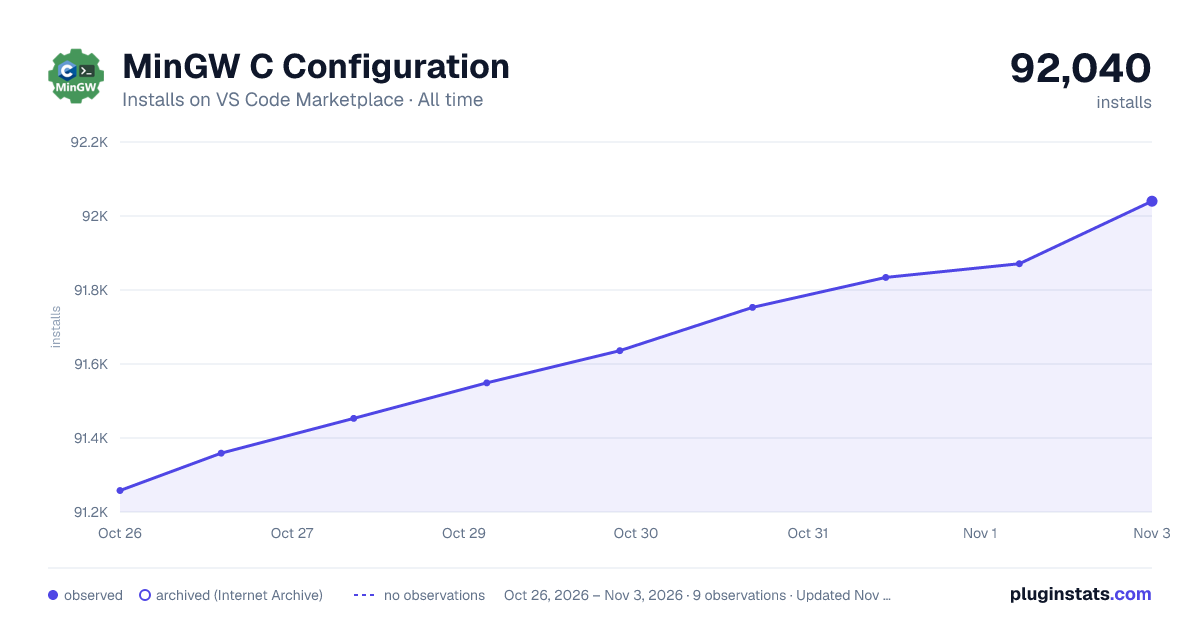

Adoption over time
7/30/90-day growth
Ranking history
Ratings over time
Listing placement
Listing placement
Filled points are observed values; hollow points come from Internet Archive snapshots of the listing page. Dashed segments span periods with no observations — values between points are not interpolated.
Each band is one page of 20. Installs on a linear scale. Placement is projected from installs, so it can differ from the marketplace's own sort order. Hover a dot to see the listing.
Recent observations
Full history (2)Similar VS Code Marketplace Programming Languages plugins
All 20 MinGW C Configuration alternativesData source
Install counts, average rating, and rating counts come from the public Visual Studio Marketplace gallery API. Installs are cumulative and exclude updates.
Listing: https://marketplace.visualstudio.com/items?itemName=brunomnsilva.mingw-c-configuration. First seen Oct 26, 2026; last successful collection Oct 27, 2026. See the methodology.