 PluginStats
zames_pro weekly downloads statistics
By Viqto0r · npm · Claude Code
Terminal coding agent that drives a real browser to chat with DeepSeek, Qwen and other web LLMs — no API key required. Reads and edits files, runs commands, commits to git, like Claude Code / Codex CLI.
zames_pro has 2,877 recorded weekly downloads on npm.
It ranks #1213 of 2,256 tracked npm listings by weekly downloads.
Over the past 7 days it changed by -50.3%.
PluginStats has 543 daily observations since Apr 23, 2025; the latest is from Oct 17, 2026.
About zames_pro
zames_pro
A terminal coding agent that drives real web chat LLMs (DeepSeek, Qwen, …) through a browser — no API key required.
English | Русский
A terminal coding agent that works on top of real web chat LLMs (chat.deepseek.com, chat.qwen.ai, …) through Playwright. In spirit it is similar to Claude Code / Codex CLI: it starts in the current directory, reads and edits files, runs commands, and commits to git.
No API key required — it drives a DeepSeek or Qwen web chat like a regular user through a real (headless) browser.
Quick start
There is no API key and no per-token bill: zames signs in to **your own chat.deepseek.com or chat.qwen.ai account** in a real (headless) Chromium and drives the web chat like a regular user. The first launch asks for your login once (the session is stored in ~/.zames/profile for DeepSeek or ~/.zames/qwen-profile for Qwen); after that just run zames and type a task in plain language:
While the agent works you can keep typing — a message sent mid-task is queued and runs right after it, in the same chat. Esc aborts the current generation, /help lists commands, /exit quits.
How it works
zames does not call the model API. It launches a headless Chromium with a persistent profile, signs in to a chat web app like a human, types the task into the chat box, and reads the answer back.
Two chat backends are available, switched with /provider : DeepSeek (chat.deepseek.com, the default) and Qwen (chat.qwen.ai). The switch is live — zames closes the current backend and opens the other one in place, no restart needed. Each keeps its own persistent profile (~/.zames/profile and ~/.zames/qwen-profile), so switching never signs the other one out.
In text: you type a task → zames sends the system prompt plus the task into the active chat web app (DeepSeek or Qwen) → the model answers → zames parses the tool call, runs the tool locally, feeds the result back, and prints the final answer for you.
Key pieces:
• The answer is read from the raw network stream (SSE), not the rendered DOM, so tool-call JSON with template strings and escapes survives intact. • A persistent per-provider profile (~/.zames/profile for DeepSeek, ~/.zames/qwen-profile for Qwen) keeps you signed in; the headless User-Agent is patched so the site's CDN does not 403 the login. • A send throttle (15 s on DeepSeek, ~1 s on Qwen, which tolerates rapid sends) keeps the web chat's rate limit happy during long tool-heavy runs. • The agent is sandboxed to the directory it was started in — no tool can read or write above it.
Table of contents
• Quick start · Features · Why zames? · Requirements • How it works · Installation · Signing in · Usage • Switching providers (DeepSeek / Qwen) • Tools · Slash commands • Project context, skills and memory · MCP (external tools) · Configuration • FAQ · Links · License
Features
• Tools like Claude Code / Codex — Read, Write, Edit, Bash, Glob, Grep, plus MultiEdit, ApplyPatch, LS, TodoWrite, git and web tools. Every edit is backed by /undo. • Runs while you keep typing — queue messages during a task; they run right after it, in the same chat (like typing during generation on the web). • Plan mode — /plan (or --plan) drops all mutating tools, so the agent can investigate the code without touching the tree. • Project context — reads AGENTS.md, MEMORY.md, skills (SKILL.md) and custom commands from the repo and ~/.zames, the same idea as Codex / Claude Code. • Subagents — the Task tool delegates a self-contained sub-task to an agent in its own separate chat (isolated context), which returns only a report, so heavy research does not flood the main context. On by default; tune with browser.subagents / browser.maxSubagents. • MCP support — plug in external tool servers (e.g. @playwright/mcp). • Scheduling — /loop, /cron and /jobs repeat tasks on a timer. • Bilingual UI — Russian / English (/config lang).
Why zames?
• No API key, no per-token bill — it uses your own DeepSeek or Qwen chat account, not the paid API. Good for long, tool-heavy tasks. • Same workflow as Claude Code / Codex — tools, AGENTS.md, skills, MCP and slash commands, so it feels familiar from day one. • Runs unattended — headless by default, resumable sessions, and /loop plus /cron for scheduled work. • Local-first — the browser profile, credentials and logs never leave your machine, and the agent is sandboxed to the project directory.
Requirements
• Node.js >= 20 • An account on the chat you want to use — DeepSeek (chat.deepseek.com, the default) or Qwen (chat.qwen.ai). Qwen also works in guest mode for a few messages. On first launch zames asks for your login in the terminal (and stores it in ~/.zames/config.json after a successful sign-in, so a later logout is handled automatically without asking you again). You can also sign in manually in the browser window when the browser is headed.
Signing in
The browser runs headless by default. When the active backend requires a sign-in, zames:
1. reuses the session stored in the persistent profile (~/.zames/profile for DeepSeek, ~/.zames/qwen-profile for Qwen) if it is still valid; 2. otherwise signs in automatically with the saved credentials (browser.auth.username / browser.auth.password); 3. otherwise asks you for the login/password in the terminal (in a TTY) and, after a successful sign-in, remembers them for next time; 4. otherwise falls back to a manual sign-in hint.
To sign in by hand (for example, if the site shows a captcha), run with a visible window:
The --headless flag (the default) and headless: true in the config keep the browser without a window; --headed / headless: false show it.
Headless works out of the box: a headless Chrome normally advertises a HeadlessChrome/... User-Agent that the site's CDN blocks with a 403, so zames strips that marker before loading the page (keeping the real engine version). You do not need --headed just to log in.…
Description from the npm listing.
- agent
- ai
- ai-agent
- ai-coding-assistant
- coding-agent
- code-assistant
- terminal-agent
- deepseek
- deepseek-chat
- claude-code
- codex
- cli
- terminal
- playwright
- browser-automation
- llm
- no-api-key
- automation
- qwen
- qwen-chat
Where zames_pro sits in the listing
Each band is one page of 20. Weekly downloads on a log scale. Placement is projected from weekly downloads, so it can differ from the marketplace's own sort order. Hover a dot to see the listing.


Charts
Images: 30d · 1y · all time · 1600×900 dark


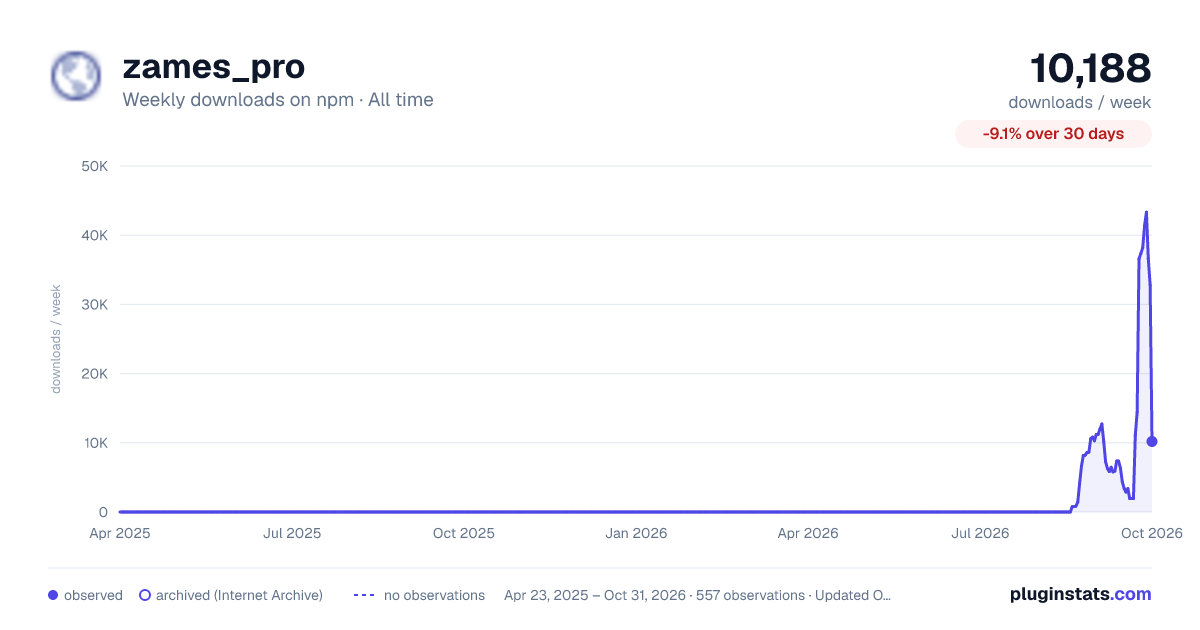

Adoption over time


7/30/90-day growth


Filled points are observed values; hollow points come from Internet Archive snapshots of the listing page. Dashed segments span periods with no observations — values between points are not interpolated.
Recent observations
Full history (543)Similar npm Claude Code plugins
Data source
Weekly downloads (trailing 7 complete days) come from the official npm downloads API. Downloads include CI and mirrors and are not equivalent to installs or users. npm publishes no ratings.
Listing: https://www.npmjs.com/package/zames_pro. First seen Oct 16, 2026; last successful collection Oct 19, 2026. See the methodology.