 PluginStats
@datarose/tailwindcss-theme-colors weekly downloads statistics
By datarose (2 listings) · npm · Tailwind plugins
Easily manage multiple themes
@datarose/tailwindcss-theme-colors has 9 recorded weekly downloads on npm, a decrease of 18.2% over the past 30 days, ranking #2080 of 2,322 tracked listings.
About @datarose/tailwindcss-theme-colors
The package was inspired by the tw-colors package. Its purpose is to enable easy management of custom templates, allowing us to create unique colors using existing color scales. With light and dark themes, we can fully customize the appearance.
Installation
Supports
- Vite >=5
- Node >=21
npm install @datarose/tailwindcss-theme-colors --save-dev
Startup
tailwind.config.js
import { createThemes } from '@datarose/tailwindcss-theme-colors'

/** @type {import('tailwindcss').Config} */
export default {
  plugins: [
    createThemes({
      light: {
        primary: '#fff',
        secondary: '#555',
        red: {
          50: '...',
          100: '...',
        },
        green: {
          lighter: '...',
          light: '...',
          dark: '...',
          darker: '...',
          nested: {
            50: '...',
            100: '...',
          },
        },
      },
      dark: {
        primary: '#000',
        secondary: '#ccc',
        red: {
          50: '...',
          100: '...',
        },
        green: {
          lighter: '...',
          light: '...',
          dark: '...',
          darker: '...',
          nested: {
            50: '...',
            100: '...',
          },
        },
      },
      'custom-theme-name': {
        'custom-color-name': 'custom-color-code',
      },
    })
  ],
}
Set default themes
If no template is selected, or the selected template name does not exist, this template will be loaded instead.
createThemes({
  light: {
    primary: '#fff',
    secondary: '#555',
  },
  dark: {
    primary: '#000',
    secondary: '#ccc',
  },
}, {
  defaultTheme: 'dark',
})
Select theme
With class name (can select X theme with .theme-X class-name)
<html class='theme-light'>
  <div>
      <h1 class='text-primary'>...</h1>
      <p class='text-secondary'>...</p>
  </div>
</html>
With data-theme attribute (can select X theme with data-theme="X" class-name)
<html data-theme='light'>
  <div>
    <h1 class='text-primary'>...</h1>
    <p class='text-secondary'>...</p>
  </div>
</html>
Select nested theme
With data-theme attribute
<html data-theme='dark'>
  ...
  <div data-theme='coffee'>...</div>
  <div data-theme='sky'>...</div>
</html>
With class name
For variants to work properly in nested themes, an empty data-theme attribute must be added alongside the nested theme class.
<html class='dark'>
  ...
  <div data-theme class='coffee'>...</div>
  <div data-theme class='sky'>...</div>
</html>
Use prefers-color-scheme: light/dark
By embedding theme objects within the light and dark functions, we can designate them as light or dark themes. If a theme object is embedded in the light function, it is classified as a light-mode theme. If a user who prefers dark mode opens the page, this theme will not work for them.
createThemes(({ light, dark }) => {
  light: light({
    primary: '#fff',
    secondary: '#555',
  }),
  dark: dark({
    primary: '#000',
    secondary: '#ccc',
  }),
})
Set default themes to light and dark modes
This way, even without selecting a theme, we can assign our desired default theme to both light and dark modes.
createThemes(({ light, dark }) => {
  light: light({
    primary: '#fff',
    secondary: '#555',
  }),
  coffee: light({
    primary: '#123456',
    secondary: '#654321',
  }),
  dark: dark({
    primary: '#000',
    secondary: '#ccc',
  }),
  sky: dark({
    primary: '#111',
    secondary: '#333',
  }),
}, {
  defaultTheme: {
    light: coffee, // when `@media (prefers-color-scheme: light)` is matched
    dark: space, // when `@media (prefers-color-scheme: dark)` is matched
  },
})
Variants
Based on the current theme, specific styles can be applied using variants.<br>
Note: In the following example the variants would have no effect with data-theme='light'
<!-- Use "serif" font for the dark theme only -->
<div data-theme='dark' class='font-sans theme-dark:font-serif'>
  ...
  <div>Serif font here</div>

  <!-- this button is rounded when the theme is `dark` -->
  <button class='theme-dark:rounded'>Click Me</button>
</div>
Caveat: group-{modifier}
Always use the group variant before the theme variant.
<html class='theme-dark'>
  ...
  <div class='group'>
    <div class='theme-dark:group-hover:bg-red-500'>
      ❌ the group variant does not work
    </div>
    <div class='group-hover:theme-dark:bg-red-500'>
      ✅ the group variant works properly
    </div>
  </div>
</html>
Configurations
createThemes(({ light, dark }) => {
  // theme list...
}, {
  produceCssVariable: (colorName) => `--custom-color-css-variable-name-${colorName}`, // default: --twtc-${colorName}
  produceThemeClass: (themeName) => `custom-theme-class-name-${themeName}`, // default: theme-${themeName}
  produceThemeVariant: (themeName) => `custom-theme-variant-name-${themeName}`, // default: theme-${themeName}
  defaultTheme: {
    light: coffee, // set default theme to light mode
    dark: space, // set default theme to dark mode
  },
  strict: false, // an error will be thrown when a theme doesn't exist // default: false
})
Early Access
The package is still very primitive, and we have many more plans for the future. We aim to boost our design with easily customizable and interchangeable templates.
Open Source Repository…
Description from the npm listing.
- tailwindcss
- tailwindcss-plugin
- theme
- colors
README badge
Show your rank in a README or on your website. The badge updates automatically.
Charts
Images: 30d · 1y · all time · 1600×900 dark


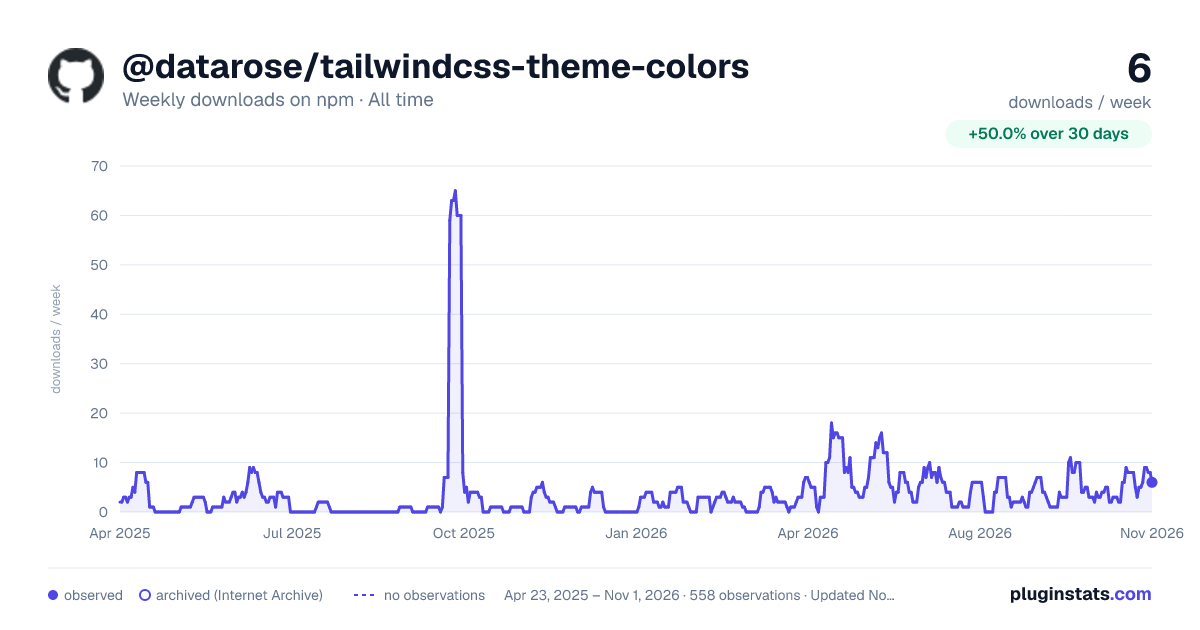

Adoption over time
7/30/90-day growth
Ranking history
Listing placement
Listing placement
Filled points are observed values; hollow points come from Internet Archive snapshots of the listing page. Dashed segments span periods with no observations — values between points are not interpolated.
Each band is one page of 20. Weekly downloads on a linear scale. Placement is projected from weekly downloads, so it can differ from the marketplace's own sort order. Hover a dot to see the listing.
Recent observations
Full history (544)Similar npm Tailwind plugins plugins
All 20 @datarose/tailwindcss-theme-colors alternativesData source
Weekly downloads (trailing 7 complete days) come from the official npm downloads API. Downloads include CI and mirrors and are not equivalent to installs or users. npm publishes no ratings.
Listing: https://www.npmjs.com/package/@datarose/tailwindcss-theme-colors. First seen Oct 16, 2026; last successful collection Oct 20, 2026. See the methodology.