 PluginStats
prettier-plugin-elm weekly downloads statistics
By gicentre · npm · Prettier plugins
Adds Elm language support to Prettier via elm-format
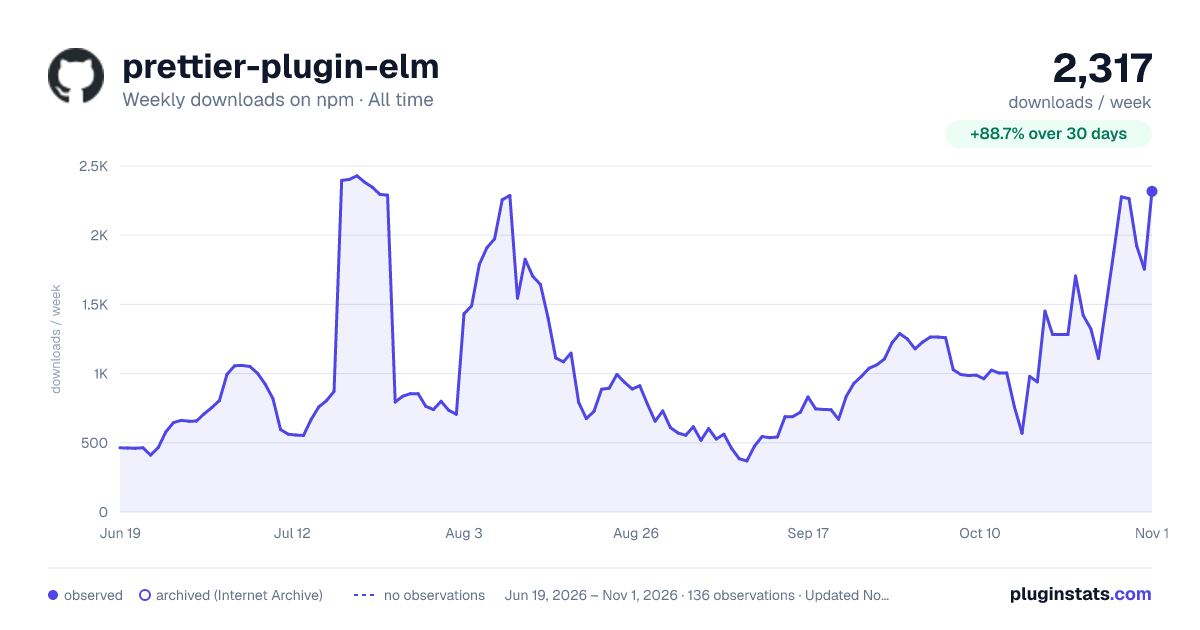
prettier-plugin-elm has 1,451 recorded weekly downloads on npm, an increase of 94.8% over the past 30 days, ranking #1410 of 2,391 tracked listings.
About prettier-plugin-elm
This plugin integrates elm-format into Prettier.
In addition to dealing with .elm files via Prettier API, this plugin lets you format Elm code blocks inside markdown documents.
For example,
<!-- prettier-ignore --># Hello world in Elm
```elm
import Html exposing (text)
main = text "Hello, World!"
```
becomes:
#    Hello world in Elm
```elm
import  Html exposing     (text)

main = text      "Hello, World!"
```
You can disable code formatting for a particular code block by adding <nobr><!-- prettier-ignore --></nobr> before ```elm.
Elm code with custom formatting:

<!-- prettier-ignore -->
```elm
main = text      "Hello, World!"
```

Prettified code:

```elm
main =
    text "Hello, World!"
```
The latest version of prettier-plugin-elm assumes that you are using Elm 0.19.
For compatibility with Elm 0.18, please install prettier-plugin-elm@0.3.
Getting started
The instructions assume that you have already installed Node.js on your machine. To check its presence, open the terminal and type these two commands:
node --version
## ≥ 18.20

npm --version
## ≥ 9
If you see errors or if the displayed versions are too old, follow the instructions on nodejs.org to download this software. By installing Node.js you also get NPM, so there is no need to obtain it separately. You might need to restart the terminal or the whole machine to see the new versions.
Global install
The easiest way to get started with Prettier and its Elm plugin is to globally install two NPM packages:
npm install --global prettier@2 prettier-plugin-elm
Global install is preferred in simple scenarios, especially when you are working alone on small projects.
Prettier v3 does has dropped support for automatic plugin search so we need to install prettier@2 globally. If you want to use Prettier v3, you need to install it locally and mention prettier-plugin-elm in the config file.
Local install
When collaborating on a group project, it is useful to keep versions of Prettier and its Elm plugin in sync within the team. This avoids frequent unwanted changes in source files, which can be caused by formatting differences between tool versions.
-
Open a terminal and ensure you are located at the root of your project:
pwd ## prints something like /path/to/my/project -
If there is no
package.jsonfile in your project directory, initialize it:## if you use npm npm init --yes## if you use pnpm pnpm init --yes## if you use yarn yarn init --yes -
Run the install command:
## if you use npm
npm install --only=dev prettier prettier-plugin-elm
## if you use pnpm pnpm add --dev prettier prettier-plugin-elm## if you use yarn yarn add --dev prettier prettier-plugin-elmVersions of Prettier and its Elm plugin will be written to
package.jsonandpackage-lock.json/pnpm-lock.yaml/yarn.lock. If you share these files with the rest of your source code, others will be able to get the exact same versions of the tools by running:## if you use npm npm install## if you use pnpm pnpm install## if you use yarn yarn install -
Mention the plugin in the config file:
-
Create a file named
.prettierrc.jsonin the root of your project. If you already have this file, open it instead. Note that it can be called differently because Prettier supports several config file names. -
Add the following content to the file:
{
  "plugins": ["prettier-plugin-elm"]
}
This tells Prettier to use the Elm plugin when formatting files.…
-
Description from the npm listing.
- elm
- elm-format
- gicentre
- prettier
- prettier-plugin
- typescript
README badge
Show your rank in a README or on your website. The badge updates automatically.
Charts
Images: 30d · 1y · all time · 1600×900 dark



Adoption over time
7/30/90-day growth
Ranking history
Listing placement
Listing placement
Filled points are observed values; hollow points come from Internet Archive snapshots of the listing page. Dashed segments span periods with no observations — values between points are not interpolated.
Each band is one page of 20. Weekly downloads on a linear scale. Placement is projected from weekly downloads, so it can differ from the marketplace's own sort order. Hover a dot to see the listing.
Recent observations
Full history (122)Similar npm Prettier plugins plugins
All 20 prettier-plugin-elm alternativesData source
Weekly downloads (trailing 7 complete days) come from the official npm downloads API. Downloads include CI and mirrors and are not equivalent to installs or users. npm publishes no ratings.
Listing: https://www.npmjs.com/package/prettier-plugin-elm. First seen Oct 16, 2026; last successful collection Oct 21, 2026. See the methodology.