 PluginStats
@gitkraken/gk weekly downloads statistics
By gitkraken (3 listings) · npm · MCP servers
gk is GitKraken on the command line. It makes working across multiple repos easier with Workspaces, provides access to pull requests and issues from multiple services (GitHub, GitLab, Bitbucket, etc.), and seamlessly connects with GitKraken Client and Git
@gitkraken/gk has 20,021 recorded weekly downloads on npm, a decrease of 21.6% over the past 30 days, ranking #793 of 2,322 tracked listings.
About @gitkraken/gk
GitKraken MCP Server
The GitKraken MCP Server is a local MCP server that is powerful and easy to use. It combines the functionality of all of your GitKraken Integrations and provides that power to your AI agents, assistants, and chatbots. Your agentic workflows will be more capable and efficient.
Use Cases
- Safe Git Operations: Perform Git operations safely and securely
- Issue & PR Automation: Read and Create Issues and Pull Requests across all supported GitKraken Integrations (GitHub, GitLab, BitBucket, Azure DevOps, Jira, Trello, Linear, etc.)
- Understand Repo Changes: Get a detailed overview of all changes in a repository and understand the impact of each change
Local GitKraken MCP Server





Installation
There are several ways of installing the GitKraken MCP Server depending on the environment in which you want to use it.
Install in VS Code with GitLens
If you are using a new enough version of VS Code and have GitLens installed, the MCP Server is installed for you automatically. To verify this, you simply need to run a Copilot prompt that would use our MCP server. For example, you can run the following prompt:
What Issues are assigned to me?
Install in Other IDEs with GitLens
GitLens can automate it's installation in other VS Code based IDEs such as Cursor, WindSurf, Trae, and Kiro.
For quick installation, use one of the one-click install buttons above. Once you complete that flow, toggle Agent mode (located by the Copilot Chat text input) and the server will start.
If you already have Gitlens, you can simply bring up the Command Palette (Ctrl+Shift+P) and type "GitLens: Install MCP Server" and select the option to install the MCP Server in your IDE.
More about using MCP server tools in VS Code's agent mode documentation.
Install without GitLens
For easy installation, you can use the GitKraken CLI command:
gk mcp install <PLATFORM>
Alternatively, you can manually add the following JSON block to your IDE's MCP settings:
{
  "mcp": {
    "servers": {
      "gitkraken": {
        "command": "gk",
        "args": ["mcp"],
        "type": "stdio"
      }
    }
  }
}
This assumes that you ran the install command globally (npm i -g @gitkraken/gk).
Optionally, you can add a similar example (i.e. without the mcp key) to a file called .vs code/mcp.json in your workspace. This will allow you to share the configuration with other host applications that accept the same format.
More about using GitKraken MCP documentation
Tools
Git Tools…
Description from the npm listing.
- cli
- command-line
- efficiency
- git-tool
- productivity
- repository-management
- tool
- utility
- version-control
- mcp
- gitkraken
README badge
Show your rank in a README or on your website. The badge updates automatically.
Charts
Images: 30d · 1y · all time · 1600×900 dark


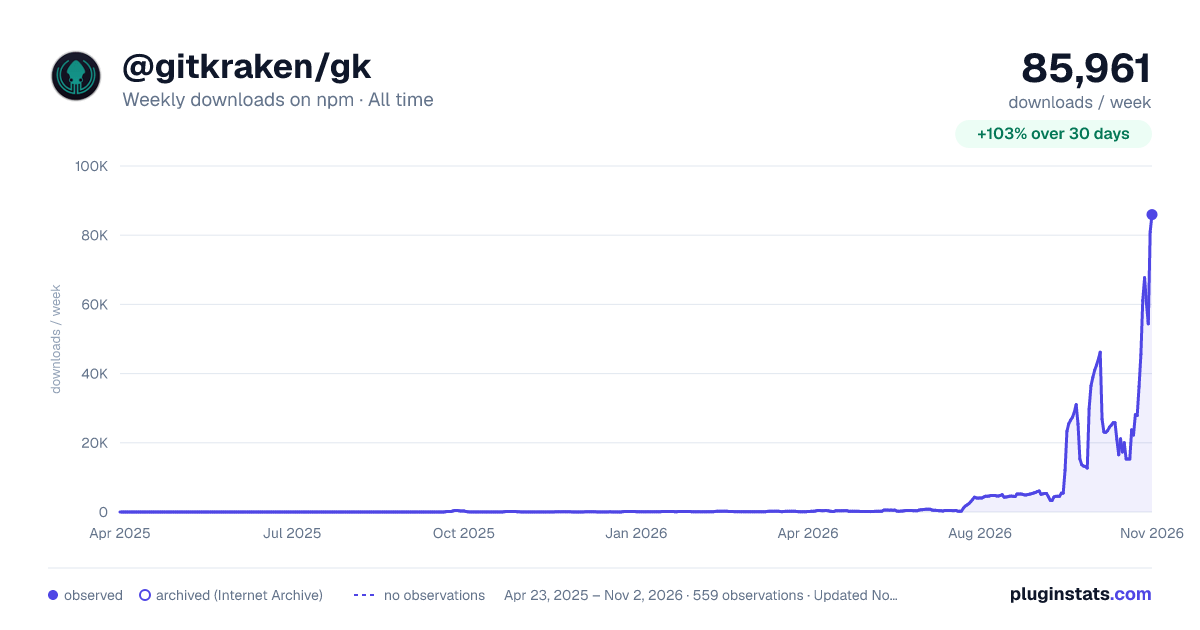

Adoption over time
7/30/90-day growth
Ranking history
Listing placement
Listing placement
Filled points are observed values; hollow points come from Internet Archive snapshots of the listing page. Dashed segments span periods with no observations — values between points are not interpolated.
Each band is one page of 20. Weekly downloads on a linear scale. Placement is projected from weekly downloads, so it can differ from the marketplace's own sort order. Hover a dot to see the listing.
Recent observations
Full history (544)Similar npm MCP servers plugins
All 20 @gitkraken/gk alternativesData source
Weekly downloads (trailing 7 complete days) come from the official npm downloads API. Downloads include CI and mirrors and are not equivalent to installs or users. npm publishes no ratings.
Listing: https://www.npmjs.com/package/@gitkraken/gk. First seen Oct 16, 2026; last successful collection Oct 20, 2026. See the methodology.