 PluginStats
@gleanwork/mcp-config-schema weekly downloads statistics
By gleanwork (2 listings) · npm · MCP servers
Type-safe schemas and builders for MCP client configurations
@gleanwork/mcp-config-schema has 7,497 recorded weekly downloads on npm, a decrease of 41.7% over the past 30 days, ranking #1031 of 2,391 tracked listings.
About @gleanwork/mcp-config-schema
@gleanwork/mcp-config-schema
Type-safe configuration schemas and builders for MCP (Model Context Protocol) clients.
The Problem
MCP servers need to work across many different AI coding assistants—Claude Code, VS Code, Cursor, Claude Desktop, Windsurf, Goose, Codex, and more. Each client has its own:
- Configuration format: JSON, YAML, or TOML
- File location: Different paths on macOS, Linux, and Windows
- Property names:
urlvsserverUrlvsuri,commandvscmd,mcpServersvsserversvsextensions - Transport support: Some support HTTP natively, others require the
mcp-remotebridge - Authentication patterns: Headers, environment variables, or OAuth
Without a unified solution, MCP server authors face a maintenance nightmare: writing and maintaining separate configuration logic for each client, tracking which clients support which features, and keeping up with changes across the ecosystem.
The Solution
This package provides a single source of truth for MCP client configurations. You describe your connection once, and it generates the correct configuration for any supported client:
import { MCPConfigRegistry } from '@gleanwork/mcp-config-schema';

const registry = new MCPConfigRegistry();

// Same options work for any client
const options = {
  transport: 'http',
  serverUrl: 'https://api.example.com/mcp/default',
  serverName: 'my-server',
  headers: { Authorization: 'Bearer token' },
};

// Generate correct config for each client
registry.createBuilder('cursor').buildConfiguration(options);      // → JSON with mcpServers
registry.createBuilder('vscode').buildConfiguration(options);      // → JSON with servers
registry.createBuilder('goose').buildConfiguration(options);       // → YAML with extensions
registry.createBuilder('claude-desktop').buildConfiguration(options); // → JSON with mcp-remote bridge
The package handles all the complexity: format differences, property mapping, platform-specific paths, transport bridging, and one-click installation URLs.
Installation
npm install @gleanwork/mcp-config-schema
Quick Start
stdio Transport (Local Server)
For stdio transport, provide registry options with your package names, then pass environment variables directly:
import { MCPConfigRegistry } from '@gleanwork/mcp-config-schema';

const registry = new MCPConfigRegistry({
  serverPackage: '@your-org/mcp-server', // Your stdio server package
});

const builder = registry.createBuilder('cursor');

// Generate configuration for stdio transport with custom environment variables
const config = builder.buildConfiguration({
  transport: 'stdio',
  env: {
    MY_INSTANCE: 'my-instance',
    MY_API_TOKEN: 'my-api-token',
  },
});
HTTP Transport (Remote Server)
For connecting to HTTP-based MCP servers, no additional configuration is needed:
import { MCPConfigRegistry } from '@gleanwork/mcp-config-schema';

const registry = new MCPConfigRegistry();
const builder = registry.createBuilder('cursor');

// Generate configuration for HTTP transport
const config = builder.buildConfiguration({
  transport: 'http',
  serverUrl: 'https://your-server.com/mcp/default',
  serverName: 'my-server',
});

// Write configuration to the client's config file (Node.js only)
await builder.writeConfiguration({
  transport: 'http',
  serverUrl: 'https://your-server.com/mcp/default',
  serverName: 'my-server',
});

// Generate one-click install URL for supported clients (Cursor, VS Code)
const oneClickUrl = builder.buildOneClickUrl({
  transport: 'http',
  serverUrl: 'https://your-server.com/mcp/default',
  serverName: 'my-server',
});
// Returns: cursor://anysphere.cursor-deeplink/mcp/install?name=my-server&config=...
HTTP Transport with Headers
For HTTP transport with authentication or custom headers:
const config = builder.buildConfiguration({
  transport: 'http',
  serverUrl: 'https://api.example.com/mcp/default',
  serverName: 'my-server',
  headers: {
    Authorization: 'Bearer my-api-token',
    'X-Custom-Header': 'custom-value',
  },
});
URL Templates with Variables
For dynamic URLs with template variables (aligned with MCP registry specification):
const config = builder.buildConfiguration({
  transport: 'http',
  serverUrl: 'https://api.example.com/{region}/mcp/{endpoint}',
  urlVariables: {
    region: 'us-east-1',
    endpoint: 'default',
  },
  serverName: 'my-server',
});
// Generates config with URL: https://api.example.com/us-east-1/mcp/default
What This Package Does
This package serves as the Single Source of Truth for MCP client configurations. It provides:
- Registry of all MCP clients and their capabilities
- Configuration builders that generate correct configs for each client
- Type-safe schemas with TypeScript types and Zod validation
- Browser support for web-based configuration tools
- Client detection to identify which clients need special handling
Supported Clients
For detailed configuration examples and requirements for each client, see CLIENTS.md.
Centrally Managed Clients
- ChatGPT - Requires web UI configuration
- Claude for Teams/Enterprise - Managed by organization admins
Core Usage
Query Client Capabilities
import { MCPConfigRegistry } from '@gleanwork/mcp-config-schema';

const registry = new MCPConfigRegistry();

// Get client configuration
const cursorConfig = registry.getConfig('cursor');
console.log(cursorConfig.displayName); // "Cursor"
console.log(cursorConfig.userConfigurable); // true
console.log(cursorConfig.transports); // ['stdio', 'http']
console.log(cursorConfig.types); // ['ide']

// Query different client groups
const httpClients = registry.getNativeHttpClients();
const bridgeClients = registry.getBridgeRequiredClients();
const macClients = registry.getClientsByPlatform('darwin');
```…
Description from the npm listing.
- mcp
- model-context-protocol
- glean
- configuration
- schema
README badge
Show your rank in a README or on your website. The badge updates automatically.
Charts
Images: 30d · 1y · all time · 1600×900 dark


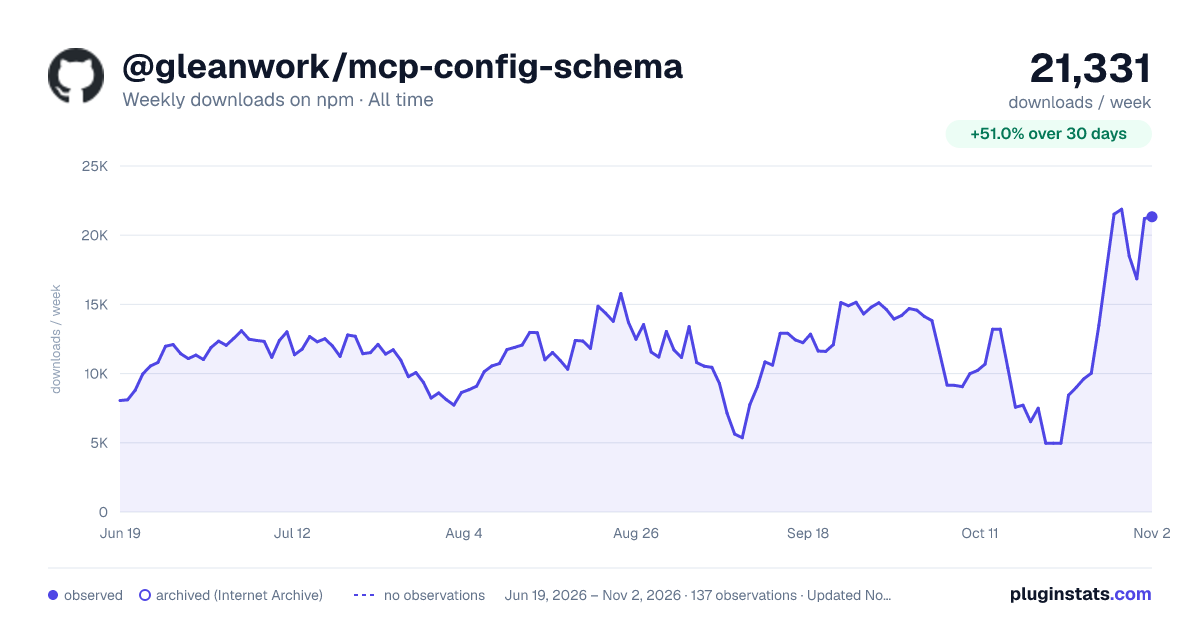

Adoption over time
7/30/90-day growth
Ranking history
Listing placement
Listing placement
Filled points are observed values; hollow points come from Internet Archive snapshots of the listing page. Dashed segments span periods with no observations — values between points are not interpolated.
Each band is one page of 20. Weekly downloads on a linear scale. Placement is projected from weekly downloads, so it can differ from the marketplace's own sort order. Hover a dot to see the listing.
Recent observations
Full history (122)Similar npm MCP servers plugins
All 20 @gleanwork/mcp-config-schema alternativesData source
Weekly downloads (trailing 7 complete days) come from the official npm downloads API. Downloads include CI and mirrors and are not equivalent to installs or users. npm publishes no ratings.
Listing: https://www.npmjs.com/package/@gleanwork/mcp-config-schema. First seen Oct 16, 2026; last successful collection Oct 21, 2026. See the methodology.