 PluginStats
@bike4mind/cli weekly downloads statistics
By bike4mind · npm · MCP servers
Interactive CLI tool for Bike4Mind with ReAct agents
@bike4mind/cli has 58,634 recorded weekly downloads on npm, an increase of 47.7% over the past 30 days, ranking #526 of 2,256 tracked listings.
About @bike4mind/cli
Bike4Mind CLI
Interactive command-line interface for Bike4Mind with ReAct agents.
Features
• 🤖 ReAct agent with reasoning and tool use • 💬 Interactive chat interface • 💾 Session persistence • 🛠️ B4M tools + MCP integration • 🎨 Rich terminal UI with Ink • 🖼️ Image paste and drag-and-drop support (iTerm2, Kitty) • 🐛 Debug logging with --verbose flag • 📄 Context file loading (CLAUDE.md, AGENTS.md, AI.md) • 📁 File references with @ autocomplete
Installation
From NPM (Recommended)
Install globally:
Or run without installing:
From Source (Development)
From the project root:
Build Requirements
The CLI uses native dependencies (better-sqlite3 for image caching, sharp for image processing) that require compilation. These should build automatically during installation, but if you encounter errors:
Prerequisites: • Python 3 (required by node-gyp) • C++ compiler (Xcode Command Line Tools on macOS, build-essential on Linux, Visual Studio on Windows)
Manual rebuild if needed:
Note: The postinstall script will automatically rebuild better-sqlite3 if the native bindings are missing, so manual intervention is rarely needed.
Usage
Start Interactive Session
The CLI will prompt you to authenticate with your Bike4Mind account on first run.
CLI Flags
A bare positional argument seeds and submits the first turn while keeping the interactive UI open (e.g. b4m "summarize the git log").
Environment / API (see API Configuration):
| Flag | Effect |
| --dev | Point the CLI at the local dev server (http://localhost:3001) and remember it. Aliases: --local, single-dash forms. | | --prod | Point the CLI at Bike4Mind production and remember it. Alias: --production. | | --api-url | Point the CLI at any instance — a self-hosted stack, an AWS deployment, http://localhost:3000, etc. Clears cached auth (bound to the old origin) and exits; run b4m again to sign in. | | --reset-api | Reset the API URL to the built-in default and clear auth, then exit. |
Session / behavior:
| Flag | Effect |
| --verbose, -v | Show debug logs in the console (also always written to file — see Debug Logs). | | --debug-stream | Ultra-verbose: log every SSE event (stream-parser debugging). Implies --verbose. | | --no-project-config | Skip loading project-specific config (.bike4mind/). | | --add-dir | Grant file access to an additional directory. Repeatable. | | --ollama-host | Add a local Ollama endpoint's models to the picker (e.g. http://localhost:11434). | | --no-remote-skills | Skip fetching remote B4M-web skills for this run (local files only). |
Headless / non-interactive (for scripts and CI):
| Flag | Effect |
| -p, --prompt | Run a single query non-interactively and exit. | | --output-format | Output when using -p: text (default), json, or stream-json (NDJSON of thoughts/actions/observations). | | --dangerously-skip-permissions | With -p, auto-allow all tool permission prompts. Use with caution in CI/CD. |
Info:
| Flag | Effect |
| --help, -h | Show help. | | --version, -V | Show CLI version. |
Host / claude-drop-in flags (--mcp-config, --strict-mcp-config, --append-system-prompt, --allowedTools, --settings, --session-id, --resume) are documented under Running as a claude engine inside a host app.
Examples:
Subcommands
Switching environments (--dev / --prod)
Flip which backend the CLI talks to without editing config by hand:
The choice is persisted to ~/.bike4mind/config.json, so a bare b4m always reopens the environment you last chose. Both single- and double-dash forms work (-dev/--dev, -prod/--prod); --local is an alias for --dev.
Auth tokens are cached per environment, so switching back and forth does not force a re-login — each environment remembers its own session. The first time you visit a new environment you'll be prompted to /login. The active environment is shown in the startup banner (🌍 API Environment: …).
For a one-off custom/self-hosted URL, use the in-session /set-api command (see API Configuration below).
Commands
While in interactive mode. This mirrors the registry in src/config/commands.ts — run /help in a session for the live list (which also includes any custom and project commands).
Authentication: • /login - Authenticate with your B4M account • /logout - Clear authentication and sign out • /whoami - Show current authenticated user
Session management: • /save - Save current session • /resume (alias /sessions) - List and resume saved sessions • /clear (alias /new) - Start a new session • /compact [instructions] - Compact the conversation into a new session • /context - Show context-window usage • /usage - Show credit usage and balance
API configuration: • /set-api - Connect to a self-hosted / custom Bike4Mind instance • /reset-api - Reset to the Bike4Mind main service • /api-info - Show current API configuration
Files & checkpoints: • /add-dir / /remove-dir / /dirs - Manage accessible directories • /undo - Undo the last file change • /checkpoints - List file restore points • /restore - Restore files to a checkpoint • /diff [number] - Diff current state against a checkpoint • /rewind - Rewind the conversation to a previous point
Tool permissions: • /trust / /untrust / /trusted - Manage auto-approved tools
Sandbox (OS-level isolation for bash): • /sandbox - Show sandbox status and configuration • /sandbox:enable / /sandbox:disable - Toggle the sandbox • /sandbox:mode - Set enforcement mode • /sandbox:network - Toggle network egress (fail-closed by default; on filters proxy-aware clients against the allowlist) • /sandbox:trust-domain [...] / /sandbox:domains - Manage the network allowlist • /sandbox:violations [count] / /sandbox:violations:clear - Inspect / clear violations
MCP & agents: • /mcp (alias /mcp:list) - Show MCP server status and connected tools • /agents (alias /agents:list) - List available agents • /agents:new / /agents:reload - Create / reload agent definitions…
Description from the npm listing.
- cli
- ai
- bike4mind
- agent
- mcp
- react-agent
README badge
Show your rank in a README or on your website. The badge updates automatically.
Charts
Images: 30d · 1y · all time · 1600×900 dark


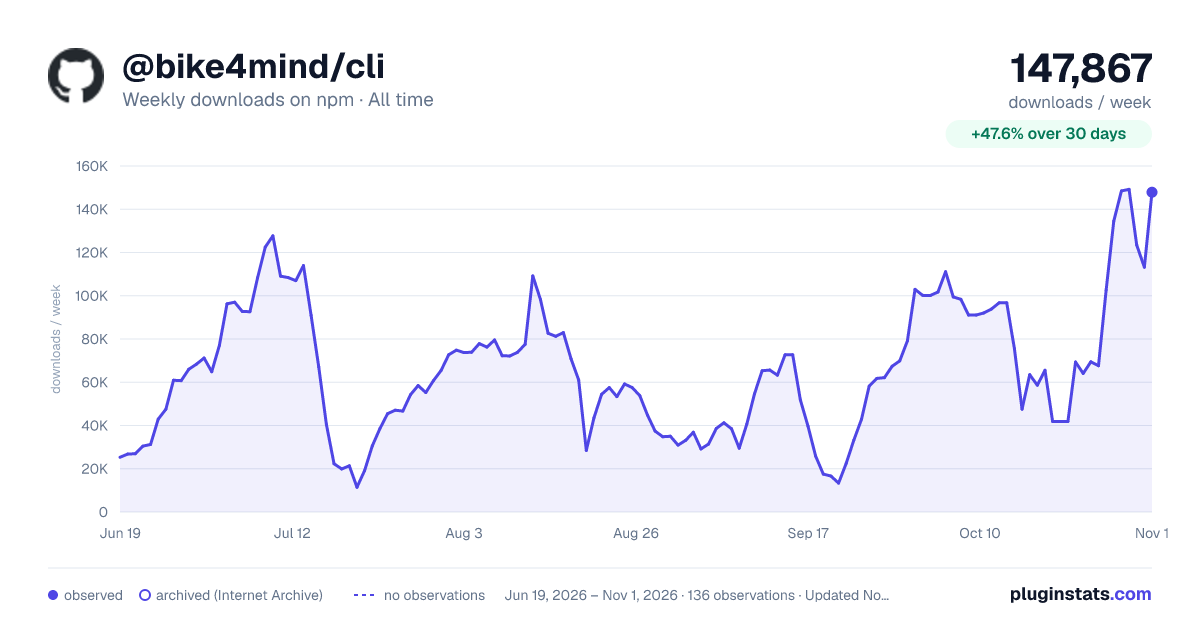

Adoption over time
7/30/90-day growth
Ranking history
Listing placement
Listing placement
Filled points are observed values; hollow points come from Internet Archive snapshots of the listing page. Dashed segments span periods with no observations — values between points are not interpolated.
Each band is one page of 20. Weekly downloads on a linear scale. Placement is projected from weekly downloads, so it can differ from the marketplace's own sort order. Hover a dot to see the listing.
Recent observations
Full history (121)Similar npm MCP servers plugins
All 20 @bike4mind/cli alternativesData source
Weekly downloads (trailing 7 complete days) come from the official npm downloads API. Downloads include CI and mirrors and are not equivalent to installs or users. npm publishes no ratings.
Listing: https://www.npmjs.com/package/@bike4mind/cli. First seen Oct 16, 2026; last successful collection Oct 19, 2026. See the methodology.