 PluginStats
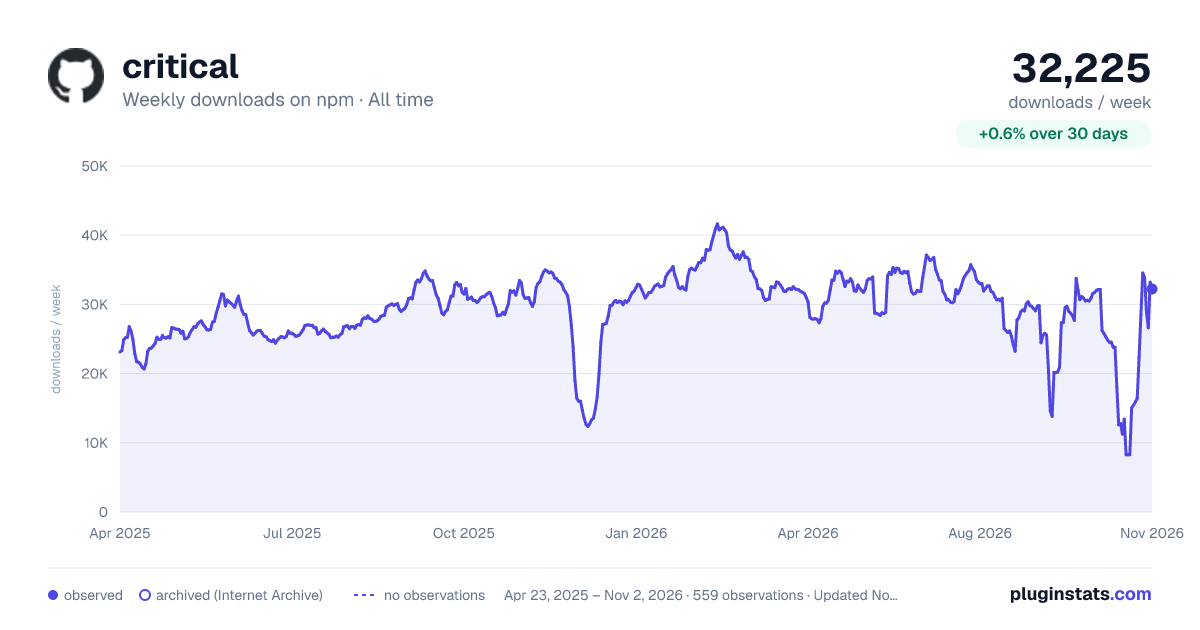
critical weekly downloads statistics
By bezoerb · npm · MCP servers
Extract & inline critical-path CSS — two engines, automatic routing, agent-native.
critical has 13,416 recorded weekly downloads on npm, a decrease of 53.7% over the past 30 days, ranking #888 of 2,322 tracked listings.
About critical
critical
Extract the critical-path (above-the-fold) CSS from your HTML, inline it, and load the rest asynchronously — so the browser can paint the first screen without waiting on a full stylesheet.
Critical removes render-blocking CSS from the critical path, which is one of the most direct levers on Largest Contentful Paint and first render. It works for static sites, MPAs, and single-page apps, and it's built to be driven by humans, build pipelines, and coding agents alike.
npm install --save-dev critical
Contents
- How it works
- Quick start
- Two engines
- CLI reference
- API reference
- Inlining behavior
- Tuning the above-the-fold set
- MCP server (agents)
- Recipes
- Design principles
- Requirements
- Alternatives
How it works
Given an HTML document and its stylesheets, Critical:
- Determines what's critical. It figures out which CSS rules style the content that paints above the fold — either by matching rules against the delivered DOM (fast, no browser) or by rendering the page in a real viewport (accurate, handles SPAs). See Two engines.
- Inlines it. The critical rules go into a
<style>at the top of<head>so first paint needs only the HTML. - Defers the rest. Each
<link rel="stylesheet">is replaced in the head by a<link rel="preload">and moved to the end of the body, so it no longer blocks first paint. No inline scripts are added, so it works under a strict Content Security Policy.
The output is deterministic: the same input produces byte-identical output, so it's safe to run in CI and diff in version control.
Quick start
CLI
# Optimize a build directory in place (inlines critical CSS, defers the rest)
critical ./dist --inline --write

# See what it would do and why, without writing anything
critical ./dist --explain

# A single file to stdout
critical index.html --inline > index.critical.html
API
import { critical } from "critical";

const { html, css, report } = await critical({
  src: "dist/index.html",
  inline: true,
});

// `html`   — the document with critical CSS inlined and stylesheets deferred
// `css`    — the critical CSS on its own (minified)
// `report` — structured diagnostics (engine used, bytes, rules, warnings, timing)
critical() never writes to disk on its own — it returns the result. Use the CLI's --write
/ --out, or write result.html / result.css yourself.
Docker
The container image includes Playwright and Chromium, so both the static and render engines work
without additional setup. Mount the generated site at /site and include critical before its
arguments:
docker pull ghcr.io/addyosmani/critical:master
docker run --rm -v "$PWD/dist:/site" ghcr.io/addyosmani/critical:master \
  critical . --inline --write
Two engines
Critical picks the right strategy for each document automatically (engine: "auto", the
default), and tells you which it used and why.
| Engine | How it decides what's critical | Needs a browser | Best for |
|---|---|---|---|
| static | Matches CSS rules against the delivered DOM (the used CSS) | No | SSG / SSR / MPA output that ships real markup |
| render | Loads the page at a real viewport and measures what's painted above the fold | Yes (Playwright) | SPA shells, and when you want a tight, viewport-accurate set |
Automatic routing. When engine is "auto", Critical inspects the delivered HTML. If the
document already contains rendered content, the static engine is correct and runs in
milliseconds. If the document is an empty application shell (e.g. <div id="root"></div> with
no markup yet), there's nothing to match against statically, so Critical escalates to the render
engine and measures the page the way a browser actually paints it.
You can always pin the engine explicitly with engine: "static" or engine: "render".
The render engine uses Playwright, declared as an optional peer dependency. It's imported lazily, so the static path — and the default install — never pull in a browser. To use the render engine:
npm i -D playwright && npx playwright install chromium.
CLI reference
critical <input> [options]

  input        a directory (all *.html are processed), an .html file, or stdin
```…
Description from the npm listing.
- above-the-fold
- critical
- css
- inline
- lcp
- mcp
- performance
README badge
Show your rank in a README or on your website. The badge updates automatically.
Charts
Images: 30d · 1y · all time · 1600×900 dark



Adoption over time
7/30/90-day growth
Ranking history
Listing placement
Listing placement
Filled points are observed values; hollow points come from Internet Archive snapshots of the listing page. Dashed segments span periods with no observations — values between points are not interpolated.
Each band is one page of 20. Weekly downloads on a linear scale. Placement is projected from weekly downloads, so it can differ from the marketplace's own sort order. Hover a dot to see the listing.
Recent observations
Full history (544)Similar npm MCP servers plugins
All 20 critical alternativesData source
Weekly downloads (trailing 7 complete days) come from the official npm downloads API. Downloads include CI and mirrors and are not equivalent to installs or users. npm publishes no ratings.
Listing: https://www.npmjs.com/package/critical. First seen Oct 16, 2026; last successful collection Oct 20, 2026. See the methodology.