 PluginStats
remove-files-webpack-plugin weekly downloads statistics
By Amaimersion · npm · Webpack plugins
A plugin for webpack that removes files and folders before and after compilation.
remove-files-webpack-plugin has 28,329 recorded weekly downloads on npm, a decrease of 17.3% over the past 30 days, ranking #675 of 2,256 tracked listings.
About remove-files-webpack-plugin
Removing of folders and files for Webpack
A plugin for webpack that removes files and folders before and after compilation.
Content
• Content • Installation • Support • Usage • Notes • Symbolic links • Notes for Windows users • Single backward slash • Segment separator • Per-drive working directory • Parameters • How to set • Namespace • Compilation modes • Examples • Version naming • Contribution • License
Installation
• With npm: • With yarn:
Support
The plugin works on any OS and webpack >= 2.2.0.
Usage
Notes
Symbolic links
Symbolic links (soft links) will be treated as ordinary files.
Notes for Windows users
Single backward slash
JavaScript uses it for escaping. If you want to use backward slash, then use double backward slash. Example: C:\Windows\System32\cmd.exe. By the way, single forward slashes are also supported.
Segment separator
All paths that you get or see from the plugin will contain platform-specific segment separator (i.e. slash): \ on Windows and / on POSIX. So, for example, even if you passed folders or files with / as separator, TestObject.method will give you a path with \ as segment separator.
Per-drive working directory
From Node.js documentation: On Windows Node.js follows the concept of per-drive working directory. This behavior can be observed when using a drive path without a backslash. For example, path.resolve('c:\') can potentially return a different result than path.resolve('c:'). For more information, see this MSDN page.
Parameters
| Name | Type | Default | Namespace | Description |
| root | string | . | All | A root directory. Not absolute paths will be appended to this. Defaults to where package.json and node_modules are located. | | include | string[] | [] | All | A folders or files for removing. | | exclude | string[] | [] | All | A folders or files for excluding. | | test | TestObject[] | [] | All | A folders for testing. | | TestObject.folder | string | Required | All | A path to the folder (relative to root). | | TestObject.method | (absolutePath: string) => boolean | Required | All | A method that accepts an item path (root + folderPath + fileName) and returns value that indicates should this item be removed or not. | | TestObject.recursive | boolean | false | All | Apply this method to all items in subdirectories. | | beforeRemove | ( absoluteFoldersPaths: string[], absoluteFilesPaths: string[] ) => boolean | undefined | All | If specified, will be called before removing. Absolute paths of folders and files that will be removed will be passed into this function. If returned value is true, then remove process will be canceled. Will be not called if items for removing not found, emulate: true or skipFirstBuild: true. | | afterRemove | ( absoluteFoldersPaths: string[], absoluteFilesPaths: string[] ) => void | undefined | All | If specified, will be called after removing. Absolute paths of folders and files that have been removed will be passed into this function. Will be not called if emulate: true or skipFirstBuild: true. | | trash | boolean | false | All | Move folders and files to the trash (recycle bin) instead of permanent removing. It is an async operation and you won't be able to control an execution chain along with other webpack plugins! afterRemove callback behavior is undefined (it can be executed before, during or after actual execution). Requires Windows 8+, macOS 10.12+ or Linux. | | log | boolean | true | All | Print messages of "info" level (example: "Which folders or files have been removed"). | | logWarning | boolean | true | All | Print messages of "warning" level (example: "An items for removing not found"). | | logError | boolean | false | All | Print messages of "error" level (example: "No such file or directory"). | | logDebug | boolean | false | All | Print messages of "debug" level (used for debugging). | | emulate | boolean | false | All | Emulate remove process. Print which folders and files will be removed without actually removing them. Ignores log parameter. | | allowRootAndOutside | boolean | false | All | Allow removing of root directory or outside root directory. It is kind of safe mode. Don't turn it on if you don't know what you actually do! | | readWebpackConfiguration | boolean | false | All | Change parameters based on webpack configuration. Following webpack parameters are supported: stats (controls logging). These webpack parameters have priority over the plugin parameters. See webpack documentation for more - https://webpack.js.org/configuration | | skipFirstBuild | boolean | false | watch | First build will be skipped. | | beforeForFirstBuild | boolean | false | watch | For first build before parameters will be applied, for subsequent builds watch parameters will be applied. | | | | | |
How to set
You can pass these parameters into any of the following keys: before, watch or after. Each key is optional, but at least one should be specified.
• before – executes once before "normal" compilation. • watch – executes every time before "watch" compilation. • after – executes once after "normal" compilation and every time after "watch" compilation.
Namespace
"Namespace" means where particular parameter will be applied. For example, "All" means particular parameter will work in any key (before, watch, after), watch means particular parameter will work only in watch key.
Compilation modes
• "normal" compilation means full compilation. • "watch" compilation means first build is a full compilation and subsequent builds is a short rebuilds of changed files.
Examples
Version naming
This project uses following structure for version naming: ...
Contribution
Feel free to use issues. Pull requests are also always welcome!
License
MIT.
Description from the npm listing.
- webpack
- webpack-plugin
- webpack-compilation
- webpack-files
- compilation
- plugin
- files
- build-automation
- clean
- cleanup
- clean-plugin
- clean-webpack-plugin
- clean-files-plugin
- clean-files-webpack-plugin
- remove
- remove-plugin
- remove-webpack-plugin
- remove-files-plugin
- remove-files-webpack-plugin
- delete
README badge
Show your rank in a README or on your website. The badge updates automatically.
Charts
Images: 30d · 1y · all time · 1600×900 dark


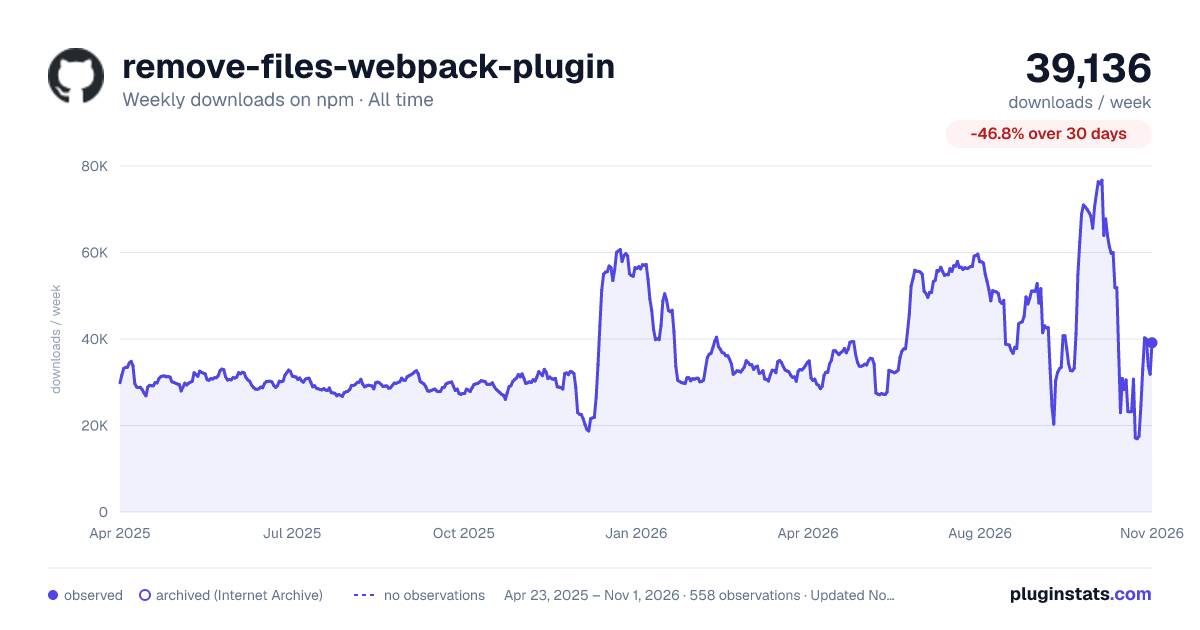

Adoption over time
7/30/90-day growth
Ranking history
Listing placement
Listing placement
Filled points are observed values; hollow points come from Internet Archive snapshots of the listing page. Dashed segments span periods with no observations — values between points are not interpolated.
Each band is one page of 20. Weekly downloads on a linear scale. Placement is projected from weekly downloads, so it can differ from the marketplace's own sort order. Hover a dot to see the listing.
Recent observations
Full history (543)Similar npm Webpack plugins plugins
All 20 remove-files-webpack-plugin alternatives- 24.3K weekly downloads-17.7%
- 19.7K weekly downloads-48.2%
- 44.2K weekly downloads-41.9%
Data source
Weekly downloads (trailing 7 complete days) come from the official npm downloads API. Downloads include CI and mirrors and are not equivalent to installs or users. npm publishes no ratings.
Listing: https://www.npmjs.com/package/remove-files-webpack-plugin. First seen Oct 16, 2026; last successful collection Oct 19, 2026. See the methodology.