 PluginStats
unplugin-info weekly downloads statistics
By yjl9903 · npm · Vite plugins
Export build information as virutal module
unplugin-info has 4,974 recorded weekly downloads on npm, a decrease of 59.2% over the past 30 days.
It ranks #1096 of 2,255 tracked npm listings by weekly downloads.
Over 90 days, weekly downloads changed by -58.7%.
PluginStats has 542 daily observations since Apr 24, 2025; the latest is from Oct 17, 2026.
About unplugin-info
unplugin-info
Export build information as virutal module.
This plugin helps you add build timestamp / commit SHA / CI environment / package.json / ... to your application. So you can easily check whether the production version meets your expectations, or config your application.
Migration from v0 to v1
+ Move git related information from ~build/info to ~build/git + Move CI related information from ~build/info to ~build/ci + Remove commitsSinceLastTag from ~build/git
Installation
Vite
Full example is located at examples/vite.
Rollup
Rspack
Full example is located at examples/rspack.
Webpack
Full example is located at examples/webpack.
Nuxt
Full example is located at examples/nuxt.
Vue CLI
Quasar
esbuild
Astro
TypeScript
To make the TypeScript work, you can add unplugin-info/client to your corresponding tsconfig.json.
Or you can add TypeScript triple-slash directives to your .d.ts (i.e. for projects initialized by Vite, it may be src/env.d.ts).
Or if you did some advanced modification (see below), you can just copy and paste client.d.ts to your project, and then do anything you want.
Usage
unplugin-info creates several virtual modules, ~build/time, ~build/git, ~build/ci, ~build/console, ~build/meta, ~build/env, and ~build/package.
You can just import these modules as usual, and do anything with them. Common use cases may be like:
~build/time
It exports the timestamp when the vite started.
~build/git
It exports the infomation about the current git repo, which is powered by simple-git.
[!NOTE]
From unplugin-info@0.6.0, the original virtual module called ~build/info will be renamed to ~build/git, and the CI/CD related information will be moved to another virtual module called ~build/ci.
You can even custom or override the exported git information.
All the functions will be executed during the generation of ~build/git, and the return result with its corresponding field name will be merged into ~build/git. The following example adds another isClean field to ~build/git.
Full example is located at examples/vite.
~build/ci
It exports the current CI/CD environment information, which is powered by ci-info.
~build/console
It will print some helpful logs in your browser.
~build/meta
It exports some meta data from the options of the plugin.
You can also generate meta data lazily.
Then you can import them in your app.
[!NOTE]
Meta data will be serialized to JSON format, so you should gen it in you vite.config.ts and pass the result object.
To get TypeScript support, you can add type declaration in your env.d.ts (It is include in the official Vite project template).
Full example is located at examples/vite.
~build/env
[!NOTE]
Now it only suports for Vite.
It exports some environment data from the options of the plugin.
Compared with ~build/meta, ~build/env is targeted at accessing environment variables for the SSR runtime (like Nuxt, Remix, Astro, and so on).
Then you can import them in your Vite app.
In the client-side, this will always output This is a default value set from vite.config.ts.
But in the server-side, the output log is determined by the corresponding environment variable process.env.BUILD_MESSAGE.
To get TypeScript support, you can add type declaration in your env.d.ts (It is include in the official Vite project template).
~build/package
It exports the information of the current package.json.
You can also control which fields should be exported. By default, we only export fields name, version, description, keywords, license, author from your package.json.
Full example is located at examples/vite.
Relationship with vite-plugin-info
This pacakge was initially called vite-plugin-info. It has been refactored using unplugin to support additional tools, including Webpack and so on.
We recommend migrating from vite-plugin-info to unplugin-info, as unplugin-info will continue to be maintained and new features will be added.
However, you can still use vite-plugin-info, as it works fine. Thanks to Vite's compatibility, and the source code of vite-plugin-info can be founded here.
License
MIT License © 2023 XLor
Description from the npm listing.
- debug
- config
- unplugin
- build
- vite
- vite-plugin
- webpack
- rspack
- git
- CI
Where unplugin-info sits in the listing
Each band is one page of 20. Weekly downloads on a log scale. Placement is projected from weekly downloads, so it can differ from the marketplace's own sort order. Hover a dot to see the listing.


Charts
Images: 30d · 1y · all time · 1600×900 dark


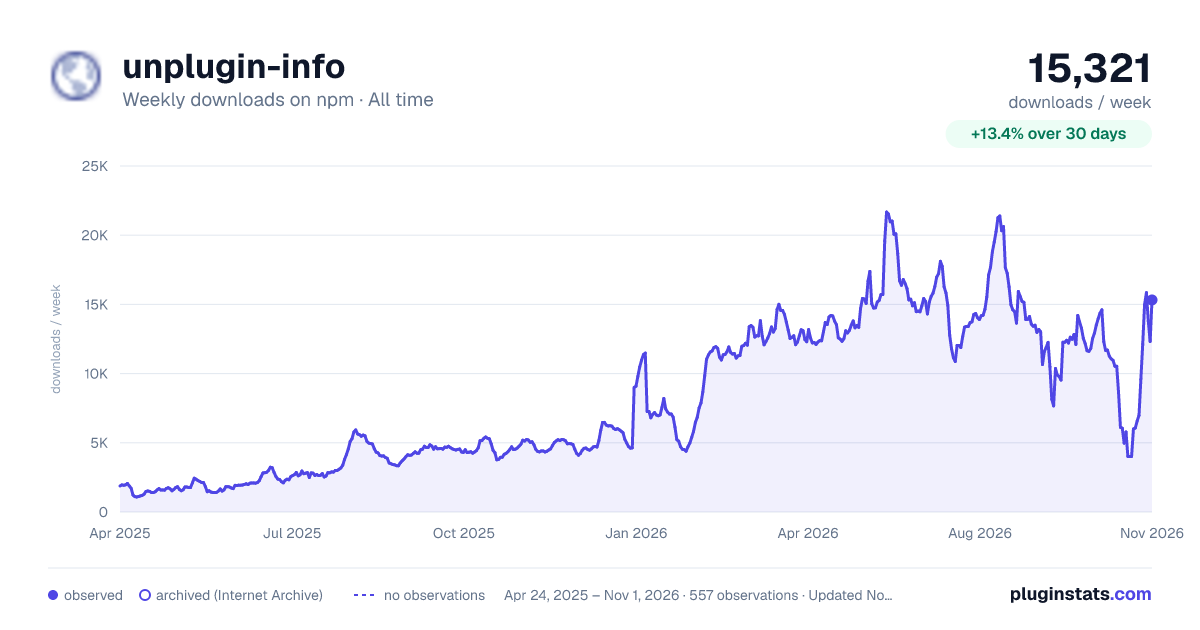

Adoption over time


7/30/90-day growth


Filled points are observed values; hollow points come from Internet Archive snapshots of the listing page. Dashed segments span periods with no observations — values between points are not interpolated.
Recent observations
Full history (542)Similar npm Vite plugins plugins
Data source
Weekly downloads (trailing 7 complete days) come from the official npm downloads API. Downloads include CI and mirrors and are not equivalent to installs or users. npm publishes no ratings.
Listing: https://www.npmjs.com/package/unplugin-info. First seen Oct 16, 2026; last successful collection Oct 19, 2026. See the methodology.