 PluginStats
prettier-plugin-powershell weekly downloads statistics
By Nick2bad4u (2 listings) · npm · Prettier plugins
Prettier plugin for formatting PowerShell source files with idiomatic defaults.
prettier-plugin-powershell has 364 recorded weekly downloads on npm, a decrease of 46.9% over the past 30 days.
It ranks #1528 of 2,251 tracked npm listings by weekly downloads.
Over 90 days, weekly downloads changed by -71.7%.
PluginStats has 121 daily observations since Jun 19, 2026; the latest is from Oct 17, 2026.
About prettier-plugin-powershell
Prettier Plugin PowerShell
A Prettier 3 plugin that formats PowerShell source files (.ps1, .psm1, .psd1) with predictable, idiomatic output. The formatter is extensively tested (high coverage with strict CI thresholds) and ready for CI/CD pipelines, editor integrations, and automated release flows.
Table of contents
• Highlights • Quick start • Configuration reference • Example formatting • Contributing • Credits • License • Contributors ✨
Highlights
• 🌟 Idiomatic PowerShell – balances spacing, casing, and pipeline layout while preserving comments and here-strings. • 🔧 Fine-grained controls – tune indentation style/width, trailing delimiters, brace style, alias rewriting, and keyword casing. • ⚡ Prettier-first – drop-in plugin for Prettier v3+, compatible with the CLI, editors, and format-on-save workflows. • 📈 Production ready – enforced by CI (lint, typecheck, tests) with Codecov-powered reporting and ≥95 % coverage gates. • 🛠️ TypeScript source – strongly typed AST helpers and printer utilities for easy extension.
Quick start
Install
Requires Node.js 18.12 or newer and Prettier v3 or newer.
Prettier configuration
Add the plugin to your Prettier config (e.g. .prettierrc.json):
You can co-locate plugin options with standard Prettier settings:
Command line
Format scripts recursively:
Programmatic usage
Configuration reference
| Option | Type | Default | Description |
| powershellIndentStyle | "spaces" "tabs" | "spaces" | Render indentation with spaces or tabs. | | powershellIndentSize | number | 4 | Overrides Prettier's tabWidth specifically for PowerShell files (clamped between 1 and 8). | | powershellTrailingComma | "none" "multiline" "all" | "none" | When to emit trailing semicolons between hashtable entries (PowerShell arrays do not support trailing commas). | | powershellSortHashtableKeys | boolean | false | Sort hashtable keys alphabetically before printing. | | powershellBlankLinesBetweenFunctions | number | 1 | Minimum blank lines preserved between function declarations (clamped between 0 and 3). | | powershellBlankLineAfterParam | boolean | true | Insert a blank line after param (...) blocks within functions/script blocks. | | powershellBraceStyle | "1tbs" "allman" "stroustrup" | "1tbs" | Choose inline braces, Allman function braces, or Stroustrup continuation keywords on new lines. | | powershellLineWidth | number | 120 | Maximum print width for wrapping pipelines, hashtables, and arrays (clamped between 40 and 200). | | powershellPreferSingleQuote | boolean | false | Prefer single-quoted strings when interpolation is not required. | | powershellKeywordCase | "preserve" "lower" "upper" "pascal" | "lower" | Normalise PowerShell keyword casing (defaults to lowercase to match PSScriptAnalyzer/Invoke-Formatter). | | powershellRewriteAliases | boolean | false | Expand cmdlet aliases such as ls, %, ?, gci. | | powershellRewriteWriteHost | boolean | false | Rewrite Write-Host invocations to Write-Output. | | powershellPreset | "none" "invoke-formatter" | "none" | Apply a bundle of defaults (e.g. invoke-formatter mirrors the settings PowerShell's built-in formatter uses). |
Invoke-Formatter parity preset
Set "powershellPreset": "invoke-formatter" to mirror the behavior of Invoke-Formatter/PSScriptAnalyzer's CodeFormatting profile. The preset only fills in values that you haven't provided yourself--any explicit option in your Prettier config still wins.
For Stroustrup style, set "powershellBraceStyle": "stroustrup". Opening braces stay on the same line, and continuation keywords (elseif, else, catch, finally, and a do loop's while or until) start on a new line. The default remains "1tbs". See the brace style examples.
Per-directory overrides (keyword casing, presets, etc.)
Prettier supports overrides, so you can scope keyword casing/presets to specific folders without extra tooling:
Combined with the preset, this makes it easy to keep your primary scripts aligned with PowerShell's formatter while letting legacy or third-party snippets retain their original casing.
Example formatting
Input:
Output with default settings:
Contributing
1. Fork and clone the repository. 2. Install dependencies with npm install. 3. Use npm run build:watch during active development. 4. Before opening a pull request, run:
• npm run lint • npm run typecheck • npm run test:coverage
5. Contributions remain under the MIT License.
Bug reports and feature requests are welcome via GitHub issues.
Credits
• Built with Prettier, TypeScript, and Vitest.
License
Distributed under the MIT License.
Contributors ✨
Thanks goes to these wonderful people (emoji key):
Nick2bad4u 🐛 💻 📖 🤔 🚇 🚧 👀 ⚠️ 🔧 Snyk bot 🛡️ 🚇 🚧 👀 StepSecurity Bot 🛡️ 🚇 🚧 dependabot[bot] 🚇 🛡️
github-actions[bot] 💻 🚇
Description from the npm listing.
- prettier
- prettier-plugin
- powershell
- formatter
- formatting
- ps1
- psm1
- psd1
- pwsh
- scripting
- devtools
- code-formatting
- opinionated
- powershell-plugin
Where prettier-plugin-powershell sits in the listing
Each band is one page of 20. Weekly downloads on a log scale. Placement is projected from weekly downloads, so it can differ from the marketplace's own sort order. Hover a dot to see the listing.


Charts
Images: 30d · 1y · all time · 1600×900 dark


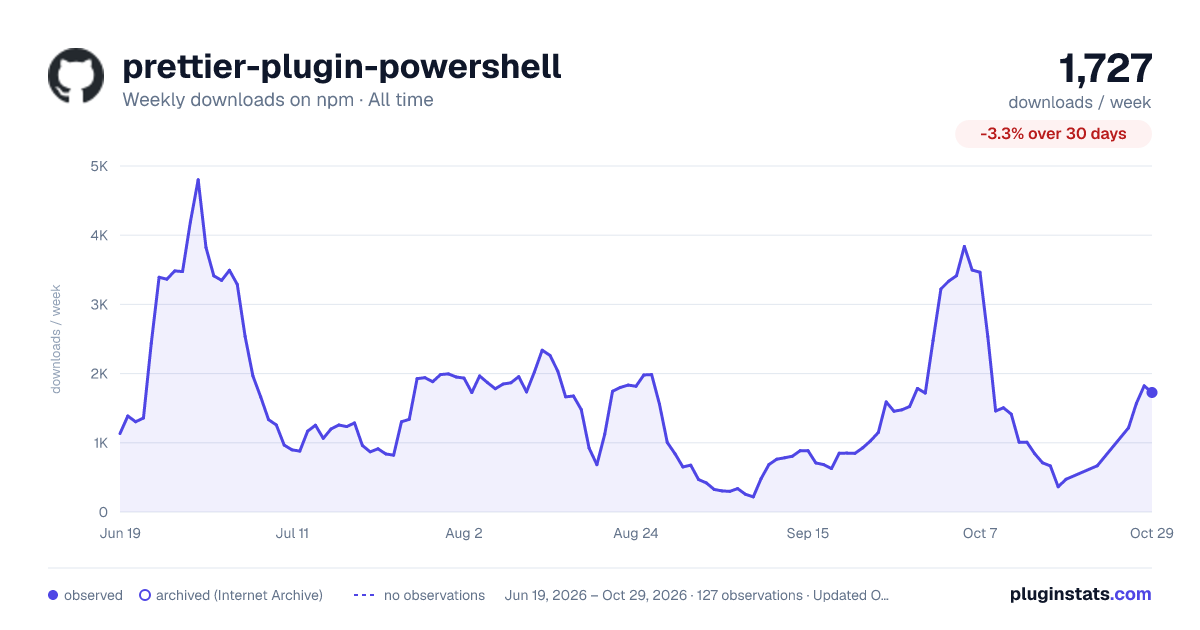

Adoption over time


7/30/90-day growth


Filled points are observed values; hollow points come from Internet Archive snapshots of the listing page. Dashed segments span periods with no observations — values between points are not interpolated.
Recent observations
Full history (121)Similar npm Prettier plugins plugins
Data source
Weekly downloads (trailing 7 complete days) come from the official npm downloads API. Downloads include CI and mirrors and are not equivalent to installs or users. npm publishes no ratings.
Listing: https://www.npmjs.com/package/prettier-plugin-powershell. First seen Oct 16, 2026; last successful collection Oct 18, 2026. See the methodology.