 PluginStats
shadowtail weekly downloads statistics
By neerajsohal · npm · Tailwind plugins
An automatic, overridable, customisable Tailwind dark mode plugin
shadowtail has 6 recorded weekly downloads on npm, ranking #2161 of 2,322 tracked listings.
About shadowtail
Midnight is a fork of awesome NightwindCSS
A Tailwind CSS plugin that gives you an out-of-the-box, customisable, overridable dark mode.
Midnight uses the existing Tailwind color palette and your own custom colors to automatically generate the dark mode version of the Tailwind color classes you use.
For example, whenever you use a class like bg-red-600 it gets automatically switched to bg-red-300 in dark mode.
You can see it in action on https://electrik.dev
Installation
npm install midnight
Enable the Dark class variant in your tailwind.config.js file.
// tailwind.config.js - Tailwind ^2.0
module.exports = {
  darkMode: "class",
  // ...
  plugins: [require("midnight")],
}
In older Tailwind versions (< 2.0)
// tailwind.config.js
module.exports = {
  experimental: {
    darkModeVariant: true,
    applyComplexClasses: true,
  },
  dark: "class",
  // ...
  plugins: [require("midnight")],
}
Helper functions
Midnight relies on a fixed 'midnight' class to manage transitions, and a toggled 'dark' class applied on a top level element in the DOM, typically the root element.
You can define your own functions to manage the dark mode (or check the examples below), or use the helper functions included in 'midnight/helper.js' to get started right away.
By default, the helper functions prevent the dreaded flicker of light mode and allow the chosen color mode to persist on update.
Initialization
To initialize midnight, add the following script tag to the head element of your pages.
// React Example
import midnight from "midnight/helper"

export default function Layout() {
  return (
    <>
      <Head>
        <script dangerouslySetInnerHTML={{ __html: midnight.init() }} />
      </Head>
      // ...
    </>
  )
}
Toggle
Similarly, you can use the toggle function to switch between dark and light mode.
// React Example
import midnight from "midnight/helper"

export default function Navbar() {
  return (
    // ...
    <button onClick={() => midnight.toggle()}></button>
    // ...
  )
}
Enable mode
If you need to selectively choose between light/dark mode, you can use the enable function. It accepts a boolean argument to enable/disable dark mode.
// React Example
import midnight from "midnight/helper"

export default function Navbar() {
  return (
    // ...
    <button onClick={() => midnight.enable(true)}></button>
    // ...
  )
}
BeforeTransition
Midnight also exports a beforeTransition function that you can leverage in case you prefer to build your own toogle functions. It prevents unwanted transitions as a side-effect of having midnight class in the html tag.
Check out the toggle function in the Nextjs example below for an example of how this could be implemented.
Examples
See examples of implementation (click to expand):
<details> <summary>Next.js (using the <a href="https://github.com/pacocoursey/next-themes">next-themes</a> library)</summary>_app.js
Add ThemeProvider using the following configuration
import { ThemeProvider } from "next-themes"

function MyApp({ Component, pageProps }) {
  return (
    <ThemeProvider
      attribute="class"
      storageKey="midnight-mode"
      defaultTheme="system" // default "light"
    >
      <Component {...pageProps} />
    </ThemeProvider>
  )
}

export default MyApp
Toggle
Set it up using the useTheme hook
import { useTheme } from "next-themes"
import midnight from "midnight/helper"

export default function Toggle(props) {
  const { theme, setTheme } = useTheme()

  const toggle = () => {
    midnight.beforeTransition()
    if (theme !== "dark") {
      setTheme("dark")
    } else {
      setTheme("light")
    }
  }

  return <button onClick={toggle}>Toggle</button>
}
index.jsx
Add Helmet using the following configuration
import React from "react"
import ReactDOM from "react-dom"
import { Helmet } from "react-helmet"
import midnight from "midnight/helper"

import App from "./App"
import "./index.css"

ReactDOM.render(
  <React.StrictMode>
    <Helmet>
      <script>{midnight.init()}</script>
    </Helmet>
    <App />
  </React.StrictMode>,
  document.getElementById("root")
)
Toggle
Set it up using the default example
import midnight from "midnight/helper"

export default function Navbar() {
  return (
    // ...
    <button onClick={() => midnight.toggle()}></button>
    // ...
  )
}
Description from the npm listing.
- tailwind
- tailwindcss
- tailwindcss-plugin
- dark-mode
- dark-theme
- postcss
- css
- javascript
README badge
Show your rank in a README or on your website. The badge updates automatically.
Charts
Images: 30d · 1y · all time · 1600×900 dark


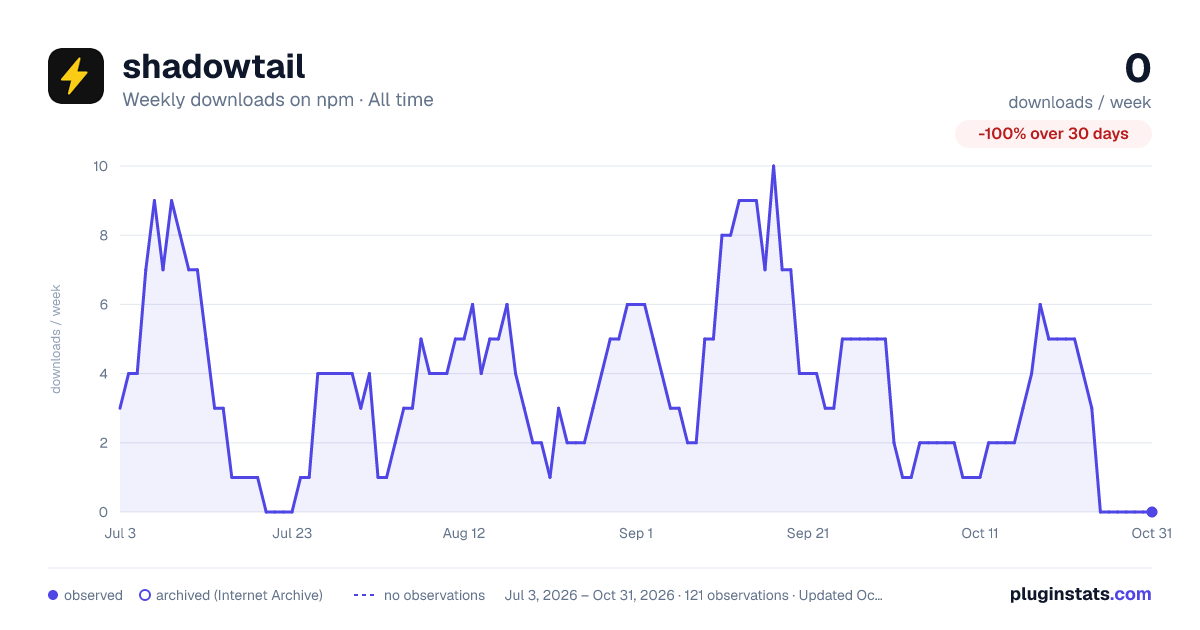

Adoption over time
7/30/90-day growth
Ranking history
Listing placement
Listing placement
Filled points are observed values; hollow points come from Internet Archive snapshots of the listing page. Dashed segments span periods with no observations — values between points are not interpolated.
Each band is one page of 20. Weekly downloads on a linear scale. Placement is projected from weekly downloads, so it can differ from the marketplace's own sort order. Hover a dot to see the listing.
Recent observations
Full history (2)Similar npm Tailwind plugins plugins
All 20 shadowtail alternativesData source
Weekly downloads (trailing 7 complete days) come from the official npm downloads API. Downloads include CI and mirrors and are not equivalent to installs or users. npm publishes no ratings.
Listing: https://www.npmjs.com/package/shadowtail. First seen Oct 18, 2026; last successful collection Oct 20, 2026. See the methodology.